Intune manages local AI agents in preview
- Maxime Hiez
- Intune
- 23 Nov, 2026
Introduction
AI agents that run on the workstation often escape the company’s inventory. Announced at Ignite 2026 on November 17, Microsoft Intune offers two levers : a software compliance policy that marks devices as noncompliant when a prohibited application is present, and a containment policy for approved agents, based on Microsoft Execution Containers (MXC). The status is mixed : public preview for software compliance, conflicting status for containment. In the sources reviewed, no Message Center or roadmap ID, no general availability date and no licensing requirement were found.
Check the endpoint DLP and local AI agents article HERE.
How does Intune detect local agents ?
Detection relies on the Intune application inventory, not on the agent’s identity. Each application is identified by a platform-specific identifier : the MSI product code for Win32, the package full name for the Store. Only these host applications appear in the inventory today.
You need a Windows 10 or 11 device enrolled in Intune and joined to Microsoft Entra, with a Properties catalog profile that enables ApplicationProperties.
Agent 365 acts as a discovery step : it gathers signals from Microsoft Defender, Microsoft Entra and Intune to spot running agents, including unapproved ones. Nothing indicates that it feeds the compliance policy, which evaluates installed applications by identifier.
How do you mark a device as noncompliant ?
The software compliance policy lets you list restricted software. A Windows device that runs one is marked noncompliant, Conditional Access blocks company resources, and the user is prompted to remove the agent. The announced status is public preview.
The steps described are the following :
- Create a software compliance policy in the Intune console
- Add the application identifier as a restricted software entry
- Assign the policy to a device or user group
- Create a Conditional Access policy that requires a compliant device
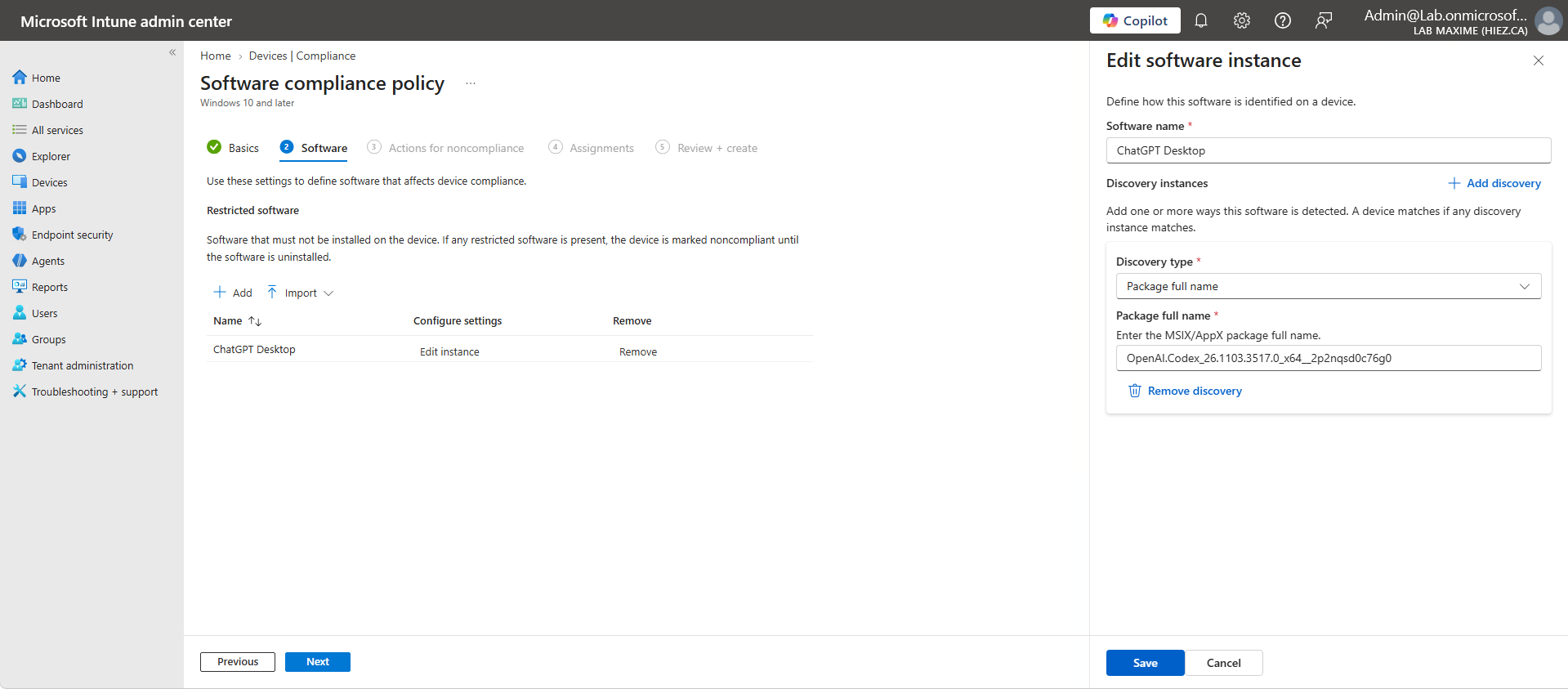
The block applies to the whole device, even when the agent is idle. After uninstalling, the user can request an immediate check.
Nothing indicates that Claude Code is covered : everything depends on the host application installed.
- The policy evaluates application identifiers, not agent identifiers : an agent with several host applications may need several entries
- Editor extensions, npm packages and standalone executables cannot be selected
note
How do you contain approved agents with MXC ?
MXC is an open source technology that runs workloads with defined resource permissions. Intune turns it into an enterprise ceiling : Windows enforces the configured limit regardless of the agent, and denies any request beyond it.
The policy is under Endpoint security > Agent containment. It sets folder access (deny, read-only or read-write) and network access (loopback or external), and can target all MXC-compatible agents or a single supported agent. Initial coverage is for containerized processes, starting with GitHub Copilot CLI and OpenAI Codex CLI.
The announced prerequisites are an MXC-compatible Windows version, a supported agent version and devices onboarded to Microsoft Defender for Endpoint, with an up-to-date antivirus and real-time protection turned on. MXC has three states :
- Enforcement : Blocks without logging anything
- Learning : Blocks and logs
- Permissive : Allows and logs, for a controlled pilot
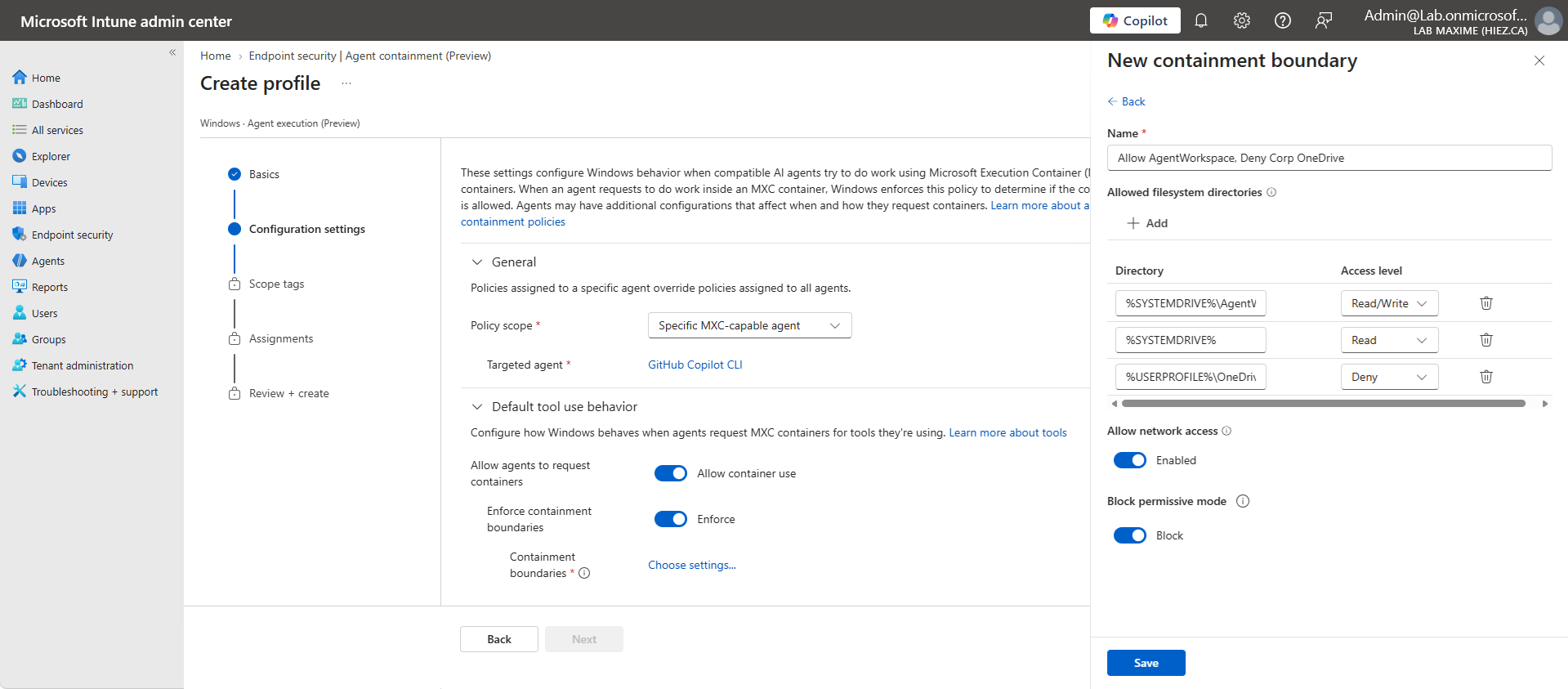
The Intune Customer Success guide presents MXC as generally available on Windows 11 and gives no status for the containment policy. The Windows developer blog titles the Intune configuration “Private Preview”, and the Intune blog says these policies are rolling out.
What admins need to know
No licensing is specified for software compliance or for containment. According to Learn, Conditional Access requires Microsoft Entra ID P1 and discovery through Defender requires Defender for Endpoint Plan 2. The policies must be created and assigned.
It is better to roll out in rings, with time-limited exceptions. Containment restricts what a workload can do without making its output trustworthy, and it only applies to agents whose vendor supports MXC. On the Defender side, runtime protection for agents (Claude Code, Codex CLI, GitHub Copilot CLI) is covered separately.
Conclusion
Intune finally brings concrete levers against unapproved local agents, but the policies are in preview or rolling out, with no published licensing or dates. Software compliance is fragile, because it targets the host application rather than the agent, and MXC depends on vendors’ goodwill. Try it in a pilot group before turning it into an access control.
Sources
Microsoft - Windows Developer Blog
Microsoft Learn - Microsoft Execution Containers
Microsoft Learn - Discover local AI agents with Microsoft Defender for Endpoint
Microsoft Learn - In development for Microsoft Intune
Microsoft Learn - App inventory for Windows devices in Microsoft Intune
Microsoft Learn - What is Conditional Access ?
Did you enjoy this post ? If you have any questions, comments or suggestions, please feel free to send me a message from the contact form.
Don’t forget to follow us and share this post.