Microsoft launches the plugin registry for Copilot
- Maxime Hiez
- Copilot
- 07 Oct, 2026
Introduction
Microsoft announced, on September 30, 2026, the rollout of the plugin registry for Copilot, a single entry point to discover, publish, manage, and govern plugins across supported Copilot experiences : Home (Chat and Cowork), Code, Autopilot, the Microsoft 365 apps (Word, Excel, PowerPoint), and SharePoint. The announcement follows five days after the launch of the new Copilot organized around Home, Code, and Autopilot, unveiled on September 25, 2026.
What is a plugin ?
A plugin bundles the capabilities a user needs to accomplish a task in Copilot into a single package that’s easy to discover, use, and manage. A plugin can contain :
- Skills : Reusable instructions for specialized work
- Connectors : Approved access to external services and data
- Agents : Customization of Copilot for specific uses
The Plugins page replaces and expands the existing Agents page : agents remain accessible, now grouped together with skills and connectors in the same menu.
What’s changing for users
Users now find the plugins approved by their organization through a consistent Plugins menu, present in Home, Code, Autopilot, and the supported Microsoft 365 apps. A plugin can connect Copilot to approved business data and actions, which makes it possible to complete more workflows without leaving the app currently in use, and reduces repeated discovery and configuration from one tool to the next.
Centralized governance for administrators
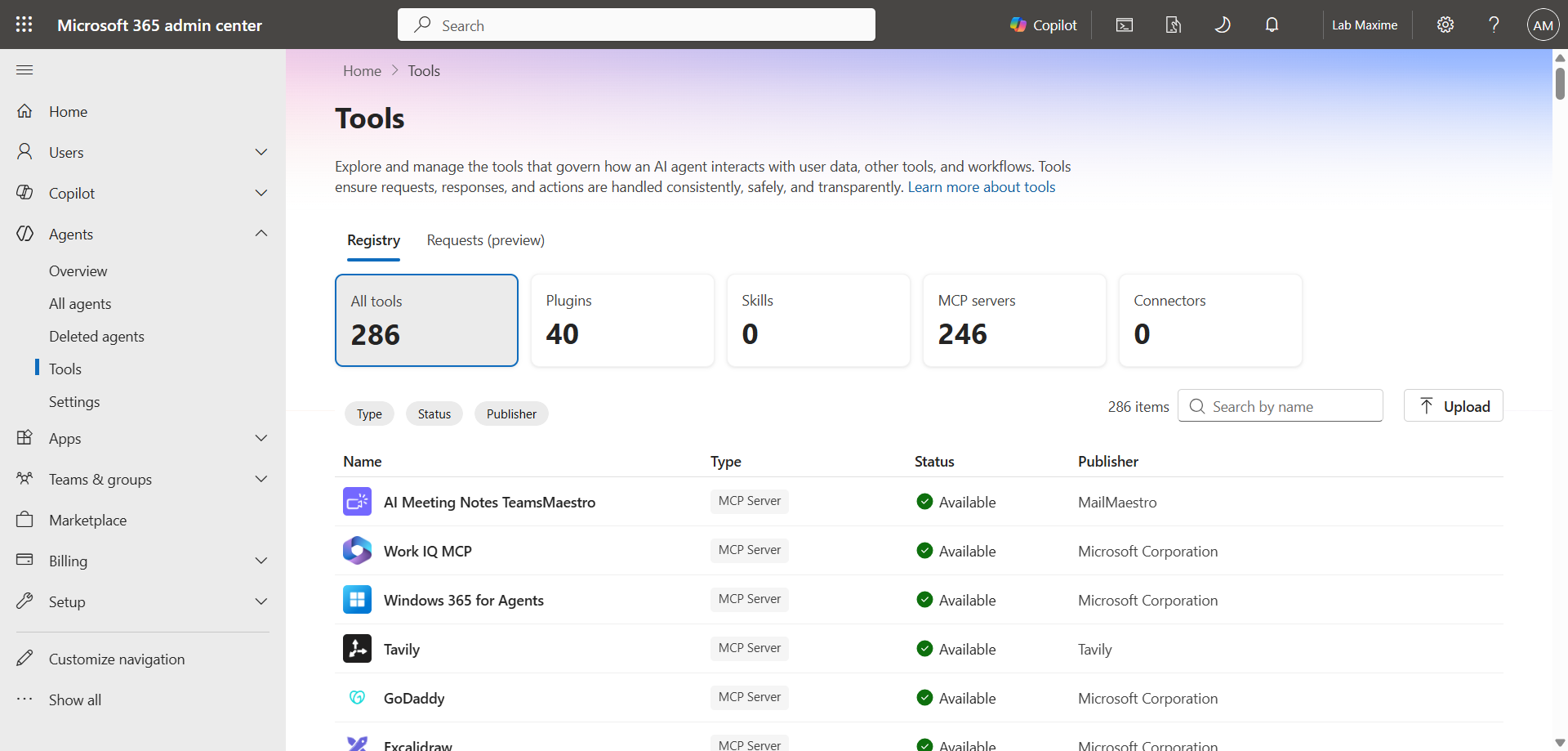
Administrators manage plugin access from a single place, through Agent 365 in the Microsoft 365 admin center, under Agents > Tools. This interface makes it possible to review Microsoft plugins, internal plugins, and partner plugins, to turn them on or off, and to block them or assign them to users or groups.
note
Availability and plugin ecosystem
More than 100 plugins are already available, covering finance, sales, project management, creative work, IT service management, market research, and software development : connectors to HubSpot, Linear, Atlassian, Asana, Webflow, Canva, Notion, MongoDB, IDC, NielsenIQ, and CAS are among them.
Developers and partners can build and publish their own plugins to the registry through the Work IQ Developer Tools (WIQD), which cover the full lifecycle of a custom plugin : design, preview, validation, packaging, and publishing. The registry is expected to eventually extend to Copilot Studio, GitHub Copilot, and Microsoft Foundry.
Conclusion
The plugin registry brings together, in a single interface, what users are trying to accomplish and what organizations need to control : plugins become easier to discover for users, easier to manage for administrators, and simpler to publish for developers and partners. For administrators who until now managed agents, skills, and connectors separately, the move to Agent 365 and the Plugins page is worth a check of already-assigned access before a broader rollout.
Sources
Microsoft Learn - What is a Microsoft 365 Copilot plugin
Did you enjoy this post ? If you have any questions, comments or suggestions, please feel free to send me a message from the contact form.
Don’t forget to follow us and share this post.