Type something to search...
Consecutive bilingual interpretation in Teams

Consecutive bilingual interpretation in Teams


Introduction

The Interpreter agent in Microsoft Teams previously offered only a simultaneous translation mode, where the synthesized voice overlapped with the speaker’s voice in real time. In interactive or bilingual meetings, this audio overlap creates a confusing experience for all participants. Microsoft has made generally available a second mode, called consecutive, which waits for each speaker to finish before delivering the translation, visible to everyone on the meeting stage.


Simultaneous vs consecutive : two modes, two contexts

The two modes are built on different philosophies and do not cover the same scenarios.

Simultaneous modeConsecutive mode
TriggerReal time, while the speaker is talkingAfter each speaker finishes
ExperienceIndividual (headset recommended)Shared, the agent appears on stage
Audio overlap riskHighN/A
Languages per sessionUp to 92 languages maximum
Typical use casePresentations, large broadcastsBilingual discussions, negotiations, interactive meetings

In consecutive mode, the Interpreter agent joins the meeting as a full participant and is visible to everyone present. The experience is no longer individual, all participants hear the translation at the same moment, which eliminates the desynchronization felt in simultaneous mode.


Supported languages and bilingual constraint

Consecutive mode supports 9 languages : Chinese, English, French, German, Italian, Japanese, Korean, Portuguese, and Spanish. This list is shared by both modes.

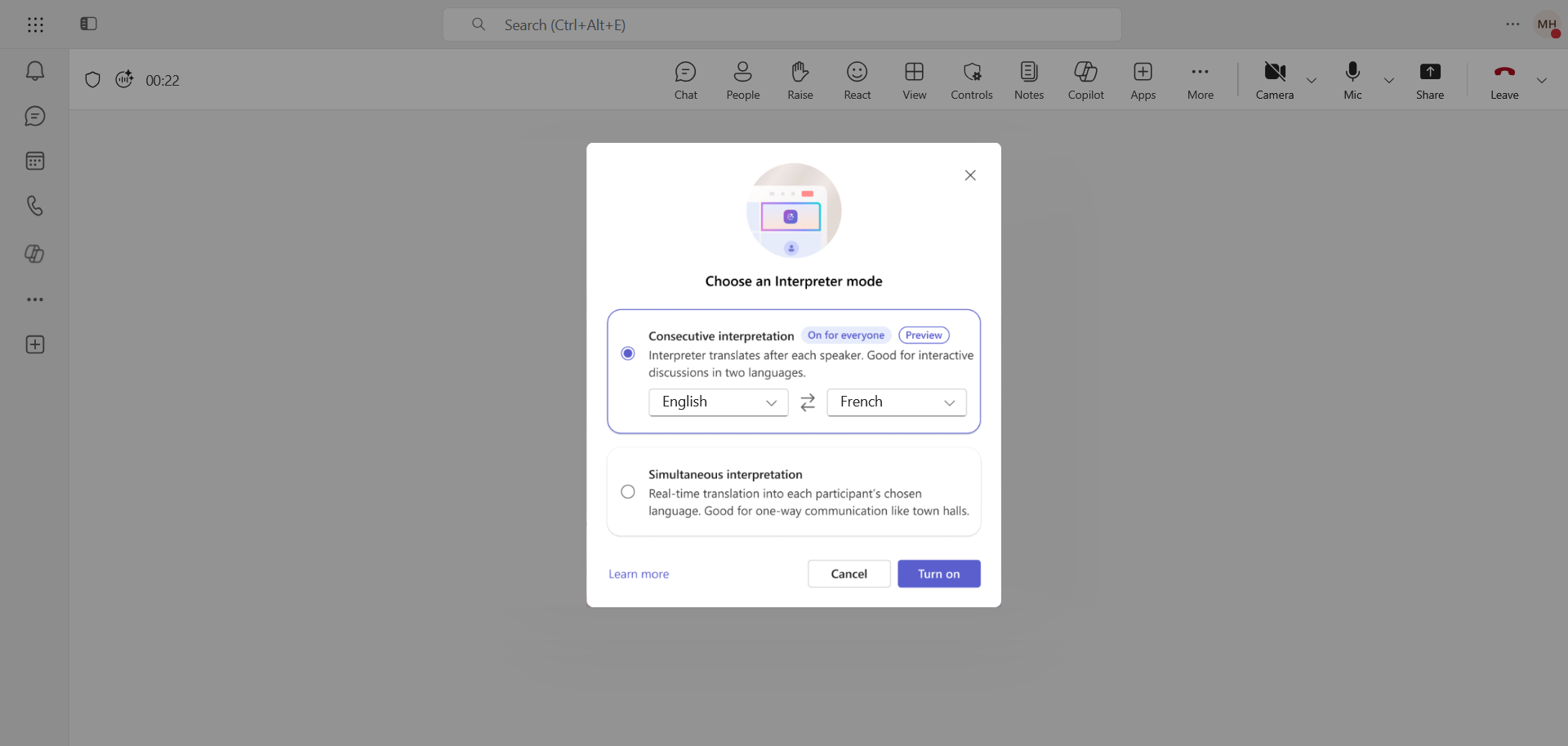
The constraint specific to consecutive mode is the bilingual nature of each session, only 2 languages can be selected per meeting. This limitation is inherent to the turn-by-turn design of the mode.


How to enable consecutive interpretation ?

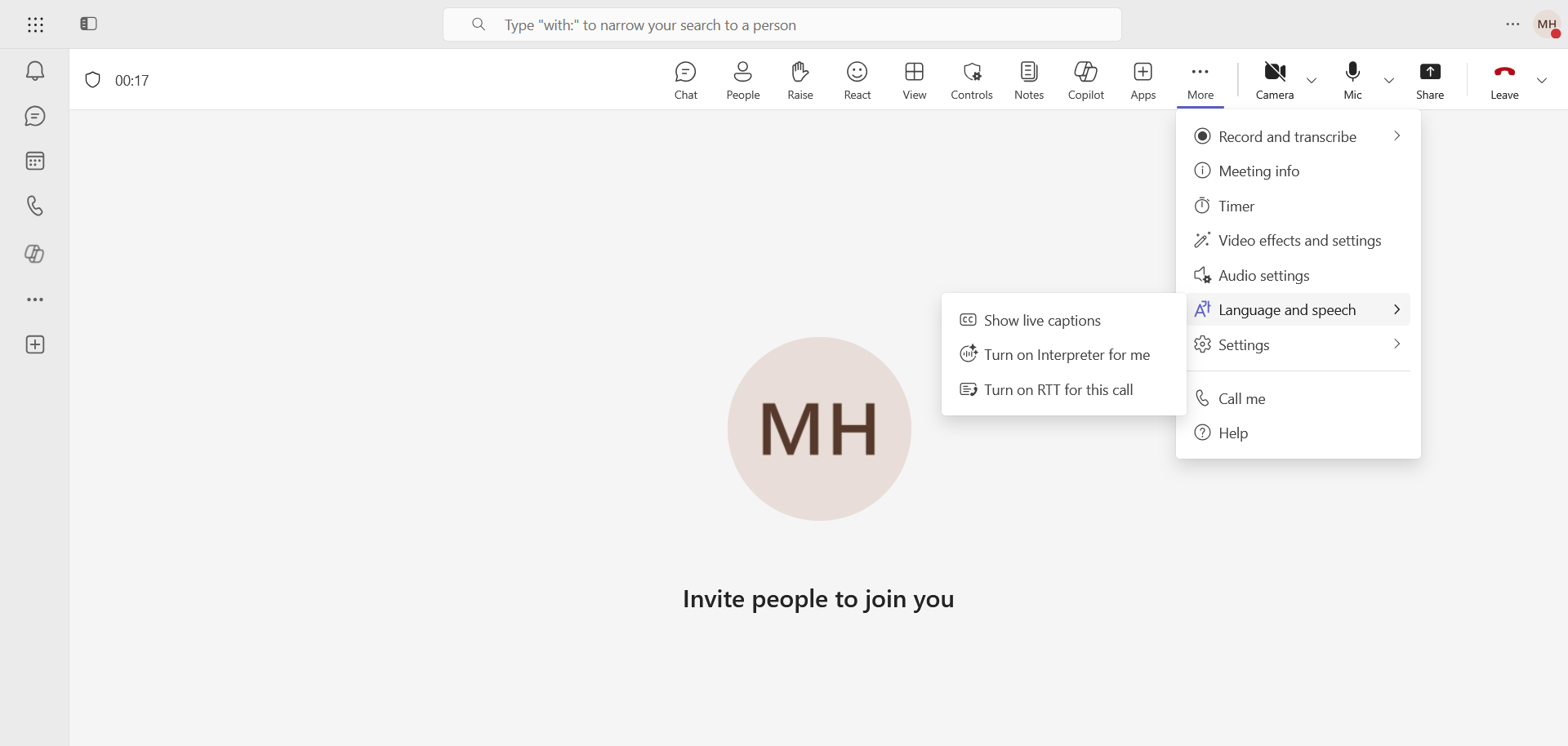
Users can enable the feature by clicking More, then Language and speech, and Turn on Interpreter for me.
image

The language selection will then be offered.
image


Licensing and monthly quota

A Microsoft 365 Copilot license is required to enable the Interpreter agent, regardless of the mode used. The user who enables interpretation does so for the entire meeting, not just for themselves.

20 hours of interpretation are included in the license (per user per month). Beyond this limit, access is subject to available capacity.


Admin controls and special cases

The Interpreter agent is enabled by default for all users with a Microsoft 365 Copilot license. There is no dedicated control in the Teams Admin Center, management is done exclusively via the following PowerShell commands :

To disable the Interpreter agent entirely :

Set-CsTeamsMeetingPolicy -Identity Global -AIInterpreter Disabled

To keep the agent but disable voice simulation :

Set-CsTeamsMeetingPolicy -Identity Global -VoiceSimulationInInterpreter Disabled

The Interpreter agent is not available in the following contexts :

  • Unscheduled 1:1 calls : Whether VoIP or PSTN
  • Town halls and Webinars : These broadcast formats are not covered
  • Microsoft Teams Free : A paid license is required

Teams Rooms for Windows (MTRoW) support the Interpreter agent from version 5.5.129.0, with a Teams Rooms Pro license.


Conclusion

Consecutive mode fills a concrete gap in the Interpreter agent for interactive meetings, the shared experience without audio overlap facilitates bilingual exchanges without disrupting the flow of conversation. General availability makes the feature accessible now to any Microsoft 365 Copilot license holder. Administrators looking to govern usage should configure meeting policies via PowerShell and monitor monthly quota consumption until the counting method between the two modes is clarified.


Sources

Microsoft - Techcommunity

Microsoft Learn - Manage the Interpreter agent


Did you enjoy this post ? If you have any questions, comments or suggestions, please feel free to send me a message from the contact form.

Don’t forget to follow us and share this post.
Related Posts

Email verification of external Teams participants

Email verification of external Teams participants

Introduction Microsoft Teams Premium introduces a new feature to enhance the security and reliability of your meetings: email verification for external participants. This feature allows mee

Read More
Nearly 70% of Fortune 500 companies use Copilot

Nearly 70% of Fortune 500 companies use Copilot

Introduction At Microsoft Ignite 2024, Microsoft highlighted why nearly 70% of Fortune 500 companies now use Microsoft 365 Copilot. This mass adoption reflects a growing trend in the indu

Read More
How to disable self-service on Copilot licenses

How to disable self-service on Copilot licenses

Introduction Microsoft has activated a setting in the tenants (by default) to allow any user to purchase a Microsoft Copilot license through the *Microsoft 365 Copilot self-service pursha

Read More
Improved Teams video quality with Super Resolution

Improved Teams video quality with Super Resolution

Introduction Microsoft continues to innovate to provide users with the best possible virtual communication experience. One of the latest advancements is the introduction of *Super Resolutio

Read More
Le Chat by Mistral AI, your personal AI assistant

Le Chat by Mistral AI, your personal AI assistant

Introduction I told you last December about the French AI, Mistral AI, the most popular model in Europe in which Microsoft invested 15 million euros in the startup. The mobile app has jus

Read More
New Yealink MeetingBoard 65 and 85 for Teams rooms

New Yealink MeetingBoard 65 and 85 for Teams rooms

Introduction The new Yealink MeetingBoard 65 and 85 are an innovative and comprehensive solution designed to transform meeting rooms into intelligent collaboration spaces. These all-in-on

Read More
Maximize the use of the Copilot prompt gallery

Maximize the use of the Copilot prompt gallery

Introduction Microsoft 365 Copilot continues to revolutionize the way organizations work by integrating advanced artificial intelligence capabilities into everyday tools. One of the key f

Read More
How to get started with Copilot in Excel

How to get started with Copilot in Excel

Introduction Microsoft 365 Copilot is a major innovation that integrates artificial intelligence directly into the applications you use every day, like Excel. Copilot helps you automate t

Read More
Microsoft Purview for Azure Data Lake and Blob Storage

Microsoft Purview for Azure Data Lake and Blob Storage

Introduction Microsoft announced that Microsoft Purview protection policies for Azure Data Lake and Blob Storage are now available in all regions. This advancement allows organization

Read More
Facilitator, new AI agent for taking notes in meetings

Facilitator, new AI agent for taking notes in meetings

Introduction Microsoft recently announced a new feature for Teams Rooms: Facilitator ; an AI agent that takes notes during Teams meetings. This feature is currently in pre-public release

Read More
Enterprise Connect 2025 : Yealink SkySound CM50 Dante kit

Enterprise Connect 2025 : Yealink SkySound CM50 Dante kit

Introduction Enterprise Connect is an annual conference that brings together communications technology professionals, innovators, and others. This event showcases technological advances i

Read More
Mistral OCR, new benchmark in character recognition

Mistral OCR, new benchmark in character recognition

Introduction In March 2025, Mistral AI announced the launch of Mistral OCR, an optical character recognition (OCR) API that sets a new standard in document understanding. This advance

Read More
Introducing the Logitech Rally Board 65

Introducing the Logitech Rally Board 65

Introduction The Logitech Rally Board 65 is an all-in-one video conferencing solution designed to simplify meetings and collaboration in business environments. With its 65-inch touchscree

Read More
Blocking screenshots during Teams meetings

Blocking screenshots during Teams meetings

Introduction Microsoft Teams continues to strengthen the privacy and security of online meetings. Starting in July 2025, a new feature will be rolled out to prevent screenshots during meeti

Read More
Mistral Code, the European AI development assistant

Mistral Code, the European AI development assistant

Introduction French startup Mistral AI, already recognized for its open source language models, has just unveiled Mistral Code, an intelligent development assistant designed for businesse

Read More
Displaying a countdown timer during Teams meetings

Displaying a countdown timer during Teams meetings

Introduction Microsoft Teams continues to evolve to offer ever-more advanced communication and collaboration solutions. Among the new features coming soon is the integration of a countdown

Read More
New Yealink MeetingBar A50 for Teams Rooms

New Yealink MeetingBar A50 for Teams Rooms

Introduction In an increasingly hybrid work world, businesses are looking for video conferencing solutions that are powerful, easy to deploy, and seamlessly integrated into their *Microsoft

Read More
Mercedes-Benz, your car becomes a rolling office

Mercedes-Benz, your car becomes a rolling office

Introduction In an automotive market increasingly focused on smart and connected mobility, Mercedes-Benz is taking a giant leap forward. With the new generation of the CLA model, the Ge

Read More
Anthropic unveils Claude Opus 4.1, faster and more reliable

Anthropic unveils Claude Opus 4.1, faster and more reliable

Introduction Anthropic, a leading player in artificial intelligence, has announced the release of Claude Opus 4.1, a significant update to its flagship model (Claude Opus 4). Designed

Read More
OpenAI unveils GPT-5, its latest smarter model

OpenAI unveils GPT-5, its latest smarter model

Introduction OpenAI has taken another step forward in the evolution of artificial intelligence with the launch of GPT-5, its most powerful language model to date. Designed to be smarter

Read More
Enabling sign language in Teams meetings

Enabling sign language in Teams meetings

Introduction In its effort to make collaboration tools more accessible to everyone, Microsoft has announced the arrival of Sign Language mode in Microsoft Teams. This new feature aims to

Read More
What's new for Copilot in August 2025

What's new for Copilot in August 2025

Introduction Microsoft releases a monthly update to Microsoft 365 Copilot to keep admins and users up-to-date on productivity-enhancing features in Microsoft 365. The August 2025 release

Read More
Sensitive content detection in Teams meetings

Sensitive content detection in Teams meetings

Introduction In a world where business interactions increasingly take place via video conferencing, the security of information shared in meetings is becoming a major issue. Microsoft is ad

Read More
Anthropic unveils Claude Sonnet 4.5, more advanced

Anthropic unveils Claude Sonnet 4.5, more advanced

Introduction Anthropic, a leading player in artificial intelligence, has announced the release of Claude Sonnet 4.5, touted as the world's best coding model and a significant leap for

Read More
How to enable DSPM for AI with Purview

How to enable DSPM for AI with Purview

Introduction With the rise of generative AI models, the phenomenon of Shadow AI (the use of artificial intelligence tools and services not approved or controlled by organizations) is incr

Read More
Record only audio in Teams meetings

Record only audio in Teams meetings

Introduction Microsoft is expanding its offering with a long-awaited option : audio-only recording for meetings and calls. This new feature allows users to capture the audio of a meeting wh

Read More
Blocking screen captures in Teams meetings

Blocking screen captures in Teams meetings

Introduction In a world where business interactions increasingly take place via video conferencing, the security of information shared in meetings is becoming a major issue. A simple screen

Read More
How to add a disclaimer in Copilot

How to add a disclaimer in Copilot

Introduction Microsoft has enabled a setting in tenants that allows administrators to display the Microsoft 365 Copilot disclaimer in bold, and to attach a shortcut pointing to a usage po

Read More
Extend Zero Trust to AI agent identities in Entra ID

Extend Zero Trust to AI agent identities in Entra ID

Introduction AI agents are becoming increasingly widespread in businesses (incident summaries, log analysis, flow execution, etc.), and it is crucial that their access is continuously evalu

Read More
Mistral Voxtral Transcribe2, real-time transcription

Mistral Voxtral Transcribe2, real-time transcription

Introduction Mistral AI has just unveiled Voxtral Transcribe 2, its second generation of speech transcription models with cutting-edge transcription quality, ultra-low latency and advan

Read More
How to enable DLP for AI websites with Purview

How to enable DLP for AI websites with Purview

Introduction Last week, I showed you how to enable DLP to prevent printing of financial data using Microsoft Purview, in order to prevent accidental or malicious data leaks (*Data Loss

Read More
Anthropic unveils Claude Opus 4.6, a benchmark for finance

Anthropic unveils Claude Opus 4.6, a benchmark for finance

Introduction Artificial intelligence is rapidly growing in the finance industry, but one reality remains : real-world financial analyses are rarely clean, linear, or perfectly defined. They

Read More
How to enable Claude AI as a model in Copilot

How to enable Claude AI as a model in Copilot

Introduction Since its launch, Microsoft 365 Copilot has established itself as a cornerstone of enhanced enterprise productivity, leveraging advanced AI models to reason, analyze, and aut

Read More
OpenAI unveils GPT-5.4, the new generation of models

OpenAI unveils GPT-5.4, the new generation of models

Introduction OpenAI has just announced GPT-5.4, a new evolution of its GPT model family. Designed for professional uses and complex tasks, this model introduces several major improvemen

Read More
Introducing Microsoft 365 E7, the Frontier Suite

Introducing Microsoft 365 E7, the Frontier Suite

Introduction Microsoft has announced the availability of the Microsoft 365 E7 license, a new offer called Frontier Suite, designed for the era of AI-driven work and agents. This announc

Read More
OpenAI unveils GPT-5.5, designed for agentic work

OpenAI unveils GPT-5.5, designed for agentic work

Introduction OpenAI has just announced GPT-5.5, barely seven weeks after GPT-5.4. The message is clear, GPT-5.5 is not an incremental update but *"a new class of intelligence for real

Read More
Mistral Small 4, one model for reasoning, visioning, and coding

Mistral Small 4, one model for reasoning, visioning, and coding

Introduction Managing multiple specialized models within a single AI pipeline adds deployment complexity and multiplies infrastructure costs. Mistral AI announced on March 16, 2026 the la

Read More
Voice-native agents in Foundry in Public Preview

Voice-native agents in Foundry in Public Preview

Introduction Microsoft announced on March 16, 2026 the Public Preview of Voice Native Agents in Microsoft Azure AI Foundry, a native combination of the Voice Live API and the *Found

Read More
Anthropic unveils Claude Opus 4.7, with a new tokenizer

Anthropic unveils Claude Opus 4.7, with a new tokenizer

Introduction Anthropic announced on April 16, 2026 the general availability of Claude Opus 4.7, the direct successor to [Claude Opus 4.6](https://maxime.hiez.ca/en/blog/2026-02-13-ai-an

Read More
GPT-5.5 Instant now available in Copilot

GPT-5.5 Instant now available in Copilot

Introduction Microsoft 365 Copilot is accelerating the renewal cadence of its underlying models ; this is the fifth iteration of the GPT-5.x series deployed in less than a year. On 7 May 20

Read More