Type something to search...
How to remove "Unlock Teams Premium" in Teams

How to remove "Unlock Teams Premium" in Teams


Introduction

By default, users can obtain a Microsoft Teams Premium trial license by requesting one directly from their Teams client. This can lead to subsequent billing issues, so it is advisable to disable this option.


What does it look like ?

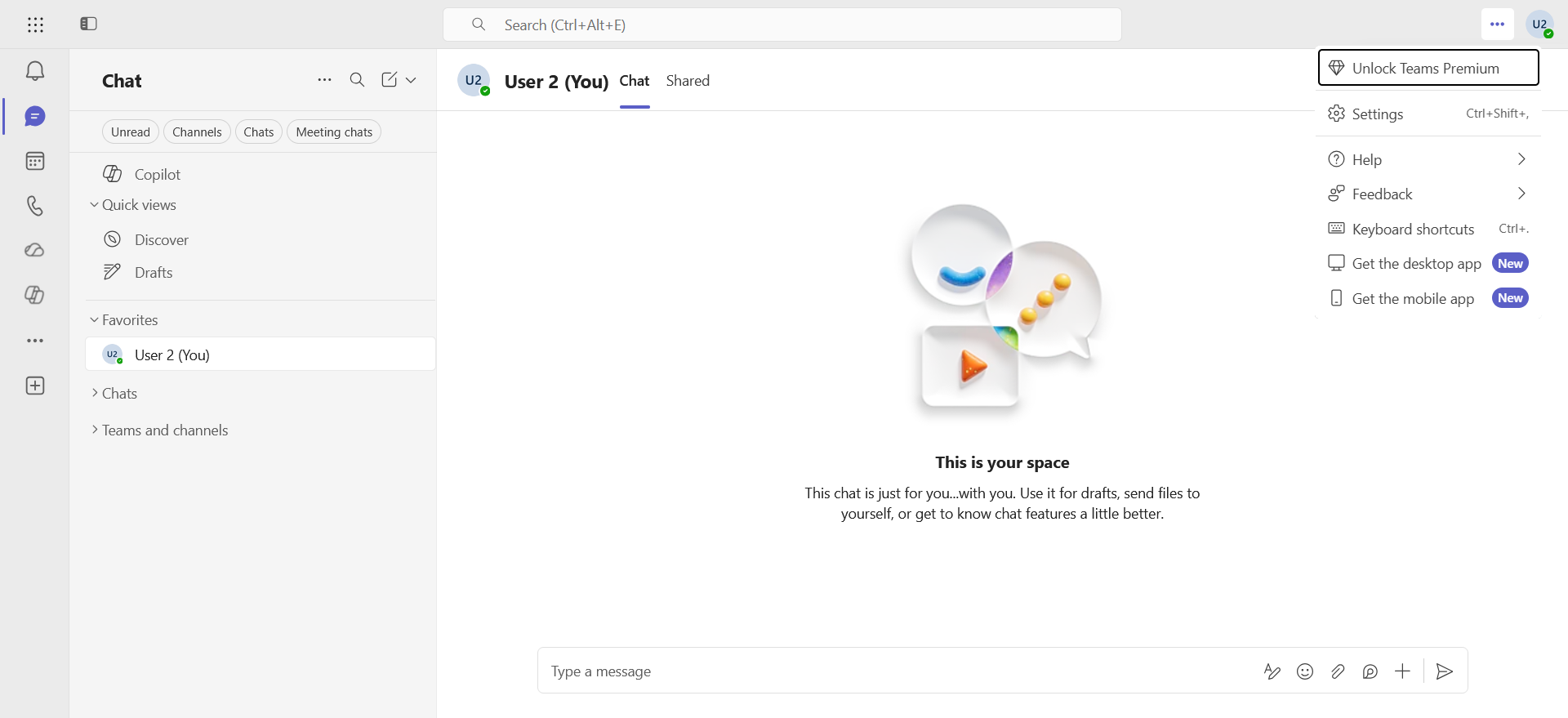
If a user clicks the next to their profile icon in Teams, the Unlock Teams Premium button becomes available …
image

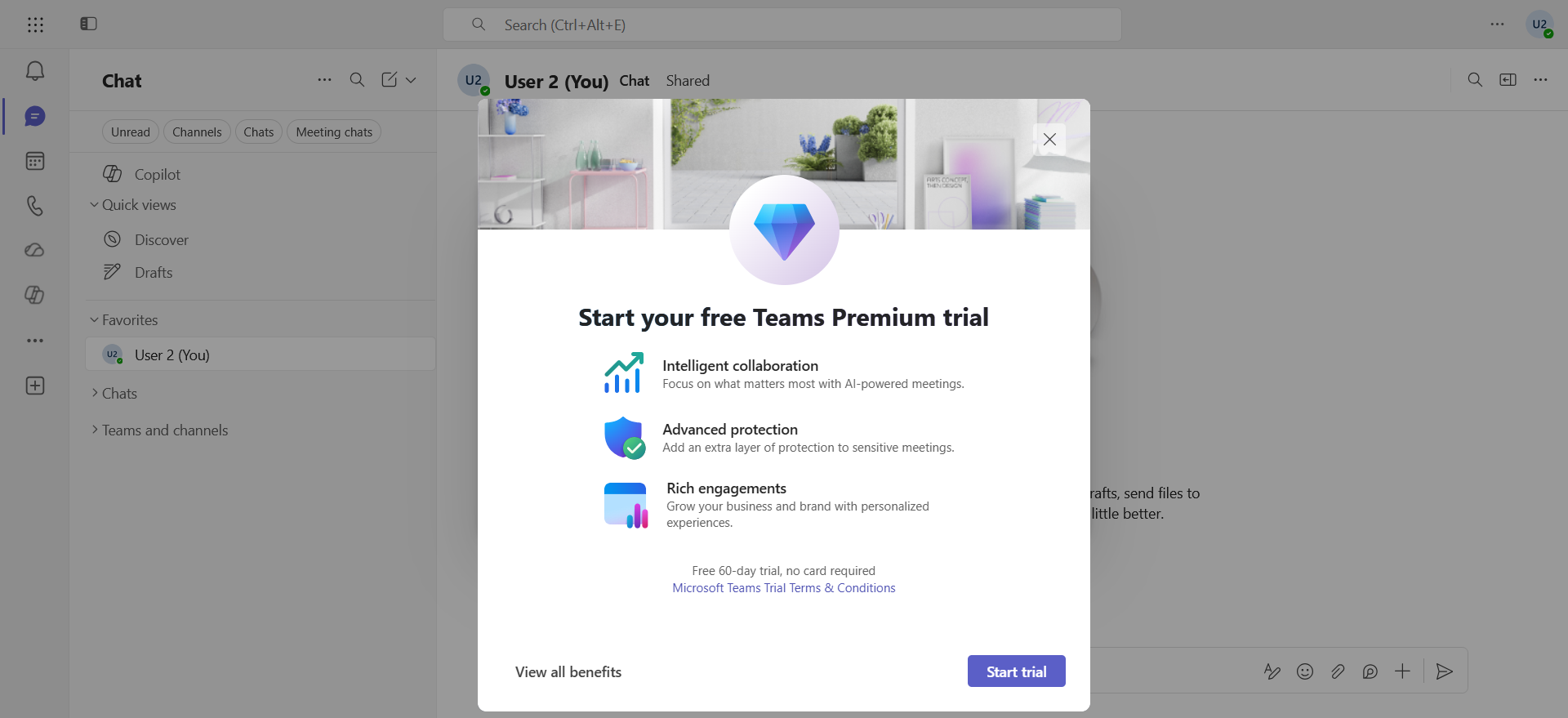
… and the trial license can be activated.
image


Prerequisites

Administrator role

  • An account with the Global Administrator or Billing Administrator role to access the Microsoft 365 Admin Center.

Step 1 : Sign in to the Microsoft 365 Admin Center

Sign in to the Microsoft 365 Admin Center by opening your web browser to https://admin.cloud.microsoft.


Step 2 : Disable self-service

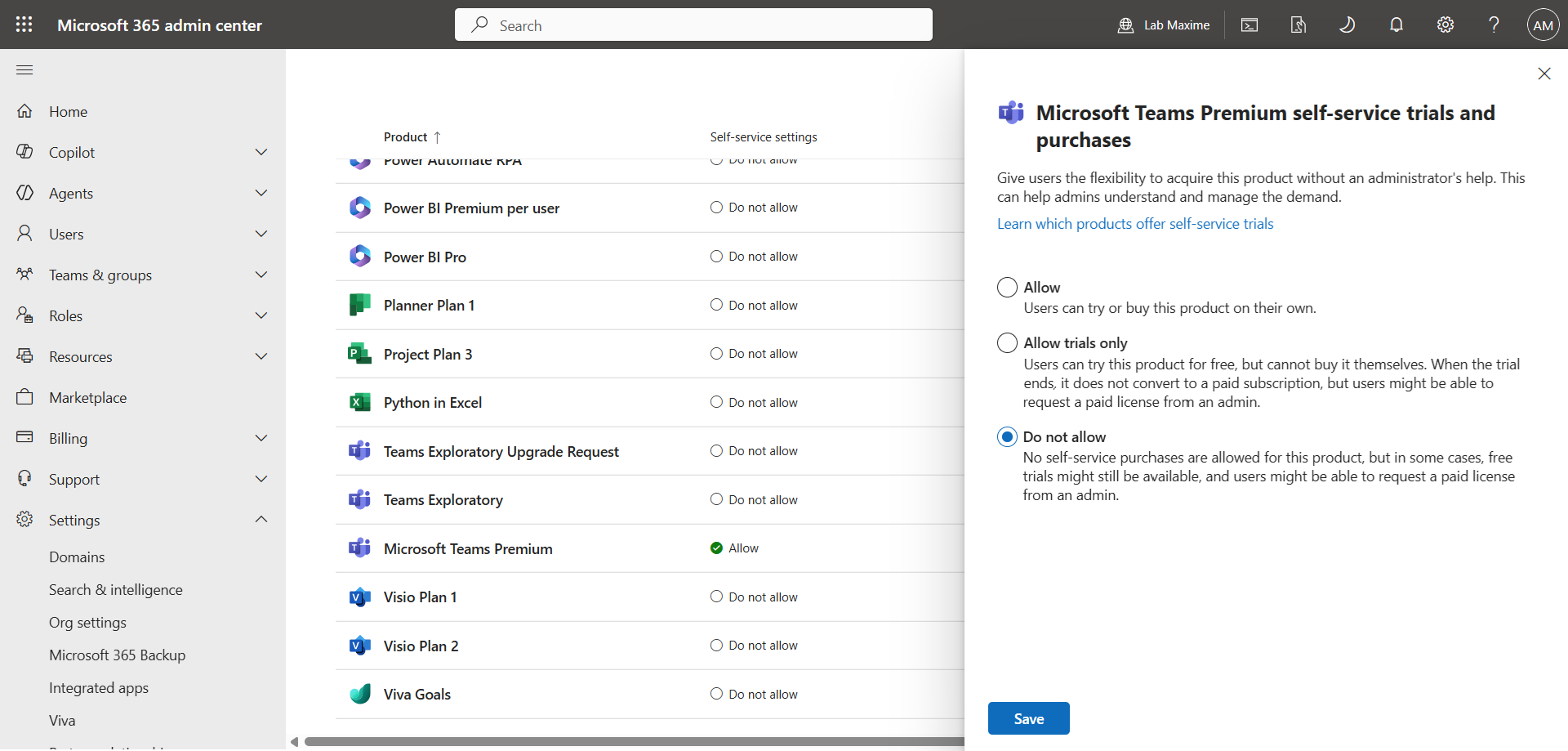
In the left menu, click Settings, then Org Settings.

In the Services tab, click Self-service trials and purchases and disable self-service trials and purchases for the Microsoft Teams Premium license.
image


Let’s go further in PowerShell

Microsoft Teams Premium isn’t the only license you should disable with self-service. The following PowerShell commands will allow you to list which licenses are affected :

Install-Module -Name MSCommerce -Scope CurrentUser
Import-Module -Name MSCommerce
Connect-MSCommerce
Get-MSCommerceProductPolicies -PolicyId AllowSelfServicePurchase

The following PowerShell command will allow you to deactivate them all :

Get-MSCommerceProductPolicies -PolicyId AllowSelfServicePurchase | Where { $_.PolicyValue -eq "Enabled"} | forEach { Update-MSCommerceProductPolicy -PolicyId AllowSelfServicePurchase -ProductId $_.ProductID -Enabled $false }

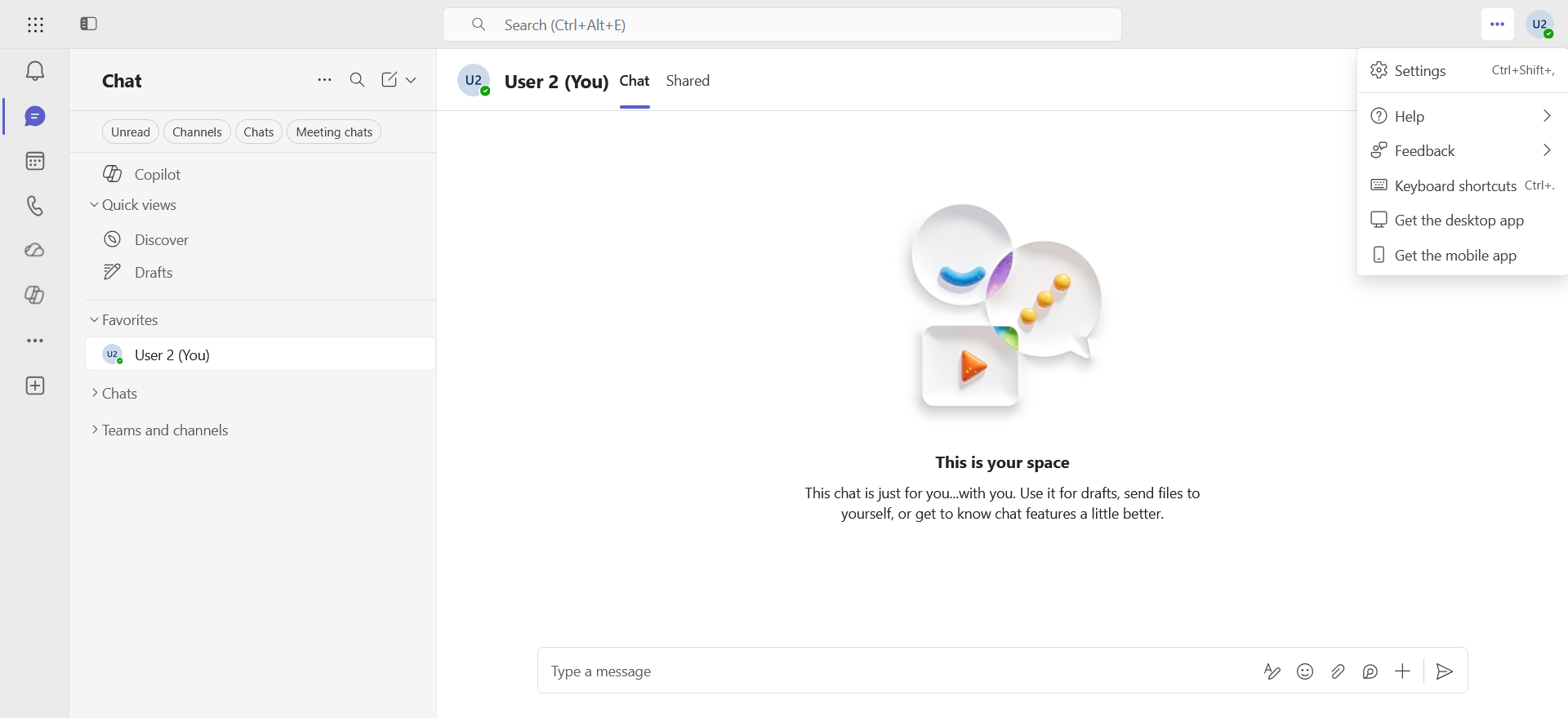
Validate the result

The result is visible after a few hours ; the Unlock Teams Premium button has disappeared.
image


Conclusion

You now know how to disable self-service for Teams Premium (and other) licenses.


Sources

Microsoft Learn - Self-service purchase


Did you enjoy this post ? If you have any questions, comments or suggestions, please feel free to send me a message from the contact form.

Don’t forget to follow us and share this post.

Related Posts

Global realignment of Microsoft 365 licenses

Global realignment of Microsoft 365 licenses

Introduction On August 31, 2023, Microsoft announced significant changes to its Microsoft 365 and Office 365 suites in response to concerns raised by the European Commission regarding compe

Read More
Pricing update for Teams telephony licenses

Pricing update for Teams telephony licenses

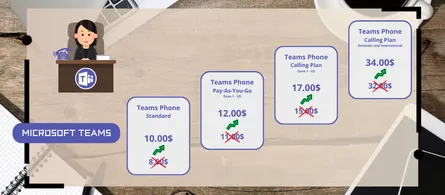
Introduction Microsoft recently announced a price increase for several Teams telephony licenses, effective April 1, 2025. This pricing update reflects the continued innovation and increased

Read More
Email verification of external Teams participants

Email verification of external Teams participants

Introduction Microsoft Teams Premium introduces a new feature to enhance the security and reliability of your meetings: email verification for external participants. This feature allows m

Read More
How to disable self-service on Copilot licenses

How to disable self-service on Copilot licenses

Introduction Microsoft has activated a setting in the tenants (by default) to allow any user to purchase a Microsoft Copilot license through the *Microsoft 365 Copilot self-service pursha

Read More
How to activate Microsoft 365 Passkey in Entra ID

How to activate Microsoft 365 Passkey in Entra ID

Introduction Microsoft 365 Passkey is an authentication method that replaces passwords with more secure options like facial recognition, fingerprint, or a PIN.Prerequisites **<

Read More
How to configure callback in a Teams queue

How to configure callback in a Teams queue

Introduction Callback in Teams allows callers in a queue to be called back after a certain time rather than waiting until an agent becomes available.Prerequisites **Required

Read More
How to add tags to an Azure virtual machine

How to add tags to an Azure virtual machine

Introduction Tags in Azure are customizable labels (in the form of metadata) that you can apply to your resources to organize and manage your cloud environments more efficiently. They play

Read More
How to handle duplicates in Teams directory search

How to handle duplicates in Teams directory search

Introduction Microsoft recently announced a significant optimization for the search by name and extension functionality in its Teams auto attendants. You have probably already had this case

Read More
How to inventory Direct Routing numbers in Teams

How to inventory Direct Routing numbers in Teams

Introduction Microsoft Teams continues to evolve to offer ever more effective communication and collaboration solutions. To make life easier for administrators, Microsoft has announced the

Read More
The end of AzureAD and MSOnline PowerShell modules

The end of AzureAD and MSOnline PowerShell modules

Introduction Microsoft recently announced the General Availability of the Microsoft Entra PowerShell module. This module offers administrators and IT professionals a new way to manage and

Read More
PowerShell Teams module updated to version 6.8.0

PowerShell Teams module updated to version 6.8.0

Introduction Microsoft recently released the new version 6.8.0 of the PowerShell module for Microsoft Teams.Installation You can check the version of the installed module via t

Read More
How to block a specific external user in Teams

How to block a specific external user in Teams

Introduction Microsoft recently introduced a new feature for Teams administrators to block specific external users. This update aims to strengthen security and protect internal members of t

Read More
PowerShell Azure module updated to version 13.3.0

PowerShell Azure module updated to version 13.3.0

Introduction Microsoft recently released the new version 13.3.0 of the PowerShell module for Microsoft Azure.Installation You can check the version of the installed module via

Read More
Microsoft 365 E5 Security as an add-on for Business Premium

Microsoft 365 E5 Security as an add-on for Business Premium

Introduction Microsoft announced that Microsoft 365 E5 Security is now available as an add-on for Microsoft 365 Business Premium customers. This new plan is designed to help small and m

Read More
PowerShell Teams module updated to version 6.9.0

PowerShell Teams module updated to version 6.9.0

Introduction Microsoft recently released the new version 6.9.0 of the PowerShell module for Microsoft Teams.Installation You can check the version of the installed module via t

Read More
Managing unlicensed OneDrive accounts in Microsoft 365

Managing unlicensed OneDrive accounts in Microsoft 365

Introduction Microsoft has introduced a new storage policy for unlicensed OneDrive accounts, which could result in additional costs for organizations if these accounts are not managed prope

Read More
How to enable Zoom and Webex meetings on MTR

How to enable Zoom and Webex meetings on MTR

Introduction In the modern business world, effective collaboration is essential. Organizations use various video conferencing platforms to stay connected, and it's crucial to be able to joi

Read More
PowerShell Teams module updated to version 7.0.0

PowerShell Teams module updated to version 7.0.0

Introduction Microsoft recently released the new version 7.0.0 of the PowerShell module for Microsoft Teams.Installation You can check the version of the installed module via t

Read More
Checking licenses for PSTN bot calls in Teams

Checking licenses for PSTN bot calls in Teams

Introduction Microsoft has announced an important update regarding license verification for PSTN bot calls to users in Microsoft Teams. This update aligns licensing requirements for Teams u

Read More
PowerShell Teams module updated to version 7.1.0

PowerShell Teams module updated to version 7.1.0

Introduction Microsoft recently released the new version 7.1.0 of the PowerShell module for Microsoft Teams.Installation You can check the version of the installed module via t

Read More
PowerShell Azure module updated to version 14.1.0

PowerShell Azure module updated to version 14.1.0

Introduction Microsoft recently released the new version 14.1.0 of the PowerShell module for Microsoft Azure.Installation You can check the version of the installed module via

Read More
How to configure a calling plan spend limit in Teams

How to configure a calling plan spend limit in Teams

Introduction Businesses interested in using Microsoft Teams as their single provider for telephony services, but reluctant due to the high cost of calling plans, can choose a *Pay-As-You-Go

Read More
How to configure and analyze emergency calls in Teams

How to configure and analyze emergency calls in Teams

Introduction Microsoft Teams telephony offers an essential feature for organizations : emergency call management. This feature allows users to make emergency calls while dynamically providi

Read More
PowerShell Teams module updated to version 7.2.0

PowerShell Teams module updated to version 7.2.0

Introduction Microsoft recently released the new version 7.2.0 of the PowerShell module for Microsoft Teams.Installation You can check the version of the installed module via t

Read More
PowerShell Azure module updated to version 14.2.0

PowerShell Azure module updated to version 14.2.0

Introduction Microsoft recently released the new version 14.2.0 of the PowerShell module for Microsoft Azure.Installation You can check the version of the installed module via

Read More
PowerShell Teams module updated to version 7.3.0

PowerShell Teams module updated to version 7.3.0

Introduction Microsoft recently released the new version 7.3.0 of the PowerShell module for Microsoft Teams.Installation You can check the version of the installed module via t

Read More
PowerShell Azure module updated to version 14.3.0

PowerShell Azure module updated to version 14.3.0

Introduction Microsoft recently released the new version 14.3.0 of the PowerShell module for Microsoft Azure.Installation You can check the version of the installed module via

Read More
PowerShell Teams module updated to version 7.4.0

PowerShell Teams module updated to version 7.4.0

Introduction Microsoft recently released the new version 7.4.0 of the PowerShell module for Microsoft Teams.Installation You can check the version of the installed module via t

Read More
Malicious URL protection in Teams

Malicious URL protection in Teams

Introduction In a world where phishing attacks and malicious links are constantly on the rise, Microsoft is strengthening Microsoft Teams security with a native malicious URL protection f

Read More
PowerShell Azure module updated to version 14.5.0

PowerShell Azure module updated to version 14.5.0

Introduction Microsoft recently released the new version 14.5.0 of the PowerShell module for Microsoft Azure.Installation You can check the version of the installed module via

Read More
How to activate Defender EDR in "Block Mode"

How to activate Defender EDR in "Block Mode"

Introduction In a context of constantly evolving cyber threats, antivirus solutions are no longer sufficient to effectively protect workstations. Microsoft Defender for Endpoint's *Block

Read More
PowerShell Teams module updated to version 7.5.0

PowerShell Teams module updated to version 7.5.0

Introduction Microsoft recently released the new version 7.5.0 of the PowerShell module for Microsoft Teams.Installation You can check the version of the installed module via t

Read More
How to configure calendar sharing in Exchange

How to configure calendar sharing in Exchange

Introduction In a context where organizations are collaborating more closely, it's not uncommon for users within one organization to need to efficiently schedule meetings by accessing the c

Read More
PowerShell Azure module updated to version 15.2.0

PowerShell Azure module updated to version 15.2.0

Introduction Microsoft recently released the new version 15.2.0 of the PowerShell module for Microsoft Azure.Installation You can check the version of the installed module via

Read More
PowerShell Teams module updated to version 7.6.0

PowerShell Teams module updated to version 7.6.0

Introduction Microsoft recently released the new version 7.6.0 of the PowerShell module for Microsoft Teams.Installation You can check the version of the installed module via t

Read More
PowerShell Azure module updated to version 15.3.0

PowerShell Azure module updated to version 15.3.0

Introduction Microsoft recently released the new version 15.3.0 of the PowerShell module for Microsoft Azure.Installation You can check the version of the installed module via

Read More
How to migrate a Surface Hub 2S to a Windows MTR

How to migrate a Surface Hub 2S to a Windows MTR

Introduction With the end of support for Windows 10, businesses can migrate their Surface Hub 2S to Microsoft Teams Rooms on Windows (MTRoW). USB migration is the method that allows

Read More
Introducing Microsoft 365 E7, the Frontier Suite

Introducing Microsoft 365 E7, the Frontier Suite

Introduction Microsoft has announced the availability of the Microsoft 365 E7 license, a new offer called Frontier Suite, designed for the era of AI-driven work and agents. This announc

Read More
Purview Sensitivity Labels are coming to OneNote

Purview Sensitivity Labels are coming to OneNote

Introduction Good news for security and compliance teams, Sensitivity Labels are now General Availability in OneNote. This update finally allows you to apply the same classification a

Read More
PowerShell Azure module updated to version 15.4.0

PowerShell Azure module updated to version 15.4.0

Introduction Microsoft recently released the new version 15.4.0 of the PowerShell module for Microsoft Azure.Installation You can check the version of the installed module via

Read More
PowerShell Teams module updated to version 7.7.0

PowerShell Teams module updated to version 7.7.0

Introduction Microsoft recently released the new version 7.7.0 of the PowerShell module for Microsoft Teams.Installation You can check the version of the installed module via t

Read More
How to enable multi-lines for Teams telephony

How to enable multi-lines for Teams telephony

Introduction Microsoft has just introduced a feature that allows a user to have up to 11 numbers (including their primary and private lines) in their Microsoft Teams phone system. Users c

Read More
Microsoft raises the conditional access policy limit

Microsoft raises the conditional access policy limit

Introduction Microsoft quietly raises the limit of conditional access policies per tenant, from 195 to 244. This limit applies to all policies, whether active, disabled, or in *report-onl

Read More
Consecutive bilingual interpretation in Teams

Consecutive bilingual interpretation in Teams

Introduction The Interpreter agent in Microsoft Teams previously offered only a simultaneous translation mode, where the synthesized voice overlapped with the speaker's voice in real ti

Read More
PowerShell Teams module updated to version 7.8.0

PowerShell Teams module updated to version 7.8.0

Introduction Microsoft recently released the new version 7.8.0 of the PowerShell module for Microsoft Teams.Installation You can check the version of the installed module via t

Read More
PowerShell Azure module updated to version 16.0.0

PowerShell Azure module updated to version 16.0.0

Introduction Microsoft recently released the new version 16.0.0 of the PowerShell module for Microsoft Azure.Installation You can check the version of the installed module via

Read More