Type something to search...
How to transfer meeting ownership in Exchange

How to transfer meeting ownership in Exchange


Introduction

When users leave the company (or change roles), they often leave behind a calendar full of meetings they are still the “organizers” of. Whoever took over their role had to recreate the meetings by sending new invitations, losing the history, the notes and so on, since until now there was no way to change the organizer of an existing meeting. The Invoke-ChangeMeetingOrganizer cmdlet now lets an administrator change the organizer of an existing meeting or meeting series, without recreating anything.


Prerequisites

Administrator role

  • An account with the Global Administrator or Exchange Administrator role to access Microsoft Exchange Online.

Step 1 : Sign in to Microsoft Exchange Online in PowerShell

Sign in to Microsoft Exchange Online using the following PowerShell command :

Connect-ExchangeOnline

Step 2 : Transfer the meeting to the new owner

Transfer the meeting using the following PowerShell command :

Invoke-ChangeMeetingOrganizer -Identity user.3@domain.com -Subject "Budget discussion" -NewOrganizer user.2@domain.com

With -Subject, the transfer only happens if a single meeting matches. Otherwise, the command returns the list of meetings found, and you just run it again with -EventId, whose value must identify the recurring series, not an occurrence.

If the cmdlet isn’t available in the tenant yet, you get the message “Transfer meeting action is disabled” and no change is made.

note

By default, transferring ownership of a recurring meeting takes effect from the next occurrence of the series. You can add the -TransferSeriesStartDate parameter if you want the change to apply from a specific date, which must be in the future and entered in the short date format defined in the regional settings of the computer where the command is run.

warning

For Teams meetings, the organizer of the associated Teams meeting isn’t updated automatically. The new organizer must manually update the meeting series with the new Teams meeting information to be able to join and manage the online meeting.

Validate the result

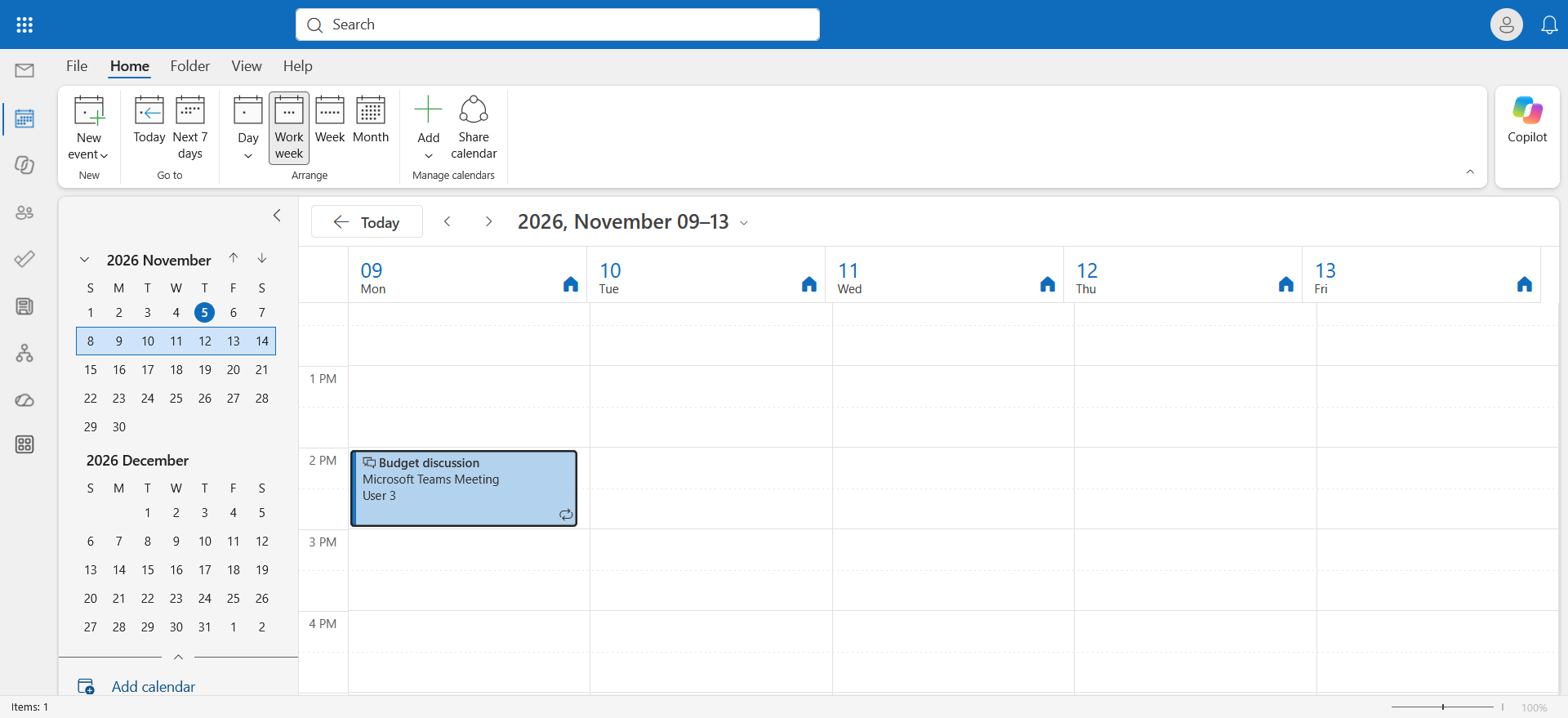
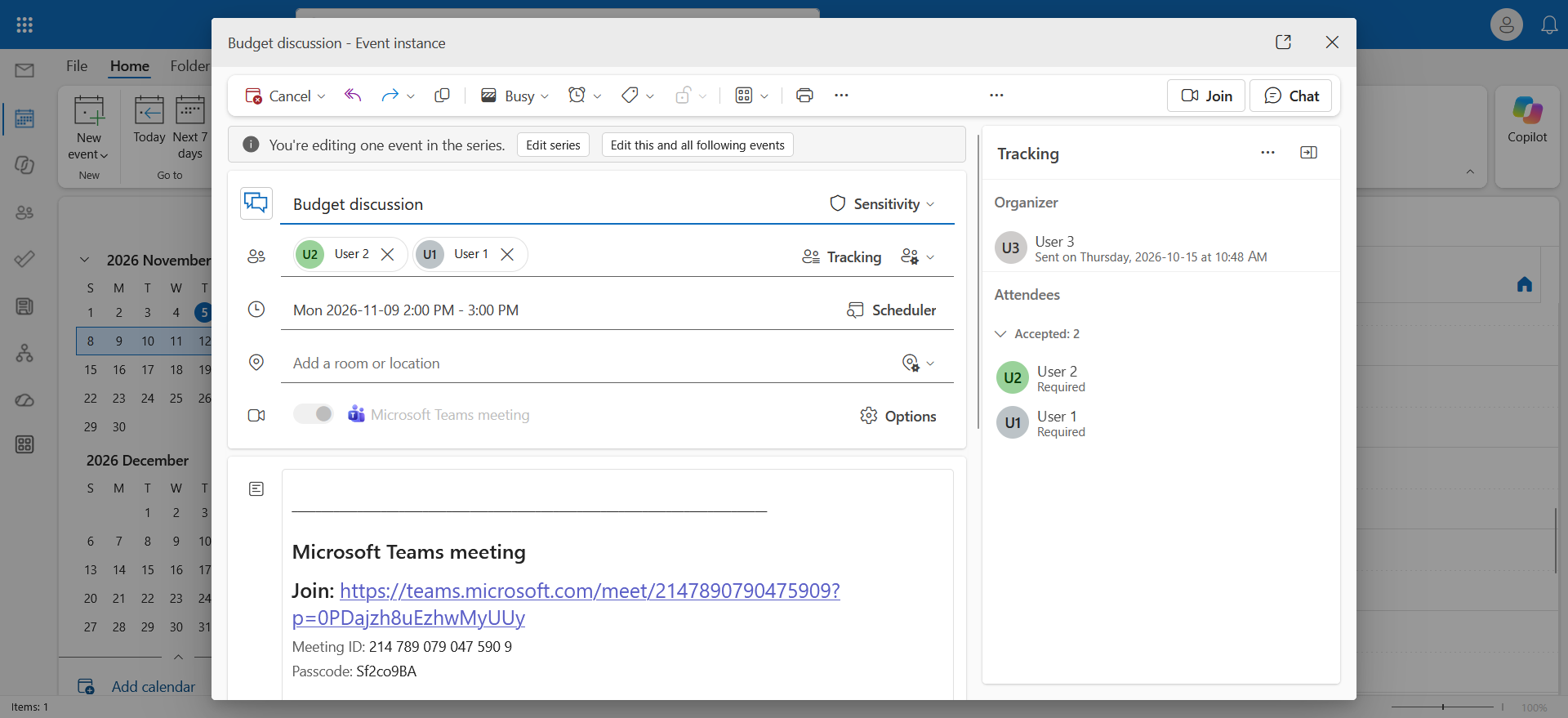
Before the transfer, the (recurring) meeting is in User 3’s calendar …
image

… with User 1 and User 2 as attendees.
image

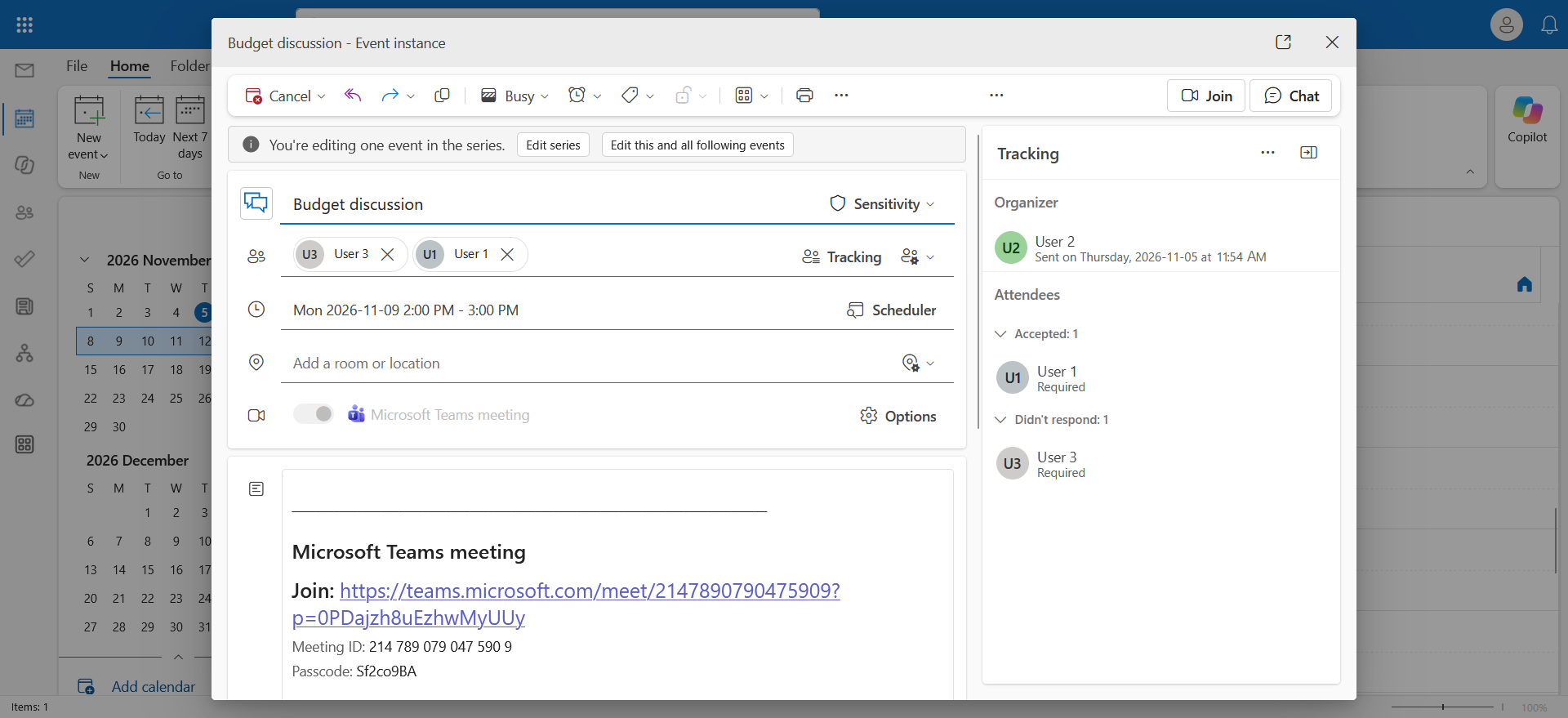
After a few minutes, the meeting is moved to the new organizer’s calendar.
image

Internal attendees (same Exchange Online organization) don’t have to do anything : their instances are updated silently and their local settings (reminder, category, Show as) are kept. External attendees, as well as those whose mailbox is hosted on-premises in a hybrid deployment, receive a cancellation for the old series, then an invitation from the new organizer for the new series. External attendees must confirm their attendance again and recreate their local changes. For attachments and OneDrive links, the new organizer may not have access to the file and must manually remove the file or link, then add a copy.


Limitations to know
  • Meetings in a permanently deleted mailbox can’t be transferred.
  • The new organizer must belong to the same Exchange Online organization as the current organizer.
  • Only meetings stored in the organizer’s default calendar can be transferred.
  • For recurring meetings, administrators can’t transfer the part of the series that remains in the original organizer’s calendar after a transfer. If needed, the future occurrences of the transferred series can be transferred again from the new organizer’s calendar to another organizer.
  • Meetings in shared mailboxes or Microsoft 365 group mailboxes can’t be transferred. If you want another user to manage these meetings, grant them the permissions needed to access and manage the mailbox calendar.

Conclusion

You now know how to transfer meeting ownership to a new user in Exchange.


Sources

Microsoft Learn - Invoke-ChangeMeetingOrganizer


Did you enjoy this post ? If you have any questions, comments or suggestions, please feel free to send me a message from the contact form.

Don’t forget to follow us and share this post.
Related Posts

Email verification of external Teams participants

Email verification of external Teams participants

Introduction Microsoft Teams Premium introduces a new feature to enhance the security and reliability of your meetings : email verification for external participants. This feature allows

Read More
How to disable self-service on Copilot licenses

How to disable self-service on Copilot licenses

Introduction Microsoft has activated a setting in the tenants (by default) to allow any user to purchase a Microsoft Copilot license through the *Microsoft 365 Copilot self-service pursha

Read More
How to activate Microsoft 365 Passkey in Entra ID

How to activate Microsoft 365 Passkey in Entra ID

Introduction Microsoft 365 Passkey is an authentication method that replaces passwords with more secure options like facial recognition, fingerprint, or a PIN.Prerequisites **<

Read More
How to configure callback in a Teams queue

How to configure callback in a Teams queue

Introduction Callback in Teams allows callers in a queue to be called back after a certain time rather than waiting until an agent becomes available.Prerequisites **Required

Read More
How to add tags to an Azure virtual machine

How to add tags to an Azure virtual machine

Introduction Tags in Azure are customizable labels (in the form of metadata) that you can apply to your resources to organize and manage your cloud environments more efficiently. They play

Read More
How to handle duplicates in Teams directory search

How to handle duplicates in Teams directory search

Introduction Microsoft recently announced a significant optimization for the search by name and extension functionality in its Teams auto attendants. You have probably already had this case

Read More
How to inventory Direct Routing numbers in Teams

How to inventory Direct Routing numbers in Teams

Introduction Microsoft Teams continues to evolve to offer ever more effective communication and collaboration solutions. To make life easier for administrators, Microsoft has announced the

Read More
The end of AzureAD and MSOnline PowerShell modules

The end of AzureAD and MSOnline PowerShell modules

Introduction Microsoft recently announced the General Availability of the Microsoft Entra PowerShell module. This module offers administrators and IT professionals a new way to manage and

Read More
PowerShell Teams module updated to version 6.8.0

PowerShell Teams module updated to version 6.8.0

Introduction Microsoft recently released the new version 6.8.0 of the PowerShell module for Microsoft Teams.Installation You can check the version of the installed module via t

Read More
How to block a specific external user in Teams

How to block a specific external user in Teams

Introduction Microsoft recently introduced a new feature for Teams administrators to block specific external users. This update aims to strengthen security and protect internal members of t

Read More
PowerShell Azure module updated to version 13.3.0

PowerShell Azure module updated to version 13.3.0

Introduction Microsoft recently released the new version 13.3.0 of the PowerShell module for Microsoft Azure.Installation You can check the version of the installed module via

Read More
PowerShell Teams module updated to version 6.9.0

PowerShell Teams module updated to version 6.9.0

Introduction Microsoft recently released the new version 6.9.0 of the PowerShell module for Microsoft Teams.Installation You can check the version of the installed module via t

Read More
How to enable Zoom and Webex meetings on MTR

How to enable Zoom and Webex meetings on MTR

Introduction In the modern business world, effective collaboration is essential. Organizations use various video conferencing platforms to stay connected, and it's crucial to be able to joi

Read More
PowerShell Teams module updated to version 7.0.0

PowerShell Teams module updated to version 7.0.0

Introduction Microsoft recently released the new version 7.0.0 of the PowerShell module for Microsoft Teams.Installation You can check the version of the installed module via t

Read More
Blocking screenshots during Teams meetings

Blocking screenshots during Teams meetings

Introduction Microsoft Teams continues to strengthen the privacy and security of online meetings. Starting in July 2025, a new feature will be rolled out to prevent screenshots during meeti

Read More
PowerShell Teams module updated to version 7.1.0

PowerShell Teams module updated to version 7.1.0

Introduction Microsoft recently released the new version 7.1.0 of the PowerShell module for Microsoft Teams.Installation You can check the version of the installed module via t

Read More
PowerShell Azure module updated to version 14.1.0

PowerShell Azure module updated to version 14.1.0

Introduction Microsoft recently released the new version 14.1.0 of the PowerShell module for Microsoft Azure.Installation You can check the version of the installed module via

Read More
How to configure a calling plan spend limit in Teams

How to configure a calling plan spend limit in Teams

Introduction Businesses interested in using Microsoft Teams as their single provider for telephony services, but reluctant due to the high cost of calling plans, can choose a *Pay-As-You-Go

Read More
Displaying a countdown timer during Teams meetings

Displaying a countdown timer during Teams meetings

Introduction Microsoft Teams continues to evolve to offer ever-more advanced communication and collaboration solutions. Among the new features coming soon is the integration of a countdown

Read More
How to configure and analyze emergency calls in Teams

How to configure and analyze emergency calls in Teams

Introduction Microsoft Teams telephony offers an essential feature for organizations : emergency call management. This feature allows users to make emergency calls while dynamically providi

Read More
PowerShell Teams module updated to version 7.2.0

PowerShell Teams module updated to version 7.2.0

Introduction Microsoft recently released the new version 7.2.0 of the PowerShell module for Microsoft Teams.Installation You can check the version of the installed module via t

Read More
PowerShell Azure module updated to version 14.2.0

PowerShell Azure module updated to version 14.2.0

Introduction Microsoft recently released the new version 14.2.0 of the PowerShell module for Microsoft Azure.Installation You can check the version of the installed module via

Read More

Mercedes-Benz, your car becomes a rolling office

Introduction In an automotive market increasingly focused on smart and connected mobility, Mercedes-Benz is taking a giant leap forward. With the new generation of the CLA model, the Ge

Read More
PowerShell Teams module updated to version 7.3.0

PowerShell Teams module updated to version 7.3.0

Introduction Microsoft recently released the new version 7.3.0 of the PowerShell module for Microsoft Teams.Installation You can check the version of the installed module via t

Read More
PowerShell Azure module updated to version 14.3.0

PowerShell Azure module updated to version 14.3.0

Introduction Microsoft recently released the new version 14.3.0 of the PowerShell module for Microsoft Azure.Installation You can check the version of the installed module via

Read More
Enabling sign language in Teams meetings

Enabling sign language in Teams meetings

Introduction In its effort to make collaboration tools more accessible to everyone, Microsoft has announced the arrival of Sign Language mode in Microsoft Teams. This new feature aims to

Read More
Sensitive content detection in Teams meetings

Sensitive content detection in Teams meetings

Introduction In a world where business interactions increasingly take place via video conferencing, the security of information shared in meetings is becoming a major issue. Microsoft is ad

Read More
PowerShell Teams module updated to version 7.4.0

PowerShell Teams module updated to version 7.4.0

Introduction Microsoft recently released the new version 7.4.0 of the PowerShell module for Microsoft Teams.Installation You can check the version of the installed module via t

Read More
Malicious URL protection in Teams

Malicious URL protection in Teams

Introduction In a world where phishing attacks and malicious links are constantly on the rise, Microsoft is strengthening Microsoft Teams security with a native malicious URL protection f

Read More
PowerShell Azure module updated to version 14.5.0

PowerShell Azure module updated to version 14.5.0

Introduction Microsoft recently released the new version 14.5.0 of the PowerShell module for Microsoft Azure.Installation You can check the version of the installed module via

Read More
How to activate Defender EDR in "Block Mode"

How to activate Defender EDR in "Block Mode"

Introduction In a context of constantly evolving cyber threats, antivirus solutions are no longer sufficient to effectively protect workstations. Microsoft Defender for Endpoint's *Block

Read More
PowerShell Teams module updated to version 7.5.0

PowerShell Teams module updated to version 7.5.0

Introduction Microsoft recently released the new version 7.5.0 of the PowerShell module for Microsoft Teams.Installation You can check the version of the installed module via t

Read More
How to configure calendar sharing in Exchange

How to configure calendar sharing in Exchange

Introduction In a context where organizations are collaborating more closely, it's not uncommon for users within one organization to need to efficiently schedule meetings by accessing the c

Read More
Record only audio in Teams meetings

Record only audio in Teams meetings

Introduction Microsoft is expanding its offering with a long-awaited option : audio-only recording for meetings and calls. This new feature allows users to capture the audio of a meeting wh

Read More
Blocking screen captures in Teams meetings

Blocking screen captures in Teams meetings

Introduction In a world where business interactions increasingly take place via video conferencing, the security of information shared in meetings is becoming a major issue. A simple screen

Read More
PowerShell Azure module updated to version 15.2.0

PowerShell Azure module updated to version 15.2.0

Introduction Microsoft recently released the new version 15.2.0 of the PowerShell module for Microsoft Azure.Installation You can check the version of the installed module via

Read More
PowerShell Teams module updated to version 7.6.0

PowerShell Teams module updated to version 7.6.0

Introduction Microsoft recently released the new version 7.6.0 of the PowerShell module for Microsoft Teams.Installation You can check the version of the installed module via t

Read More
PowerShell Azure module updated to version 15.3.0

PowerShell Azure module updated to version 15.3.0

Introduction Microsoft recently released the new version 15.3.0 of the PowerShell module for Microsoft Azure.Installation You can check the version of the installed module via

Read More
How to migrate a Surface Hub 2S to a Windows MTR

How to migrate a Surface Hub 2S to a Windows MTR

Introduction With the end of support for Windows 10, businesses can migrate their Surface Hub 2S to Microsoft Teams Rooms on Windows (MTRoW). USB migration is the method that allows

Read More
Purview Sensitivity Labels are coming to OneNote

Purview Sensitivity Labels are coming to OneNote

Introduction Good news for security and compliance teams, Sensitivity Labels are now General Availability in OneNote. This update finally allows you to apply the same classification a

Read More
PowerShell Azure module updated to version 15.4.0

PowerShell Azure module updated to version 15.4.0

Introduction Microsoft recently released the new version 15.4.0 of the PowerShell module for Microsoft Azure.Installation You can check the version of the installed module via

Read More
PowerShell Teams module updated to version 7.7.0

PowerShell Teams module updated to version 7.7.0

Introduction Microsoft recently released the new version 7.7.0 of the PowerShell module for Microsoft Teams.Installation You can check the version of the installed module via t

Read More
How to enable multi-lines for Teams telephony

How to enable multi-lines for Teams telephony

Introduction Microsoft has just introduced a feature that allows a user to have up to 11 numbers (including their primary and private lines) in their Microsoft Teams phone system. Users c

Read More
Microsoft raises the conditional access policy limit

Microsoft raises the conditional access policy limit

Introduction Microsoft quietly raises the limit of conditional access policies per tenant, from 195 to 244. This limit applies to all policies, whether active, disabled, or in *report-onl

Read More
Consecutive bilingual interpretation in Teams

Consecutive bilingual interpretation in Teams

Introduction The Interpreter agent in Microsoft Teams previously offered only a simultaneous translation mode, where the synthesized voice overlapped with the speaker's voice in real ti

Read More
PowerShell Teams module updated to version 7.8.0

PowerShell Teams module updated to version 7.8.0

Introduction Microsoft recently released the new version 7.8.0 of the PowerShell module for Microsoft Teams.Installation You can check the version of the installed module via t

Read More
PowerShell Azure module updated to version 16.0.0

PowerShell Azure module updated to version 16.0.0

Introduction Microsoft recently released the new version 16.0.0 of the PowerShell module for Microsoft Azure.Installation You can check the version of the installed module via

Read More
How to remove "Unlock Teams Premium" in Teams

How to remove "Unlock Teams Premium" in Teams

Introduction By default, users can obtain a Microsoft Teams Premium trial license by requesting one directly from their Teams client. This can lead to subsequent billing issues, so it is

Read More
PowerShell Azure module updated to version 16.1.0

PowerShell Azure module updated to version 16.1.0

Introduction Microsoft recently published the new version 16.1.0 of the PowerShell module for Microsoft Azure.Installation You can check the installed module version via the fo

Read More
PowerShell Teams module updated to version 7.9.0

PowerShell Teams module updated to version 7.9.0

Introduction Microsoft recently released the new version 7.9.0 of the PowerShell module for Microsoft Teams.Installation You can check the version of the installed module via t

Read More
Bot protection in Microsoft Teams meetings

Bot protection in Microsoft Teams meetings

Introduction AI note-taking tools like Read.ai, Fireflies.ai or Otter.ai join meetings as external participants. For organizers, this raises a real control challenge : when the lobby

Read More
PowerShell Azure module updated to version 16.2.0

PowerShell Azure module updated to version 16.2.0

Introduction Microsoft recently published the new version 16.2.0 of the PowerShell module for Microsoft Azure.Installation You can check the installed module version via the fo

Read More
How to record Teams queue calls

How to record Teams queue calls

Introduction Call recording in call queues was until now a limited feature in Microsoft Teams. Agents had to manually start the recording and the file was stored in their OneDrive. This

Read More
Free/Busy sharing moves to Cross-Tenant Access Policy

Free/Busy sharing moves to Cross-Tenant Access Policy

Introduction The Exchange Online team announced the move of cross-tenant sharing of Free/Busy, MailTips and calendars to the Microsoft 365 Cross-Tenant Access Policy. These three scen

Read More
Reporting security concerns in Teams meetings

Reporting security concerns in Teams meetings

Introduction Microsoft Teams already allows a suspicious message or call to be reported. Reporting now extends to meetings and group calls, with the MC1446794 announcement. The rollout

Read More
Vishing and synthetic media detection in Teams

Vishing and synthetic media detection in Teams

Introduction The Teams PowerShell 7.9.0 module introduced two parameters that were not the subject of a dedicated announcement : VoicePhishingDetection in the calling policy and *Synthe

Read More
Exchange mailboxes increased to 100GB

Exchange mailboxes increased to 100GB

Introduction On August 19, 2026, the Exchange team detailed a licensing change that went relatively unnoticed ; the Microsoft 365 Business Basic, Business Standard and *Business Premi

Read More
PowerShell Azure module updated to version 16.3.0

PowerShell Azure module updated to version 16.3.0

Introduction Microsoft recently published the new version 16.3.0 of the PowerShell module for Microsoft Azure.Installation You can check the installed module version via the fo

Read More
How to enforce email confidentiality in Exchange

How to enforce email confidentiality in Exchange

Introduction The "Private" sensitivity level in Outlook is a property of the message. In transit, it is represented by the SMTP header "Sensitivity: Private", which Exchange maps to the

Read More
Mandatory consent before joining a Teams meeting

Mandatory consent before joining a Teams meeting

Introduction Microsoft Teams is introducing mandatory consent before entering a meeting, with the announcement MC1454114. Administrators can now require every participant to accept cust

Read More
PowerShell Teams module updated to version 8.0.0

PowerShell Teams module updated to version 8.0.0

Introduction Microsoft recently released the new version 8.0.0 of the PowerShell module for Microsoft Teams.Installation You can check the version of the installed module via t

Read More
Simultaneous dual-presenter screen sharing in Teams

Simultaneous dual-presenter screen sharing in Teams

Introduction Microsoft is developing a feature that lets two presenters share their screen or a window at the same time in a Teams meeting, referenced under roadmap item 80239. Genera

Read More
Teams limits transcript access via Graph

Teams limits transcript access via Graph

Introduction Microsoft introduced a control that limits Microsoft Graph applications' and agents' access to Teams meeting transcripts, with the announcement MC1393806. This control

Read More
Teams adds message reminders

Teams adds message reminders

Introduction Microsoft Teams is introducing Remind Me, a reminder option for chat and channel messages, with the announcement MC1470887 (roadmap item 565869). The Targeted Release

Read More
PowerShell Azure module updated to version 16.4.0

PowerShell Azure module updated to version 16.4.0

Introduction Microsoft recently published the new version 16.4.0 of the PowerShell module for Microsoft Azure.Installation You can check the installed module version via the fo

Read More
How to enable cross-tenant message recall in Exchange

How to enable cross-tenant message recall in Exchange

Introduction Cloud message recall has so far only worked within a single tenant. Cross-Tenant Message Recall extends this capability to trusted organizations : a sender from an authorized

Read More
File blocking in Teams with Weaponizable File Protection

File blocking in Teams with Weaponizable File Protection

Introduction Since January 12, 2026, Weaponizable File Protection in Microsoft Teams has been on by default in tenants still on the original settings : it blocks messages that contain a

Read More
Granular Conditional Access for Teams meetings

Granular Conditional Access for Teams meetings

Introduction Today, Microsoft Teams is a single cloud app in Microsoft Entra Conditional Access : a policy that requires multifactor authentication or a compliant device applies to th

Read More
PowerShell Azure module updated to version 16.5.0

PowerShell Azure module updated to version 16.5.0

Introduction Microsoft recently published the new version 16.5.0 of the PowerShell module for Microsoft Azure.Installation You can check the installed module version via the fo

Read More
Teams adds two protections for meetings and guests

Teams adds two protections for meetings and guests

Introduction In Microsoft Teams, a meeting or a guest invitation comes down to a simple question that users have to answer on their own : is this person really who they claim to be ? Two

Read More
Advanced hunting for Teams calls and meetings in Defender

Advanced hunting for Teams calls and meetings in Defender

Introduction A user report says a Microsoft Teams call or meeting was suspicious, but it doesn't say what actually happened. To investigate, the security team needs the events themselves.

Read More
Anthropic unveils Claude Meetings in beta

Anthropic unveils Claude Meetings in beta

Introduction Anthropic launched Claude Meetings in beta on November 12, 2026 : Claude joins a video call as a visible participant, follows the conversation, answers questions and star

Read More
PowerShell Azure module updated to version 17.0.0

PowerShell Azure module updated to version 17.0.0

Introduction Microsoft recently published the new version 17.0.0 of the PowerShell module for Microsoft Azure.Installation You can check the installed module version via the fo

Read More
How to replace reactions in Teams meetings

How to replace reactions in Teams meetings

Introduction Teams Premium lets organizations replace the standard meeting reactions with custom visuals in their brand colors. Administrators upload the visual assets and define themes,

Read More