Type something to search...
File blocking in Teams with Weaponizable File Protection

File blocking in Teams with Weaponizable File Protection


Introduction

Since January 12, 2026, Weaponizable File Protection in Microsoft Teams has been on by default in tenants still on the original settings : it blocks messages that contain a potentially dangerous file type, based on a list of extensions defined by Microsoft. With the announcement MC1509801 (roadmap item 571298), Microsoft is opening this list to administrators, who will be able to keep the Microsoft list or replace it with a custom list. Worldwide general availability begins in early November 2026 and should be complete by mid-November 2026. No action is required.


What Weaponizable File Protection blocks

Announced in September 2025 with MC1148540, the protection blocks messages that contain a file type that could be exploited for malicious purposes, in chats and channels alike. The whole message is blocked, not just the attachment. The recipient sees an indication but can neither read the content nor download the file ; the sender can edit the message to remove the file and resend it. In external collaboration, it only takes one organization in the conversation to have the protection turned on for it to apply to everyone.

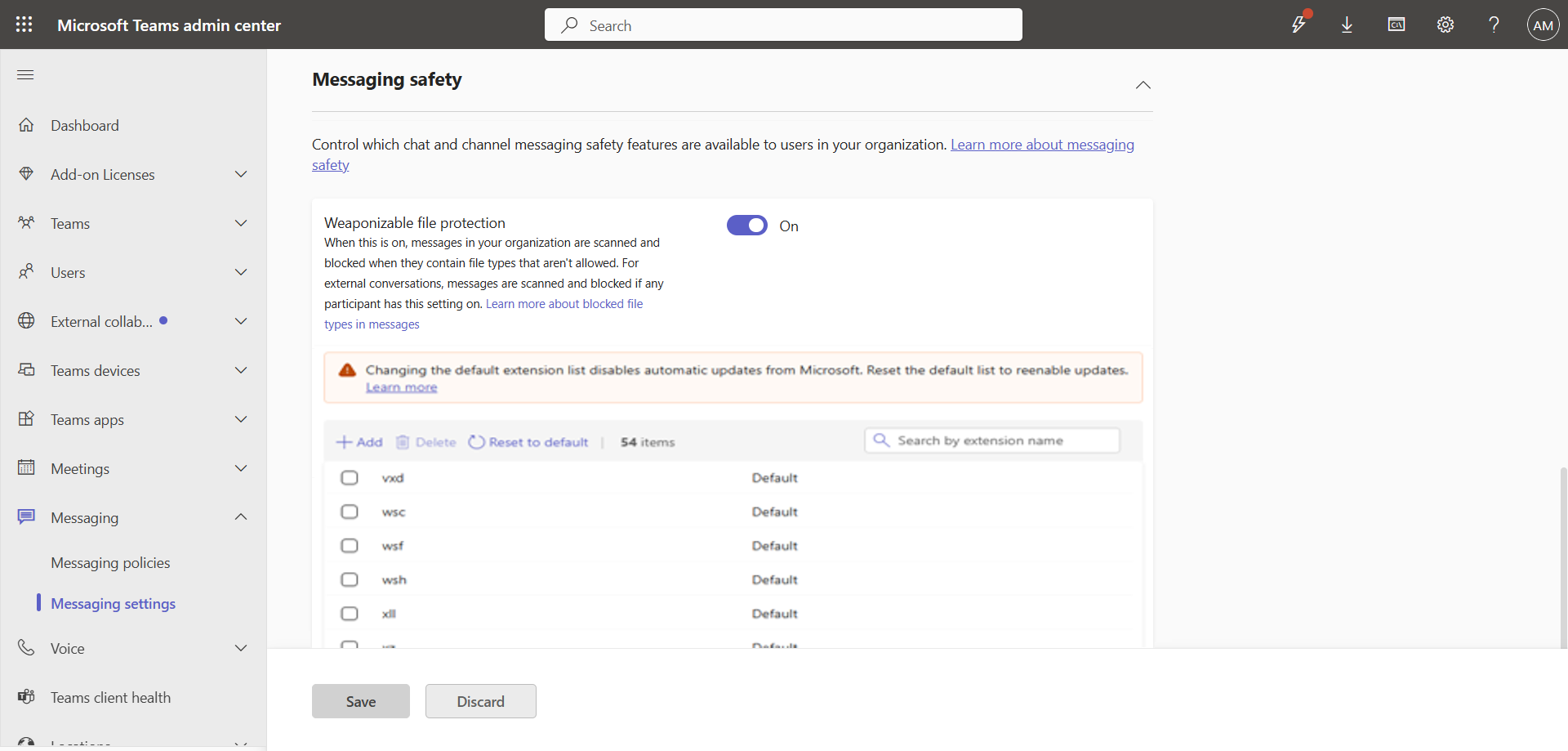
The setting lives in the Microsoft Teams Admin Center, under Messaging settings > Messaging safety, with the Scan messages for file types that are not allowed option : the same section as malicious URL protection. In PowerShell, it maps to the FileTypeCheck parameter of the Set-CsTeamsMessagingConfiguration cmdlet, added in version 6.7.0 of the MicrosoftTeams module (November 2024) and documented with “Enabled” as the default value.

The Microsoft list published on Microsoft Learn has 53 extensions, including exe, dll, msi, iso, lnk, bat, docm and ppam. The Learn page dedicated to the feature, updated on February 25, 2026, still says this list isn’t configurable : it simply hasn’t caught up with the announcement.


Microsoft list or custom list ?

Organizations will have two options : keep the list recommended by Microsoft, or create a custom list in which administrators add or remove extensions based on their own security needs. Once a list is customized, that’s the one the tenant applies.

The choice comes with a trade-off. Organizations that stay on the Microsoft list automatically receive its future updates ; those that switch to a custom list no longer do. An administrator can return to the Microsoft list at any time, which restores automatic updates.

Nothing changes for users : the blocking experience stays the same, only the list of affected extensions differs.


Configuration in PowerShell

The documentation for Set-CsTeamsMessagingConfiguration already lists two new parameters alongside FileTypeCheck :

Set-CsTeamsMessagingConfiguration
   [-FileTypeCustomizationSetting <string>]
   [-FileTypeBlockList <string[]>]
  • FileTypeCustomizationSetting : Selects which list applies. “MicrosoftRecommendedBlockList”, the default value, keeps the current behavior ; “CustomBlockList” blocks the file types specified in FileTypeBlockList instead of the Microsoft list.
  • FileTypeBlockList : A string array that only applies when FileTypeCheck is set to “Enabled” and FileTypeCustomizationSetting is set to “CustomBlockList”. With “CustomBlockList”, it must contain at least one entry.

Switching back to “MicrosoftRecommendedBlockList” clears the custom list : a carefully built list doesn’t survive a rollback, so it’s worth keeping a copy somewhere else before any switch. Since the messaging configuration is a single, global configuration for each tenant, the list applies to the whole organization.
image

These parameters are documented even though the feature hasn’t rolled out yet. So far, no release note for the MicrosoftTeams module mentions them : not the stable 8.0.0 release of September 15, 2026, nor the 8.0.1-preview of October 12, 2026. At this stage, neither the message center nor the documentation describes a Microsoft Teams Admin Center setting for the custom list.

note

The two new parameters aren’t available in GCC, GCC High and DoD environments. Roadmap item 571298 only targets the worldwide instance (Worldwide, Standard Multi-Tenant).

Conclusion

The Microsoft list remains the right default : it evolves without any intervention, whereas a custom list becomes a list you have to maintain yourself as the Microsoft list changes. Customizing makes sense for an organization that needs to block an extension missing from the list, or to allow one its business depends on. In that case, it’s best to wait for the rollout to finish, expected by mid-November 2026, check that the installed MicrosoftTeams module actually exposes the two parameters, and keep a copy of the list before any return to the Microsoft list.


Sources

Microsoft 365 Roadmap - ID 571298

Microsoft Learn - Weaponizable File Protection in Teams

Microsoft Learn - Set-CsTeamsMessagingConfiguration

Message Center - MC1509801

Microsoft Learn - Release notes


Did you enjoy this post ? If you have any questions, comments or suggestions, please feel free to send me a message from the contact form.

Don’t forget to follow us and share this post.
Related Posts

Email verification of external Teams participants

Email verification of external Teams participants

Introduction Microsoft Teams Premium introduces a new feature to enhance the security and reliability of your meetings : email verification for external participants. This feature allows

Read More
How to disable self-service on Copilot licenses

How to disable self-service on Copilot licenses

Introduction Microsoft has activated a setting in the tenants (by default) to allow any user to purchase a Microsoft Copilot license through the *Microsoft 365 Copilot self-service pursha

Read More
The SMS messages will be native in Teams

The SMS messages will be native in Teams

Introduction Microsoft Teams continues to evolve, offering comprehensive communication and collaboration solutions. Among its features, SMS integration allows Teams users to easily communic

Read More
How to activate Microsoft 365 Passkey in Entra ID

How to activate Microsoft 365 Passkey in Entra ID

Introduction Microsoft 365 Passkey is an authentication method that replaces passwords with more secure options like facial recognition, fingerprint, or a PIN.Prerequisites **<

Read More
How to sign in with Passkey to Microsoft 365

How to sign in with Passkey to Microsoft 365

Introduction Microsoft 365 Passkey is an authentication method that replaces passwords with more secure options like facial recognition, fingerprint, or a PIN.Prerequisites **<

Read More
How to configure callback in a Teams queue

How to configure callback in a Teams queue

Introduction Callback in Teams allows callers in a queue to be called back after a certain time rather than waiting until an agent becomes available.Prerequisites **Required

Read More
How to add tags to an Azure virtual machine

How to add tags to an Azure virtual machine

Introduction Tags in Azure are customizable labels (in the form of metadata) that you can apply to your resources to organize and manage your cloud environments more efficiently. They play

Read More
How to handle duplicates in Teams directory search

How to handle duplicates in Teams directory search

Introduction Microsoft recently announced a significant optimization for the search by name and extension functionality in its Teams auto attendants. You have probably already had this case

Read More
How to inventory Direct Routing numbers in Teams

How to inventory Direct Routing numbers in Teams

Introduction Microsoft Teams continues to evolve to offer ever more effective communication and collaboration solutions. To make life easier for administrators, Microsoft has announced the

Read More
The end of AzureAD and MSOnline PowerShell modules

The end of AzureAD and MSOnline PowerShell modules

Introduction Microsoft recently announced the General Availability of the Microsoft Entra PowerShell module. This module offers administrators and IT professionals a new way to manage and

Read More
PowerShell Teams module updated to version 6.8.0

PowerShell Teams module updated to version 6.8.0

Introduction Microsoft recently released the new version 6.8.0 of the PowerShell module for Microsoft Teams.Installation You can check the version of the installed module via t

Read More
Debugging Teams calls via the SIP ladder

Debugging Teams calls via the SIP ladder

Introduction Microsoft Teams continues to evolve to offer ever more advanced communication and collaboration solutions. Among the features arriving very soon, we find the possibility of obt

Read More
How to block a specific external user in Teams

How to block a specific external user in Teams

Introduction Microsoft recently introduced a new feature for Teams administrators to block specific external users. This update aims to strengthen security and protect internal members of t

Read More
How to enable LAPS on the MTR Admin account via Intune

How to enable LAPS on the MTR Admin account via Intune

Introduction Microsoft's LAPS (Local Administrator Password Solution) is a free tool designed to improve password security for local administrator accounts on workstations, servers and

Read More
PowerShell Azure module updated to version 13.3.0

PowerShell Azure module updated to version 13.3.0

Introduction Microsoft recently released the new version 13.3.0 of the PowerShell module for Microsoft Azure.Installation You can check the version of the installed module via

Read More
PowerShell Teams module updated to version 6.9.0

PowerShell Teams module updated to version 6.9.0

Introduction Microsoft recently released the new version 6.9.0 of the PowerShell module for Microsoft Teams.Installation You can check the version of the installed module via t

Read More
Impact analysis of Entra ID conditional access policies

Impact analysis of Entra ID conditional access policies

Introduction Conditional access in Entra is a security policy that allows administrators to control access to applications and resources based on specific conditions. These conditions can i

Read More
How to create a Windows local admin account via Intune LAPS

How to create a Windows local admin account via Intune LAPS

Introduction I wrote an article last February on how to replace the password of your MTR's local account using LAPS (Local Administrator Password Solution) in Intune. I concluded my article

Read More
How to enable Zoom and Webex meetings on MTR

How to enable Zoom and Webex meetings on MTR

Introduction In the modern business world, effective collaboration is essential. Organizations use various video conferencing platforms to stay connected, and it's crucial to be able to joi

Read More
New security approach for non-compliant emails

New security approach for non-compliant emails

Introduction Microsoft has announced a major update to Defender for Office 365 that strengthens email security by improving the handling of non-RFC compliant emails. This initiative is

Read More
PowerShell Teams module updated to version 7.0.0

PowerShell Teams module updated to version 7.0.0

Introduction Microsoft recently released the new version 7.0.0 of the PowerShell module for Microsoft Teams.Installation You can check the version of the installed module via t

Read More
Blocking screenshots during Teams meetings

Blocking screenshots during Teams meetings

Introduction Microsoft Teams continues to strengthen the privacy and security of online meetings. Starting in July 2025, a new feature will be rolled out to prevent screenshots during meeti

Read More
"Anti-Tampering" certification for Defender for Endpoint (2025)

"Anti-Tampering" certification for Defender for Endpoint (2025)

Introduction Microsoft recently announced that Microsoft Defender for Endpoint has successfully passed the 2025 anti-tampering tests conducted by AV-Comparatives, a recognized independe

Read More
PowerShell Teams module updated to version 7.1.0

PowerShell Teams module updated to version 7.1.0

Introduction Microsoft recently released the new version 7.1.0 of the PowerShell module for Microsoft Teams.Installation You can check the version of the installed module via t

Read More
PowerShell Azure module updated to version 14.1.0

PowerShell Azure module updated to version 14.1.0

Introduction Microsoft recently released the new version 14.1.0 of the PowerShell module for Microsoft Azure.Installation You can check the version of the installed module via

Read More
How to configure a calling plan spend limit in Teams

How to configure a calling plan spend limit in Teams

Introduction Businesses interested in using Microsoft Teams as their single provider for telephony services, but reluctant due to the high cost of calling plans, can choose a *Pay-As-You-Go

Read More
Displaying a countdown timer during Teams meetings

Displaying a countdown timer during Teams meetings

Introduction Microsoft Teams continues to evolve to offer ever-more advanced communication and collaboration solutions. Among the new features coming soon is the integration of a countdown

Read More
How to configure and analyze emergency calls in Teams

How to configure and analyze emergency calls in Teams

Introduction Microsoft Teams telephony offers an essential feature for organizations : emergency call management. This feature allows users to make emergency calls while dynamically providi

Read More
PowerShell Teams module updated to version 7.2.0

PowerShell Teams module updated to version 7.2.0

Introduction Microsoft recently released the new version 7.2.0 of the PowerShell module for Microsoft Teams.Installation You can check the version of the installed module via t

Read More
PowerShell Azure module updated to version 14.2.0

PowerShell Azure module updated to version 14.2.0

Introduction Microsoft recently released the new version 14.2.0 of the PowerShell module for Microsoft Azure.Installation You can check the version of the installed module via

Read More
How to enable DLP for Teams with Purview

How to enable DLP for Teams with Purview

Introduction In a context where sensitive data, particularly banking information, is increasingly circulating in collaborative tools, businesses must be extra vigilant to avoid accidental o

Read More
How to enable DLP for Outlook with Purview

How to enable DLP for Outlook with Purview

Introduction Last week, I showed you how to enable DLP for Teams with Microsoft Purview to prevent accidental or malicious data leaks (Data Loss Prevention). Purview is a comprehensive

Read More
PowerShell Teams module updated to version 7.3.0

PowerShell Teams module updated to version 7.3.0

Introduction Microsoft recently released the new version 7.3.0 of the PowerShell module for Microsoft Teams.Installation You can check the version of the installed module via t

Read More
PowerShell Azure module updated to version 14.3.0

PowerShell Azure module updated to version 14.3.0

Introduction Microsoft recently released the new version 14.3.0 of the PowerShell module for Microsoft Azure.Installation You can check the version of the installed module via

Read More
Entra Private Access for Domain Controllers

Entra Private Access for Domain Controllers

Introduction Microsoft has announced the Public Preview of Microsoft Entra Private Access for Active Directory Domain Controllers, a major step forward in strengthening the security of

Read More
PowerShell Teams module updated to version 7.4.0

PowerShell Teams module updated to version 7.4.0

Introduction Microsoft recently released the new version 7.4.0 of the PowerShell module for Microsoft Teams.Installation You can check the version of the installed module via t

Read More
Malicious URL protection in Teams

Malicious URL protection in Teams

Introduction In a world where phishing attacks and malicious links are constantly on the rise, Microsoft is strengthening Microsoft Teams security with a native malicious URL protection f

Read More
PowerShell Azure module updated to version 14.5.0

PowerShell Azure module updated to version 14.5.0

Introduction Microsoft recently released the new version 14.5.0 of the PowerShell module for Microsoft Azure.Installation You can check the version of the installed module via

Read More
How to activate Defender EDR in "Block Mode"

How to activate Defender EDR in "Block Mode"

Introduction In a context of constantly evolving cyber threats, antivirus solutions are no longer sufficient to effectively protect workstations. Microsoft Defender for Endpoint's *Block

Read More
PowerShell Teams module updated to version 7.5.0

PowerShell Teams module updated to version 7.5.0

Introduction Microsoft recently released the new version 7.5.0 of the PowerShell module for Microsoft Teams.Installation You can check the version of the installed module via t

Read More
How to enable DSPM for AI with Purview

How to enable DSPM for AI with Purview

Introduction With the rise of generative AI models, the phenomenon of Shadow AI (the use of artificial intelligence tools and services not approved or controlled by organizations) is incr

Read More
How to configure calendar sharing in Exchange

How to configure calendar sharing in Exchange

Introduction In a context where organizations are collaborating more closely, it's not uncommon for users within one organization to need to efficiently schedule meetings by accessing the c

Read More
How to block a website URL in Edge with Defender

How to block a website URL in Edge with Defender

Introduction Web browsing is one of the most common attack vectors in business environments. To strengthen security, Microsoft Defender for Endpoint offers a powerful feature : blocking m

Read More
How to enable DLP for cloud storage with Purview

How to enable DLP for cloud storage with Purview

Introduction A few months ago, I showed you how to enable DLP for Outlook with Microsoft Purview to prevent accidental or malicious data leaks (Data Loss Prevention). Purview is a com

Read More
PowerShell Azure module updated to version 15.2.0

PowerShell Azure module updated to version 15.2.0

Introduction Microsoft recently released the new version 15.2.0 of the PowerShell module for Microsoft Azure.Installation You can check the version of the installed module via

Read More
PowerShell Teams module updated to version 7.6.0

PowerShell Teams module updated to version 7.6.0

Introduction Microsoft recently released the new version 7.6.0 of the PowerShell module for Microsoft Teams.Installation You can check the version of the installed module via t

Read More
Extend Zero Trust to AI agent identities in Entra ID

Extend Zero Trust to AI agent identities in Entra ID

Introduction AI agents are becoming increasingly widespread in businesses (incident summaries, log analysis, flow execution, etc.), and it is crucial that their access is continuously evalu

Read More
How to enable DLP for printing with Purview

How to enable DLP for printing with Purview

Introduction A few weeks ago, I showed you how to enable DLP to prevent the copying of financial data to an external cloud storage solution using Microsoft Purview, in order to prevent

Read More
How to enable DLP for AI websites with Purview

How to enable DLP for AI websites with Purview

Introduction Last week, I showed you how to enable DLP to prevent printing of financial data using Microsoft Purview, in order to prevent accidental or malicious data leaks (*Data Loss

Read More
PowerShell Azure module updated to version 15.3.0

PowerShell Azure module updated to version 15.3.0

Introduction Microsoft recently released the new version 15.3.0 of the PowerShell module for Microsoft Azure.Installation You can check the version of the installed module via

Read More
How to migrate a Surface Hub 2S to a Windows MTR

How to migrate a Surface Hub 2S to a Windows MTR

Introduction With the end of support for Windows 10, businesses can migrate their Surface Hub 2S to Microsoft Teams Rooms on Windows (MTRoW). USB migration is the method that allows

Read More
How to enable DLP for copy/paste with Purview

How to enable DLP for copy/paste with Purview

Introduction Last month, I showed you how to enable DLP to prevent financial data from being sent to an AI website using Microsoft Purview, in order to prevent accidental or malicious d

Read More
Purview Sensitivity Labels are coming to OneNote

Purview Sensitivity Labels are coming to OneNote

Introduction Good news for security and compliance teams, Sensitivity Labels are now General Availability in OneNote. This update finally allows you to apply the same classification a

Read More
How to block Teams calls and chats with Purview IB

How to block Teams calls and chats with Purview IB

Introduction Microsoft Purview's Information Barriers allow you to restrict communication and collaboration between specific user groups within a Microsoft 365 environment. Their prim

Read More
PowerShell Azure module updated to version 15.4.0

PowerShell Azure module updated to version 15.4.0

Introduction Microsoft recently released the new version 15.4.0 of the PowerShell module for Microsoft Azure.Installation You can check the version of the installed module via

Read More
External MFA is now available in Entra ID

External MFA is now available in Entra ID

Introduction Microsoft has announced the General Availability of External MFA, in Microsoft Entra ID, formerly known as External Authentication Methods. This feature allows the use

Read More
How to create Sensitivity Labels for emails in Purview

How to create Sensitivity Labels for emails in Purview

Introduction Emails remain one of the primary vectors for information leaks in businesses. Whether it's a message sent to the wrong recipient, an attachment forwarded without proper oversig

Read More
How to secure your emails with Sensitivity Labels

How to secure your emails with Sensitivity Labels

Introduction Last week, I showed you how to create Sensitivity Labels to secure your emails, without explaining how they work. Today I'll talk about how to use them and what results you g

Read More
PowerShell Teams module updated to version 7.7.0

PowerShell Teams module updated to version 7.7.0

Introduction Microsoft recently released the new version 7.7.0 of the PowerShell module for Microsoft Teams.Installation You can check the version of the installed module via t

Read More
Detect exposed passwords in plain text with Purview

Detect exposed passwords in plain text with Purview

Introduction In a Microsoft 365 environment, data breaches aren't limited to credit card numbers or personal information. A frequently underestimated risk is the sharing of passwords in p

Read More
How to enable multi-lines for Teams telephony

How to enable multi-lines for Teams telephony

Introduction Microsoft has just introduced a feature that allows a user to have up to 11 numbers (including their primary and private lines) in their Microsoft Teams phone system. Users c

Read More
Microsoft raises the conditional access policy limit

Microsoft raises the conditional access policy limit

Introduction Microsoft quietly raises the limit of conditional access policies per tenant, from 195 to 244. This limit applies to all policies, whether active, disabled, or in *report-onl

Read More
Consecutive bilingual interpretation in Teams

Consecutive bilingual interpretation in Teams

Introduction The Interpreter agent in Microsoft Teams previously offered only a simultaneous translation mode, where the synthesized voice overlapped with the speaker's voice in real ti

Read More
PowerShell Teams module updated to version 7.8.0

PowerShell Teams module updated to version 7.8.0

Introduction Microsoft recently released the new version 7.8.0 of the PowerShell module for Microsoft Teams.Installation You can check the version of the installed module via t

Read More
PowerShell Azure module updated to version 16.0.0

PowerShell Azure module updated to version 16.0.0

Introduction Microsoft recently released the new version 16.0.0 of the PowerShell module for Microsoft Azure.Installation You can check the version of the installed module via

Read More
How to remove "Unlock Teams Premium" in Teams

How to remove "Unlock Teams Premium" in Teams

Introduction By default, users can obtain a Microsoft Teams Premium trial license by requesting one directly from their Teams client. This can lead to subsequent billing issues, so it is

Read More
How to create Sensitive Information Types in Purview

How to create Sensitive Information Types in Purview

Introduction In previous articles, we examined how Microsoft Purview can protect sensitive data through DLP (Data Loss Prevention) policies and Sensitivity Labels. However, all thes

Read More
Purview Sensitivity Labels now support security groups

Purview Sensitivity Labels now support security groups

Introduction Microsoft has updated the scoping of Sensitivity Labels policies in Microsoft Purview, now generally available. Administrators can now include non-mail-enabled security

Read More
PowerShell Azure module updated to version 16.1.0

PowerShell Azure module updated to version 16.1.0

Introduction Microsoft recently published the new version 16.1.0 of the PowerShell module for Microsoft Azure.Installation You can check the installed module version via the fo

Read More
PowerShell Teams module updated to version 7.9.0

PowerShell Teams module updated to version 7.9.0

Introduction Microsoft recently released the new version 7.9.0 of the PowerShell module for Microsoft Teams.Installation You can check the version of the installed module via t

Read More
Bot protection in Microsoft Teams meetings

Bot protection in Microsoft Teams meetings

Introduction AI note-taking tools like Read.ai, Fireflies.ai or Otter.ai join meetings as external participants. For organizers, this raises a real control challenge : when the lobby

Read More
Microsoft Entra Backup and Recovery finally available

Microsoft Entra Backup and Recovery finally available

Introduction Accidentally deleting a user account, a conditional access policy, or a service principal assignment can quickly paralyze a Microsoft Entra ID tenant. Until now, no native me

Read More
How to migrate SMS and voice users to Passkey

How to migrate SMS and voice users to Passkey

Introduction In many Microsoft 365 tenants, SMS and voice call remain the last MFA safety net for a portion of the accounts. They are also the weakest methods against SIM swap, *interce

Read More
PowerShell Azure module updated to version 16.2.0

PowerShell Azure module updated to version 16.2.0

Introduction Microsoft recently published the new version 16.2.0 of the PowerShell module for Microsoft Azure.Installation You can check the installed module version via the fo

Read More
How to configure role expiration in Purview

How to configure role expiration in Purview

Introduction In most tenants, Microsoft Purview permissions pile up. An external auditor is granted eDiscovery access for three weeks, a consultant gets the Compliance Administrator r

Read More
How to record Teams queue calls

How to record Teams queue calls

Introduction Call recording in call queues was until now a limited feature in Microsoft Teams. Agents had to manually start the recording and the file was stored in their OneDrive. This

Read More
Shieldstral, the multimodal safety classifier from Mistral AI

Shieldstral, the multimodal safety classifier from Mistral AI

Introduction Mistral AI announced on August 4, 2026 Shieldstral, a multimodal safety classifier meant to moderate the inputs and the outputs of a language model. The model sits before a

Read More
Free/Busy sharing moves to Cross-Tenant Access Policy

Free/Busy sharing moves to Cross-Tenant Access Policy

Introduction The Exchange Online team announced the move of cross-tenant sharing of Free/Busy, MailTips and calendars to the Microsoft 365 Cross-Tenant Access Policy. These three scen

Read More
Reporting security concerns in Teams meetings

Reporting security concerns in Teams meetings

Introduction Microsoft Teams already allows a suspicious message or call to be reported. Reporting now extends to meetings and group calls, with the MC1446794 announcement. The rollout

Read More
Vishing and synthetic media detection in Teams

Vishing and synthetic media detection in Teams

Introduction The Teams PowerShell 7.9.0 module introduced two parameters that were not the subject of a dedicated announcement : VoicePhishingDetection in the calling policy and *Synthe

Read More
Exchange mailboxes increased to 100GB

Exchange mailboxes increased to 100GB

Introduction On August 19, 2026, the Exchange team detailed a licensing change that went relatively unnoticed ; the Microsoft 365 Business Basic, Business Standard and *Business Premi

Read More
How to launch an email attack simulation with Defender

How to launch an email attack simulation with Defender

Introduction Training your users to recognize a phishing email cannot be limited to an annual awareness session, it is a reflex that is maintained, tested and measured under realistic con

Read More
PowerShell Azure module updated to version 16.3.0

PowerShell Azure module updated to version 16.3.0

Introduction Microsoft recently published the new version 16.3.0 of the PowerShell module for Microsoft Azure.Installation You can check the installed module version via the fo

Read More
Teams tightens the rules for onmicrosoft.com tenants

Teams tightens the rules for onmicrosoft.com tenants

Introduction Microsoft is introducing an outbound external messaging limit in Teams for tenants that only use their default onmicrosoft.com domain (MOERA). The rollout begins mid-Se

Read More
Entra Connect Sync update required before September 30, 2026

Entra Connect Sync update required before September 30, 2026

Introduction All synchronization services in Microsoft Entra Connect Sync will stop working on September 30, 2026 for tenants not on at least version 2.5.79.0. This version, released in

Read More
How to enforce email confidentiality in Exchange

How to enforce email confidentiality in Exchange

Introduction The "Private" sensitivity level in Outlook is a property of the message. In transit, it is represented by the SMTP header "Sensitivity: Private", which Exchange maps to the

Read More
Why a Purview DLP policy takes days to activate

Why a Purview DLP policy takes days to activate

Introduction A DLP (Data Loss Prevention) policy that shows "sync complete" in the Purview portal can still take several days before it actually blocks anything. The lag isn't an is

Read More
Mandatory consent before joining a Teams meeting

Mandatory consent before joining a Teams meeting

Introduction Microsoft Teams is introducing mandatory consent before entering a meeting, with the announcement MC1454114. Administrators can now require every participant to accept cust

Read More
PowerShell Teams module updated to version 8.0.0

PowerShell Teams module updated to version 8.0.0

Introduction Microsoft recently released the new version 8.0.0 of the PowerShell module for Microsoft Teams.Installation You can check the version of the installed module via t

Read More
Simultaneous dual-presenter screen sharing in Teams

Simultaneous dual-presenter screen sharing in Teams

Introduction Microsoft is developing a feature that lets two presenters share their screen or a window at the same time in a Teams meeting, referenced under roadmap item 80239. Genera

Read More
Teams limits transcript access via Graph

Teams limits transcript access via Graph

Introduction Microsoft introduced a control that limits Microsoft Graph applications' and agents' access to Teams meeting transcripts, with the announcement MC1393806. This control

Read More
Teams adds message reminders

Teams adds message reminders

Introduction Microsoft Teams is introducing Remind Me, a reminder option for chat and channel messages, with the announcement MC1470887 (roadmap item 565869). The Targeted Release

Read More
Status update on restoring a destroyed Microsoft 365 tenant

Status update on restoring a destroyed Microsoft 365 tenant

Introduction Backing up a single Microsoft 365 workload is a solved problem. Restoring a complete tenant after an attack that destroys both data and configuration is not. The question is

Read More
PowerShell Azure module updated to version 16.4.0

PowerShell Azure module updated to version 16.4.0

Introduction Microsoft recently published the new version 16.4.0 of the PowerShell module for Microsoft Azure.Installation You can check the installed module version via the fo

Read More
How to sign in to M365 apps with an external passkey

How to sign in to M365 apps with an external passkey

Introduction Microsoft announced the general availability of browser authentication for external identity providers in Entra ID. For domains federated through WS-Fed or SAML 2.0, th

Read More
Purview network DLP in Entra Global Secure Access

Purview network DLP in Entra Global Secure Access

Introduction Microsoft Purview has been rolling out, since late September 2026, the general availability of Network Data Security, the integration that extends DLP (*Data Loss Prevent

Read More
How to enable cross-tenant message recall in Exchange

How to enable cross-tenant message recall in Exchange

Introduction Cloud message recall has so far only worked within a single tenant. Cross-Tenant Message Recall extends this capability to trusted organizations : a sender from an authorized

Read More
How to block the creation of AI agent identities in Entra ID

How to block the creation of AI agent identities in Entra ID

Introduction Starting November 4, 2026, any default user (without a built-in or custom role in Entra ID) will be able to create agent blueprints, unless an administrator has explicitly

Read More
How to Enable Microsoft Entra Passkey on Windows

How to Enable Microsoft Entra Passkey on Windows

Introduction Microsoft Entra passkey on Windows lets you register a device-bound passkey directly in the local Windows Hello container, to sign in to Microsoft Entra ID with Windows

Read More
Teams adds intelligent call delegation

Teams adds intelligent call delegation

Introduction An incoming call often interrupts work with no way of knowing whether it's worth taking. Microsoft Teams hands that triage to an AI attendant with *Intelligent Call Delegatio

Read More
File type filtering in Entra Global Secure Access

File type filtering in Entra Global Secure Access

Introduction Microsoft Entra Global Secure Access offers content policies, which control in real time what users and agents share with generative AI applications, unmanaged cloud applic

Read More
Teams detects phishing in chats

Teams detects phishing in chats

Introduction Until now, the native protection Microsoft Teams offers in chats relied on specific indicators : a malicious URL, a dangerous file type or brand impersonation on a first exte

Read More
Teams voicemail emails get a new sender

Teams voicemail emails get a new sender

Introduction In Microsoft Teams, a voicemail lands in the Exchange Online mailbox as an email with an audio attachment, and many organizations have built rules around these emails. With

Read More
Teams blurs and scans QR codes in messages

Teams blurs and scans QR codes in messages

Introduction In Microsoft Teams, links shared in chats already go through Malicious URL protection. A QR code, however, arrives as an image. Microsoft has two separate protections for it,

Read More
WHfB and Platform SSO become standalone MFA factors in Entra ID

WHfB and Platform SSO become standalone MFA factors in Entra ID

Introduction Windows Hello for Business (WHfB) and Platform SSO on macOS already satisfy the MFA requirement at primary sign-in in Microsoft Entra ID, but a step-up prompt, an *

Read More
Recording consent for PSTN calls in Teams

Recording consent for PSTN calls in Teams

Introduction Since January 2026, the Microsoft Teams calling policy can require explicit consent from participants before a one-on-one call is recorded or transcribed. One exception remai

Read More