Extend Zero Trust to AI agent identities in Entra ID
- Maxime Hiez
- Entra ID
- 30 Jan, 2026
Introduction
AI agents are becoming increasingly widespread in businesses (incident summaries, log analysis, flow execution, etc.), and it is crucial that their access is continuously evaluated and limited to what is strictly necessary. Microsoft is introducing conditional access policies to apply Zero Trust controls to AI agents and other non-human identities. The goal is to determine, for each token request, whether an agent can access a resource based on its identity, risk, and context.
Microsoft Entra now treats agents as first-class identities and extends Conditional Access to their authentication flows to limit abuse and misuse.
What is an agent identity ?
Microsoft Entra formalizes three concepts:
- Agent Blueprint : A template for creating agent identities
- Agent Identity : A specialized machine identity for AI systems
- Agent User : An identity whose behavior is the same as a human’s
What is possible today
Conditional access allows for identity-based, risk-based, and context-based controls to be applied before granting access, but for AI agents, capabilities are intentionally limited at the moment.
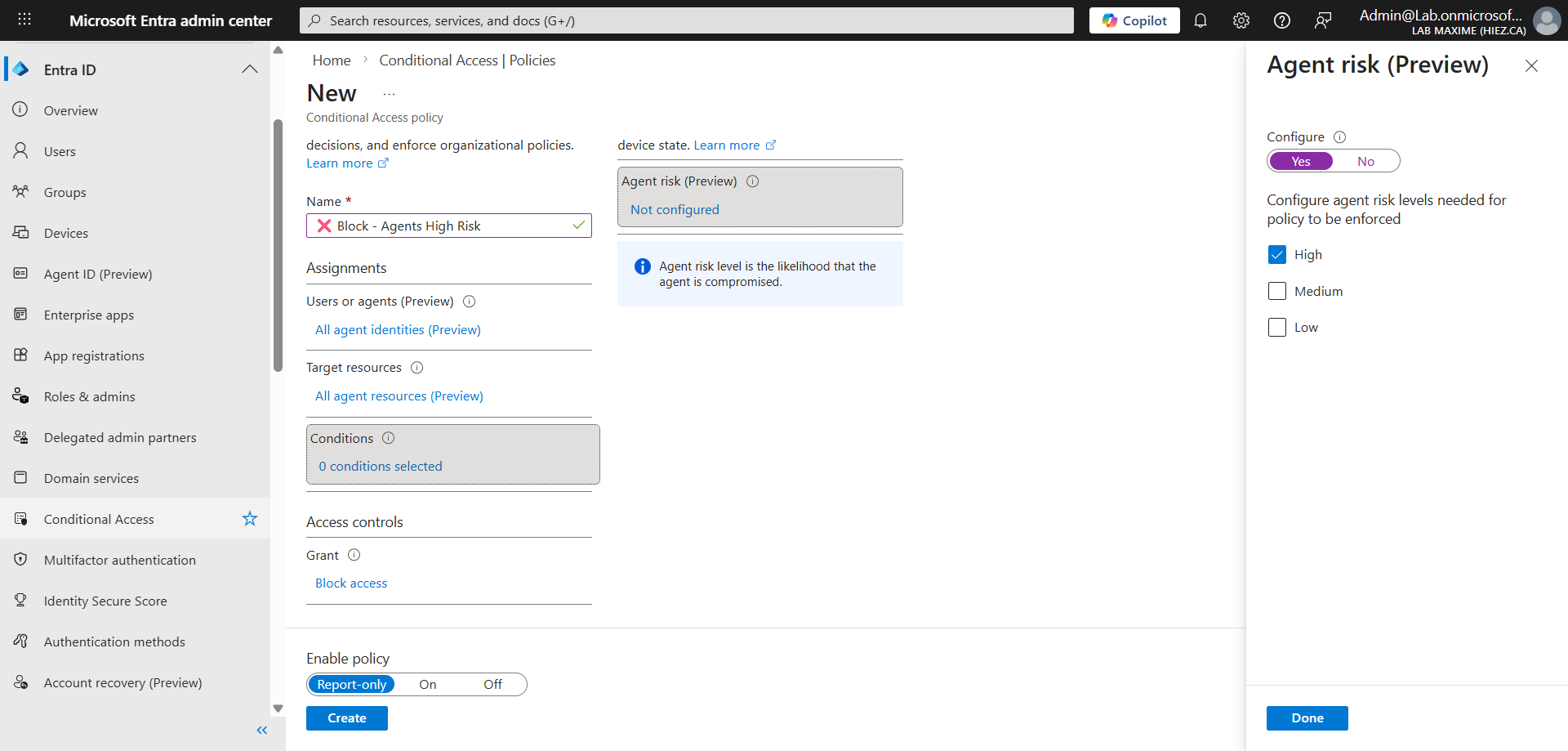
Supported features
- Identity targeting : Agents can be included/excluded from rules
- Access blocking : The only control currently available
- Agent risk : Simple risk level assessment
- Request assessment : Token requests are checked
Features not currently available
- MFA and authentication strength
- Device compliance
- Approved client applications
- Application protection rules
- Session or location conditions
- Connection frequency and terms of use
How conditional access works for agents ?
When an agent identity or an agent user requests a token, Microsoft Entra follows this process :
- Identify the requesting agent
- Check conditional access rule assignments
- Evaluate any agent risk criteria
- Allow or block token issuance
No MFA prompt, no device verification, no strong authentication evaluation, just a block or allow decision based on identity and risk.
Practical use cases
Even with these limitations, conditional access rules for agents can be useful :
- Stop compromised agents : If an agent exhibits high-risk behavior, the token request is immediately blocked, stopping any unauthorized action.
- Separate agent roles : You can define rules to allow certain specific agents while blocking others, depending on the department or use case.
- Limit agent sprawl : In large organizations, hundreds of agents can be created; only approved agents can access resources.
Required licenses
- Conditional access requires the Microsoft Entra ID P1 license (included in Microsoft 365 E3 and Microsoft 365 Business Premium).
- Policies based on risk-based signals require the Microsoft Entra ID P2 license (included in Microsoft 365 E5). Ensure that each identity targeted by the policy has the appropriate license.
Future outlook
Microsoft indicates that agent capabilities could evolve toward :
- More sophisticated agent risk scoring
- Behavioral analytics
- More granular granting controls
- Targeted policies per task or per capability
Conclusion
With conditional access policies for agent identities, Microsoft Entra brings to the world of AI agents the same adaptive access guarantees as for people and applications : signal → decision → application. Even though controls are intentionally limited in this first iteration, the architecture (attributes, blueprint targeting, dedicated logs) provides a robust framework for industrializing agent security… without slowing adoption.
Sources
Microsoft Learn - Microsoft Entra licenses
Did you enjoy this post ? If you have any questions, comments or suggestions, please feel free to send me a message from the contact form.
Don’t forget to follow us and share this post.