Type something to search...
How to configure role expiration in Purview

How to configure role expiration in Purview


Introduction

In most tenants, Microsoft Purview permissions pile up. An external auditor is granted eDiscovery access for three weeks, a consultant gets the Compliance Administrator role for the duration of a project, and nobody removes the assignment afterwards. Purview now allows an expiration date to be attached to a role group assignment : at the deadline, the assignment is removed automatically and access is revoked without any intervention.


Prerequisites

Required licenses

  • Microsoft 365 (all editions).

Administrator role

  • An account with the Global Administrator or Role Management role to access the Microsoft Purview Portal.

Step 1 : Sign in to the Microsoft Purview Portal

Sign in to the Microsoft Purview Portal by opening your web browser to https://purview.microsoft.com.


Step 2 : Access the role groups

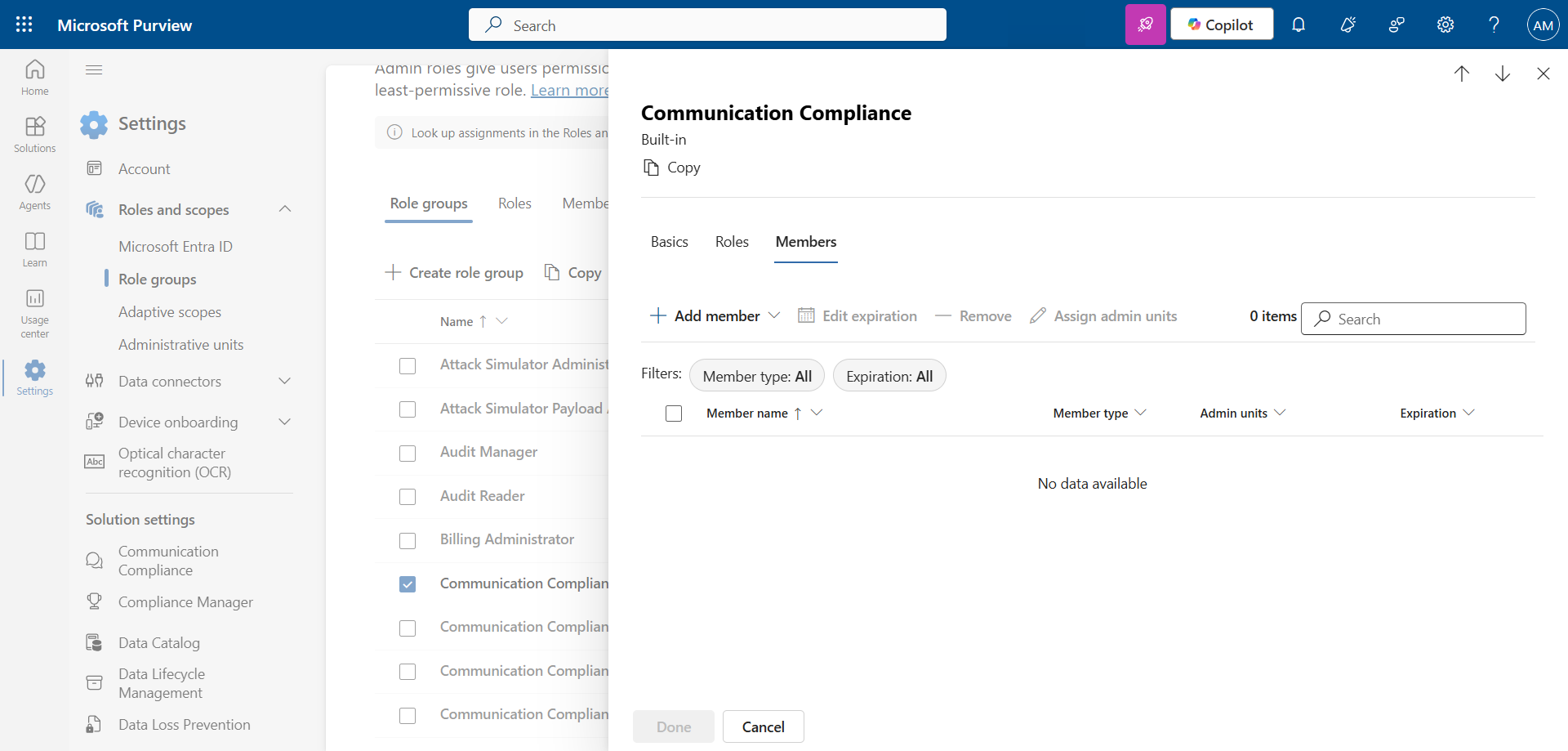
In the left menu, click Settings, then Roles and scopes, and Role groups.

Select the role group to modify, then click Edit.
image


Step 3 : Assign the group

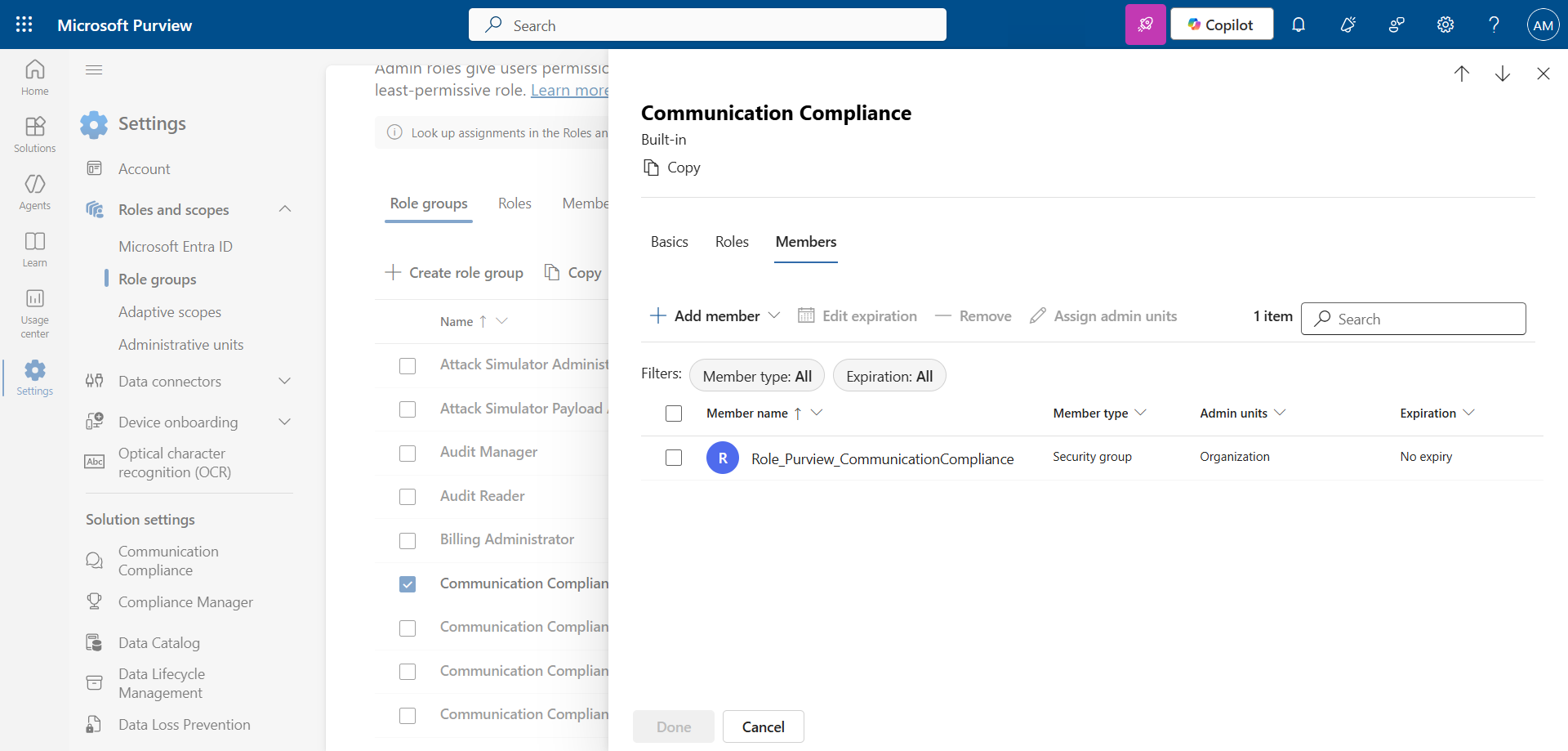
Click Add member, and Choose groups (or Choose users) to add the relevant groups (or accounts).
image


Step 4 : Set an expiration date

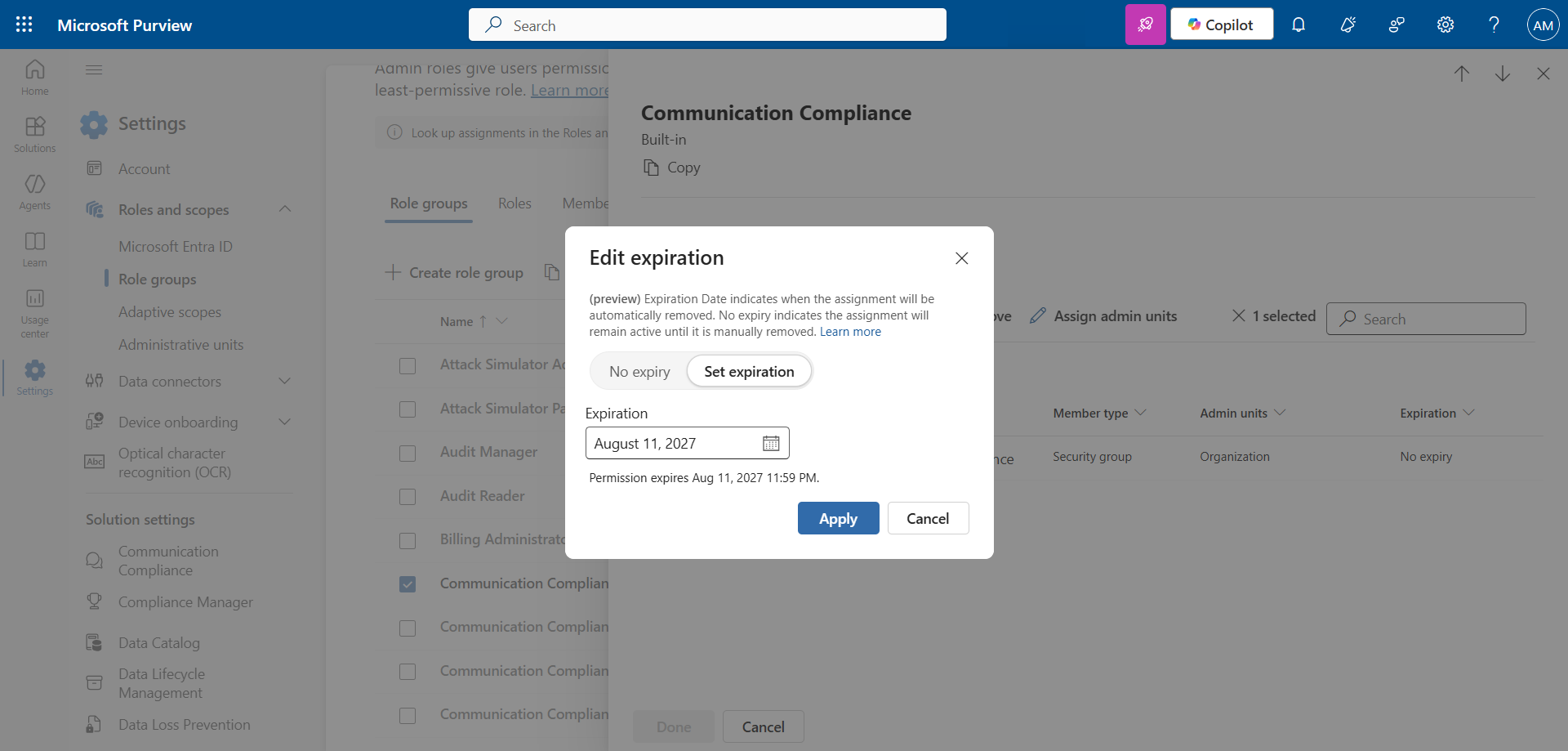
Select the added group or groups, and click Edit expiration to set the deadline. The duration can range from a minimum of one day to a maximum of two years from the current date.
image

info

The expiration date is evaluated in the time zone of the administrator who sets it. In a multi-region organization, that alone is enough to shift a revocation by several hours from what was planned.

Step 5 : Update, extend or remove an expiration

An expiration is not set in stone. From the same Edit expiration screen, three actions are possible :

  • Update the deadline : Bring forward or push back the date of an existing assignment.
  • Extend the assignment : Push back the deadline before it is reached.
  • Remove the expiration : Make the assignment permanent.

The My Permissions page lets the user check the latest expiration date among their active assignments.


What to check before rolling it out broadly

Several behaviors are worth knowing before applying the principle to all role groups :

  • Two exceptions : All built-in and custom role groups accept an expiration, except eDiscovery Administrator and eDiscovery Manager.
  • No notification : Neither the user nor the administrator receives an alert before the deadline. The loss of access is silent.
  • Independent assignments : If a user gets the same role group through an individual assignment and through a security group, each assignment keeps its own deadline. Access remains active as long as one of the two is valid.
  • Inheritance through a security group : When a role group is assigned to a security group, any new member inherits the deadline attached to that assignment.
  • Ongoing actions preserved : At expiration, operations already completed or in progress are not affected, only new operations are refused.

The most structuring point is the absence of notification. A temporary assignment placed on a genuinely operational role, for example a DLP administrator in the middle of a deployment campaign, can interrupt a project without warning. The counterpart of this automation is therefore a need for follow-up on the organization side, with a schedule of deadlines maintained outside Purview.


Conclusion

You now know how to configure, extend and remove an expiration date on role group assignments in Microsoft Purview.


Sources

Microsoft Learn - Permissions in the Microsoft Purview portal


Did you enjoy this post ? If you have any questions, comments or suggestions, please feel free to send me a message from the contact form.

Don’t forget to follow us and share this post.
Related Posts

Email verification of external Teams participants

Email verification of external Teams participants

Introduction Microsoft Teams Premium introduces a new feature to enhance the security and reliability of your meetings: email verification for external participants. This feature allows m

Read More
How to activate Microsoft 365 Passkey in Entra ID

How to activate Microsoft 365 Passkey in Entra ID

Introduction Microsoft 365 Passkey is an authentication method that replaces passwords with more secure options like facial recognition, fingerprint, or a PIN.Prerequisites **<

Read More
How to sign in with Passkey to Microsoft 365

How to sign in with Passkey to Microsoft 365

Introduction Microsoft 365 Passkey is an authentication method that replaces passwords with more secure options like facial recognition, fingerprint, or a PIN.Prerequisites **<

Read More
How to enable LAPS on the MTR Admin account via Intune

How to enable LAPS on the MTR Admin account via Intune

Introduction Microsoft's LAPS (Local Administrator Password Solution) is a free tool designed to improve password security for local administrator accounts on workstations, servers and

Read More
Microsoft Purview for Azure Data Lake and Blob Storage

Microsoft Purview for Azure Data Lake and Blob Storage

Introduction Microsoft announced that Microsoft Purview protection policies for Azure Data Lake and Blob Storage are now available in all regions. This advancement allows organization

Read More
Impact analysis of Entra ID conditional access policies

Impact analysis of Entra ID conditional access policies

Introduction Conditional access in Entra is a security policy that allows administrators to control access to applications and resources based on specific conditions. These conditions can i

Read More
How to create a Windows local admin account via Intune LAPS

How to create a Windows local admin account via Intune LAPS

Introduction I wrote an article last February on how to replace the password of your MTR's local account using LAPS (Local Administrator Password Solution) in Intune. I concluded my article

Read More
New security approach for non-compliant emails

New security approach for non-compliant emails

Introduction Microsoft has announced a major update to Defender for Office 365 that strengthens email security by improving the handling of non-RFC compliant emails. This initiative is

Read More
Blocking screenshots during Teams meetings

Blocking screenshots during Teams meetings

Introduction Microsoft Teams continues to strengthen the privacy and security of online meetings. Starting in July 2025, a new feature will be rolled out to prevent screenshots during meeti

Read More
"Anti-Tampering" certification for Defender for Endpoint (2025)

"Anti-Tampering" certification for Defender for Endpoint (2025)

Introduction Microsoft recently announced that Microsoft Defender for Endpoint has successfully passed the 2025 anti-tampering tests conducted by AV-Comparatives, a recognized independe

Read More
How to enable DLP for Teams with Purview

How to enable DLP for Teams with Purview

Introduction In a context where sensitive data, particularly banking information, is increasingly circulating in collaborative tools, businesses must be extra vigilant to avoid accidental o

Read More
How to enable DLP for Outlook with Purview

How to enable DLP for Outlook with Purview

Introduction Last week, I showed you how to enable DLP for Teams with Microsoft Purview to prevent accidental or malicious data leaks (Data Loss Prevention). Purview is a comprehensive

Read More
Entra Private Access for Domain Controllers

Entra Private Access for Domain Controllers

Introduction Microsoft has announced the Public Preview of Microsoft Entra Private Access for Active Directory Domain Controllers, a major step forward in strengthening the security of

Read More
Sensitive content detection in Teams meetings

Sensitive content detection in Teams meetings

Introduction In a world where business interactions increasingly take place via video conferencing, the security of information shared in meetings is becoming a major issue. Microsoft is ad

Read More
How to activate Defender EDR in "Block Mode"

How to activate Defender EDR in "Block Mode"

Introduction In a context of constantly evolving cyber threats, antivirus solutions are no longer sufficient to effectively protect workstations. Microsoft Defender for Endpoint's *Block

Read More
How to enable DSPM for AI with Purview

How to enable DSPM for AI with Purview

Introduction With the rise of generative AI models, the phenomenon of Shadow AI (the use of artificial intelligence tools and services not approved or controlled by organizations) is incr

Read More
How to block a website URL in Edge with Defender

How to block a website URL in Edge with Defender

Introduction Web browsing is one of the most common attack vectors in business environments. To strengthen security, Microsoft Defender for Endpoint offers a powerful feature : blocking m

Read More
How to enable DLP for cloud storage with Purview

How to enable DLP for cloud storage with Purview

Introduction A few months ago, I showed you how to enable DLP for Outlook with Microsoft Purview to prevent accidental or malicious data leaks (Data Loss Prevention). Purview is a com

Read More
Blocking screen captures in Teams meetings

Blocking screen captures in Teams meetings

Introduction In a world where business interactions increasingly take place via video conferencing, the security of information shared in meetings is becoming a major issue. A simple screen

Read More
Extend Zero Trust to AI agent identities in Entra ID

Extend Zero Trust to AI agent identities in Entra ID

Introduction AI agents are becoming increasingly widespread in businesses (incident summaries, log analysis, flow execution, etc.), and it is crucial that their access is continuously evalu

Read More
How to enable DLP for printing with Purview

How to enable DLP for printing with Purview

Introduction A few weeks ago, I showed you how to enable DLP to prevent the copying of financial data to an external cloud storage solution using Microsoft Purview, in order to prevent

Read More
How to enable DLP for AI websites with Purview

How to enable DLP for AI websites with Purview

Introduction Last week, I showed you how to enable DLP to prevent printing of financial data using Microsoft Purview, in order to prevent accidental or malicious data leaks (*Data Loss

Read More
How to enable DLP for copy/paste with Purview

How to enable DLP for copy/paste with Purview

Introduction Last month, I showed you how to enable DLP to prevent financial data from being sent to an AI website using Microsoft Purview, in order to prevent accidental or malicious d

Read More
Purview Sensitivity Labels are coming to OneNote

Purview Sensitivity Labels are coming to OneNote

Introduction Good news for security and compliance teams, Sensitivity Labels are now General Availability in OneNote. This update finally allows you to apply the same classification a

Read More
How to block Teams calls and chats with Purview IB

How to block Teams calls and chats with Purview IB

Introduction Microsoft Purview's Information Barriers allow you to restrict communication and collaboration between specific user groups within a Microsoft 365 environment. Their prim
Read More
External MFA is now available in Entra ID

External MFA is now available in Entra ID

Introduction Microsoft has announced the General Availability of External MFA, in Microsoft Entra ID, formerly known as External Authentication Methods. This feature allows the use

Read More
How to create Sensitivity Labels for emails in Purview

How to create Sensitivity Labels for emails in Purview

Introduction Emails remain one of the primary vectors for information leaks in businesses. Whether it's a message sent to the wrong recipient, an attachment forwarded without proper oversig

Read More
How to secure your emails with Sensitivity Labels

How to secure your emails with Sensitivity Labels

Introduction Last week, I showed you how to create Sensitivity Labels to secure your emails, without explaining how they work. Today I'll talk about how to use them and what results you g

Read More
Detect exposed passwords in plain text with Purview

Detect exposed passwords in plain text with Purview

Introduction In a Microsoft 365 environment, data breaches aren't limited to credit card numbers or personal information. A frequently underestimated risk is the sharing of passwords in p

Read More
Microsoft raises the conditional access policy limit

Microsoft raises the conditional access policy limit

Introduction Microsoft quietly raises the limit of conditional access policies per tenant, from 195 to 244. This limit applies to all policies, whether active, disabled, or in *report-onl

Read More
How to create Sensitive Information Types in Purview

How to create Sensitive Information Types in Purview

Introduction In previous articles, we examined how Microsoft Purview can protect sensitive data through DLP (Data Loss Prevention) policies and Sensitivity Labels. However, all thes

Read More
Purview Sensitivity Labels now support security groups

Purview Sensitivity Labels now support security groups

Introduction Microsoft has updated the scoping of Sensitivity Labels policies in Microsoft Purview, now generally available. Administrators can now include non-mail-enabled security

Read More
Bot protection in Microsoft Teams meetings

Bot protection in Microsoft Teams meetings

Introduction AI note-taking tools like Read.ai, Fireflies.ai or Otter.ai join meetings as external participants. For organizers, this raises a real control challenge : when the lobby

Read More
Microsoft Entra Backup and Recovery finally available

Microsoft Entra Backup and Recovery finally available

Introduction Accidentally deleting a user account, a conditional access policy, or a service principal assignment can quickly paralyze a Microsoft Entra ID tenant. Until now, no native me

Read More
How to migrate SMS and voice users to Passkey

How to migrate SMS and voice users to Passkey

Introduction In many Microsoft 365 tenants, SMS and voice call remain the last MFA safety net for a portion of the accounts. They are also the weakest methods against SIM swap, *interce

Read More
Shieldstral, the multimodal safety classifier from Mistral AI

Shieldstral, the multimodal safety classifier from Mistral AI

Introduction Mistral AI announced on August 4, 2026 Shieldstral, a multimodal safety classifier meant to moderate the inputs and the outputs of a language model. The model sits before a

Read More