Type something to search...
Microsoft raises the conditional access policy limit

Microsoft raises the conditional access policy limit


Introduction

Microsoft quietly raises the limit of conditional access policies per tenant, from 195 to 244. This limit applies to all policies, whether active, disabled, or in report-only mode, and its actual scope often escapes teams until they hit the limit. For organizations managing regulated or multi-team environments, understanding how this quota is consumed is as important as knowing the number itself.


What counts against the quota, and what does not

The quota is often misunderstood because it covers more than just active policies. The following elements all consume a slot in the limit :

  • Enabled policies : Consume the quota, as expected
  • Disabled policies : Consume the quota, even if they never apply
  • Policies in report-only mode : Consume the quota, despite their testing role

Conversely, several elements have their own separate limits and do not count against this quota :

  • IP address-based named locations : Separate limit of 195 entries
  • Custom authentication strengths : Separate limit of 15 entries
  • Microsoft-managed policies : Such as blocking legacy authentication and requiring MFA for all users

Why large organizations hit the limit ?

Conditional access policy proliferation follows predictable patterns in complex environments. The first structural cause is the limit of 250 applications per policy. As soon as an access profile covers more than 250 applications, the policy must be duplicated, which doubles quota consumption for a single functional requirement.

Multi-framework compliance requirements amplify this phenomenon. An organization simultaneously subject to FedRAMP, HIPAA, and ISO 27001 maintains distinct policy sets for each framework. Added to this are :

  • Exception policies : Created for temporary exclusions that become permanent for lack of review
  • Guest and external identity policies : Separated by design, multiplied by partners
  • Workload identity policies : Service accounts and non-human applications handled separately
  • Pending emergency policies : Disabled but retained in the quota
  • Multi-team governance : Each team creates its own policies without central coordination, resulting in duplicates

Auditing your current quota

Before creating new policies, it is useful to know the exact number of existing policies. Two methods are available.

Via the Graph API (v1.0), with the ConsistencyLevel: eventual header required to enable counting :

GET https://graph.microsoft.com/v1.0/identity/conditionalAccess/policies?$count=true
ConsistencyLevel: eventual

Via the following PowerShell command (with the Microsoft Graph PowerShell SDK module) :

Get-MgPolicyConditionalAccessPolicyCount

Or via the beta version of the module, which may reflect more recent quota changes :

Get-MgBetaPolicyConditionalAccessPolicyCount

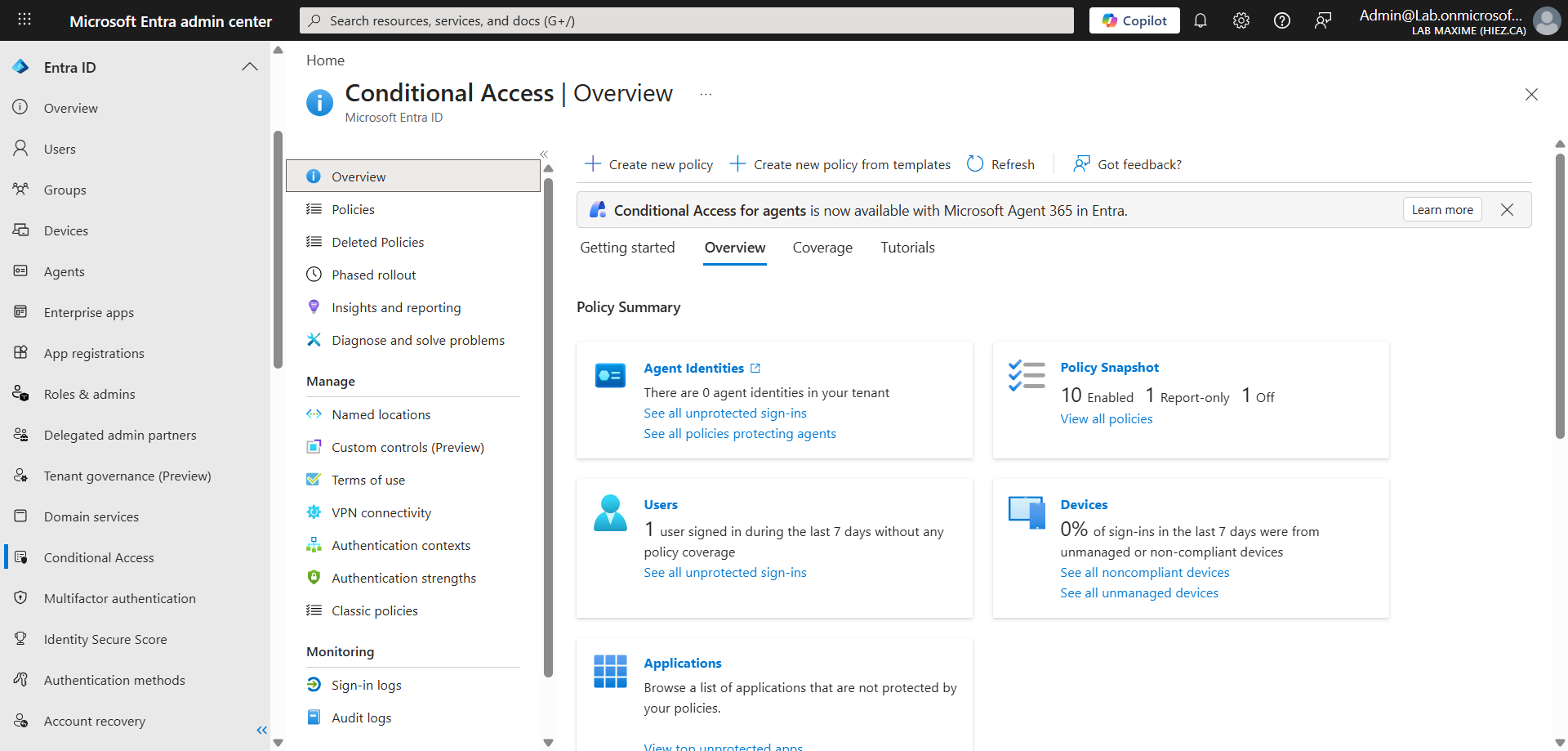
These commands return the total number of policies, across all states. The result should be compared to the limit visible in the Entra portal under Conditional Access > Overview > Policy Snapshot.
image


Best practices to contain proliferation

The increase in the limit provides headroom, but does not solve the underlying problem. The following practices help limit quota growth over the long term :

  • Group applications by profile : One policy per profile of similar requirements, not one policy per application. The Filter for applications filter allows dynamic targeting without a static list
  • Review temporary exclusions : A quarterly audit helps clean up obsolete policies
  • Transition report-only policies : A policy in report-only mode consumes the same quota as an active policy. Move to production or delete — do not accumulate
  • Standardize policy names : A structured naming convention (framework, scope, state) makes it easier to identify duplicates during audits

For further analysis of policy impact, see the March 2025 article Impact analysis of Entra ID conditional access policies, which covered report-only mode and the associated diagnostic tools.


Conclusion

The raise of the conditional access policy limit in Entra ID gives organizations more room to manage complex environments. This additional headroom is not an invitation to create more policies, but an opportunity to clean up existing ones. Auditing the current quota, combined with a review of disabled policies and accumulated exclusions, remains the priority before exploiting the newly available space.


Sources

Microsoft Learn - Entra service limits

Microsoft Learn - Plan conditional access

Microsoft Learn - Microsoft-managed policies


Did you enjoy this post ? If you have any questions, comments or suggestions, please feel free to send me a message from the contact form.

Don’t forget to follow us and share this post.
Related Posts

Email verification of external Teams participants

Email verification of external Teams participants

Introduction Microsoft Teams Premium introduces a new feature to enhance the security and reliability of your meetings: email verification for external participants. This feature allows mee

Read More
How to activate Microsoft 365 Passkey in Entra ID

How to activate Microsoft 365 Passkey in Entra ID

Introduction Microsoft 365 Passkey is an authentication method that replaces passwords with more secure options like facial recognition, fingerprint, or a PIN.Prerequisites **<

Read More
How to sign in with Passkey to Microsoft 365

How to sign in with Passkey to Microsoft 365

Introduction Microsoft 365 Passkey is an authentication method that replaces passwords with more secure options like facial recognition, fingerprint, or a PIN.Prerequisites **<

Read More
How to enable LAPS on the MTR Admin account via Intune

How to enable LAPS on the MTR Admin account via Intune

Introduction Microsoft's LAPS (Local Administrator Password Solution) is a free tool designed to improve password security for local administrator accounts on workstations, servers and

Read More
Impact analysis of Entra ID conditional access policies

Impact analysis of Entra ID conditional access policies

Introduction Conditional access in Entra is a security policy that allows administrators to control access to applications and resources based on specific conditions. These conditions can i

Read More
How to create a Windows local admin account via Intune LAPS

How to create a Windows local admin account via Intune LAPS

Introduction I wrote an article last February on how to replace the password of your MTR's local account using LAPS (Local Administrator Password Solution) in Intune. I concluded my article

Read More
New security approach for non-compliant emails

New security approach for non-compliant emails

Introduction Microsoft has announced a major update to Defender for Office 365 that strengthens email security by improving the handling of non-RFC compliant emails. This initiative is

Read More
Blocking screenshots during Teams meetings

Blocking screenshots during Teams meetings

Introduction Microsoft Teams continues to strengthen the privacy and security of online meetings. Starting in July 2025, a new feature will be rolled out to prevent screenshots during meeti

Read More
"Anti-Tampering" certification for Defender for Endpoint (2025)

"Anti-Tampering" certification for Defender for Endpoint (2025)

Introduction Microsoft recently announced that Microsoft Defender for Endpoint has successfully passed the 2025 anti-tampering tests conducted by AV-Comparatives, a recognized independe

Read More
How to enable DLP for Teams with Purview

How to enable DLP for Teams with Purview

Introduction In a context where sensitive data, particularly banking information, is increasingly circulating in collaborative tools, businesses must be extra vigilant to avoid accidental o

Read More
How to enable DLP for Outlook with Purview

How to enable DLP for Outlook with Purview

Introduction Last week, I showed you how to enable DLP for Teams with Microsoft Purview to prevent accidental or malicious data leaks (Data Loss Prevention). Purview is a comprehensive

Read More
Entra Private Access for Domain Controllers

Entra Private Access for Domain Controllers

Introduction Microsoft has announced the Public Preview of Microsoft Entra Private Access for Active Directory Domain Controllers, a major step forward in strengthening the security of

Read More
How to activate Defender EDR in "Block Mode"

How to activate Defender EDR in "Block Mode"

Introduction In a context of constantly evolving cyber threats, antivirus solutions are no longer sufficient to effectively protect workstations. Microsoft Defender for Endpoint's *Block

Read More
How to enable DSPM for AI with Purview

How to enable DSPM for AI with Purview

Introduction With the rise of generative AI models, the phenomenon of Shadow AI (the use of artificial intelligence tools and services not approved or controlled by organizations) is incr

Read More
How to block a website URL in Edge with Defender

How to block a website URL in Edge with Defender

Introduction Web browsing is one of the most common attack vectors in business environments. To strengthen security, Microsoft Defender for Endpoint offers a powerful feature : blocking m

Read More
How to enable DLP for cloud storage with Purview

How to enable DLP for cloud storage with Purview

Introduction A few months ago, I showed you how to enable DLP for Outlook with Microsoft Purview to prevent accidental or malicious data leaks (Data Loss Prevention). Purview is a com

Read More
Extend Zero Trust to AI agent identities in Entra ID

Extend Zero Trust to AI agent identities in Entra ID

Introduction AI agents are becoming increasingly widespread in businesses (incident summaries, log analysis, flow execution, etc.), and it is crucial that their access is continuously evalu

Read More
How to enable DLP for printing with Purview

How to enable DLP for printing with Purview

Introduction A few weeks ago, I showed you how to enable DLP to prevent the copying of financial data to an external cloud storage solution using Microsoft Purview, in order to prevent

Read More
How to enable DLP for AI websites with Purview

How to enable DLP for AI websites with Purview

Introduction Last week, I showed you how to enable DLP to prevent printing of financial data using Microsoft Purview, in order to prevent accidental or malicious data leaks (*Data Loss

Read More
How to enable DLP for copy/paste with Purview

How to enable DLP for copy/paste with Purview

Introduction Last month, I showed you how to enable DLP to prevent financial data from being sent to an AI website using Microsoft Purview, in order to prevent accidental or malicious d

Read More
Purview Sensitivity Labels are coming to OneNote

Purview Sensitivity Labels are coming to OneNote

Introduction Good news for security and compliance teams, Sensitivity Labels are now General Availability in OneNote. This update finally allows you to apply the same classification a

Read More
How to block Teams calls and chats with Purview IB

How to block Teams calls and chats with Purview IB

Introduction Microsoft Purview's Information Barriers allow you to restrict communication and collaboration between specific user groups within a Microsoft 365 environment. Their prim
Read More
External MFA is now available in Entra ID

External MFA is now available in Entra ID

Introduction Microsoft has announced the General Availability of External MFA, in Microsoft Entra ID, formerly known as External Authentication Methods. This feature allows the use

Read More
How to create Sensitivity Labels for emails in Purview

How to create Sensitivity Labels for emails in Purview

Introduction Emails remain one of the primary vectors for information leaks in businesses. Whether it's a message sent to the wrong recipient, an attachment forwarded without proper oversig

Read More
How to secure your emails with Sensitivity Labels

How to secure your emails with Sensitivity Labels

Introduction Last week, I showed you how to create Sensitivity Labels to secure your emails, without explaining how they work. Today I'll talk about how to use them and what results you g

Read More
Detect exposed passwords in plain text with Purview

Detect exposed passwords in plain text with Purview

Introduction In a Microsoft 365 environment, data breaches aren't limited to credit card numbers or personal information. A frequently underestimated risk is the sharing of passwords in p

Read More