Type something to search...
How to enable Zoom and Webex meetings on MTR

How to enable Zoom and Webex meetings on MTR


Introduction

In the modern business world, effective collaboration is essential. Organizations use various video conferencing platforms to stay connected, and it’s crucial to be able to join meetings across different platforms without complications. This is where the Direct Guest Join feature for Microsoft Teams Rooms (MTRs) comes in. This innovation allows users to join Zoom and Webex meetings directly from their MTRs, simplifying meeting management and improving the flexibility of collaborative work environments.


Benefits of the Direct Guest Join feature
  • Increased flexibility : Allows users to easily join meetings on different platforms without leaving the MTR interface.
  • Simplified processes : Eliminates the need for complex setups and multiple steps to join third-party meetings.
  • Improved collaboration : Facilitates collaboration between teams using different video conferencing platforms.

Prerequisites

Required licenses

  • Teams Rooms Pro (or Teams Rooms Basic).

A Teams room

  • An MTR deployed.

Administrator roles

  • An account with the Global Administrator role to access Microsoft Teams Rooms Pro Management.
  • An account with the Global Administrator or Security Administrator role to access the Microsoft Defender portal.
  • An account with the Global Administrator or Exchange Administrator role to access Microsoft Exchange Online.

Step 1 : Sign in to the Microsoft Defender portal

Sign in to the Microsoft Defender portal by opening your web browser to https://security.microsoft.com.


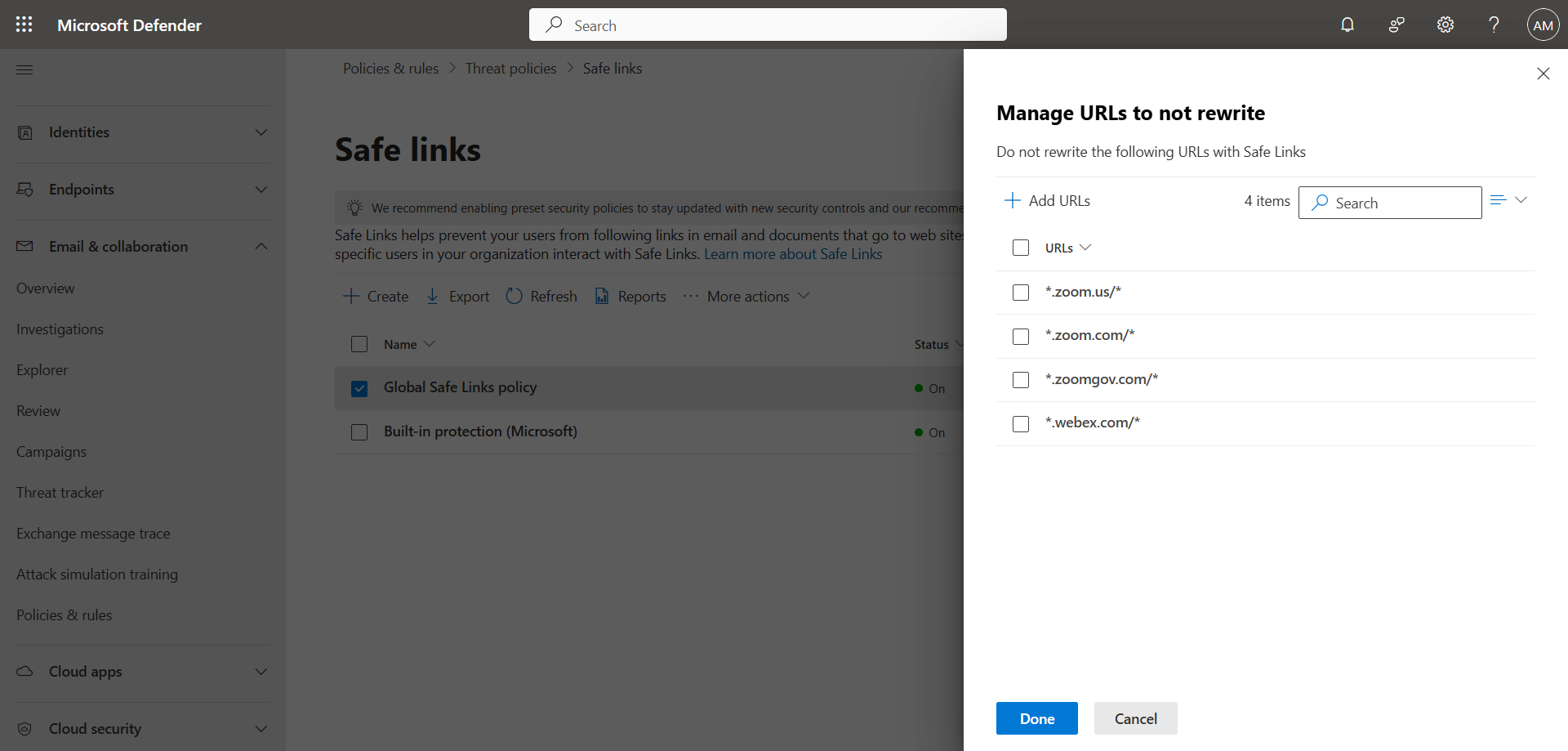
If your organization uses the Microsoft Defender for Office 365 Safe Links feature, it is important that Zoom and Webex URLs are not rewritten so that the room can read the invitation content.

In the left menu, click Policies & Rules, then Threat Policies, and Safe Links.

Edit the rule and add the following URLs :

  • *.zoom.us/*
  • *.zoom.com/*
  • *.zoomgov.com/*
  • *.webex.com/*

image


Step 3 : Sign in to Microsoft Exchange Online using PowerShell

Sign in to Microsoft Exchange Online using the following PowerShell command :

Connect-ExchangeOnline

Step 4 : Edit Exchange attributes

For an MTR to join a Teams meeting, they must use hidden properties in the Outlook invitation. However, to be able to join a Zoom or Webex meeting, they must be able to read the body of the invitation message. Therefore, you must preserve this body to ensure a Join button is generated. Also, these meetings are created outside of your organization, and it’s important that the room calendar accepts the invitation.

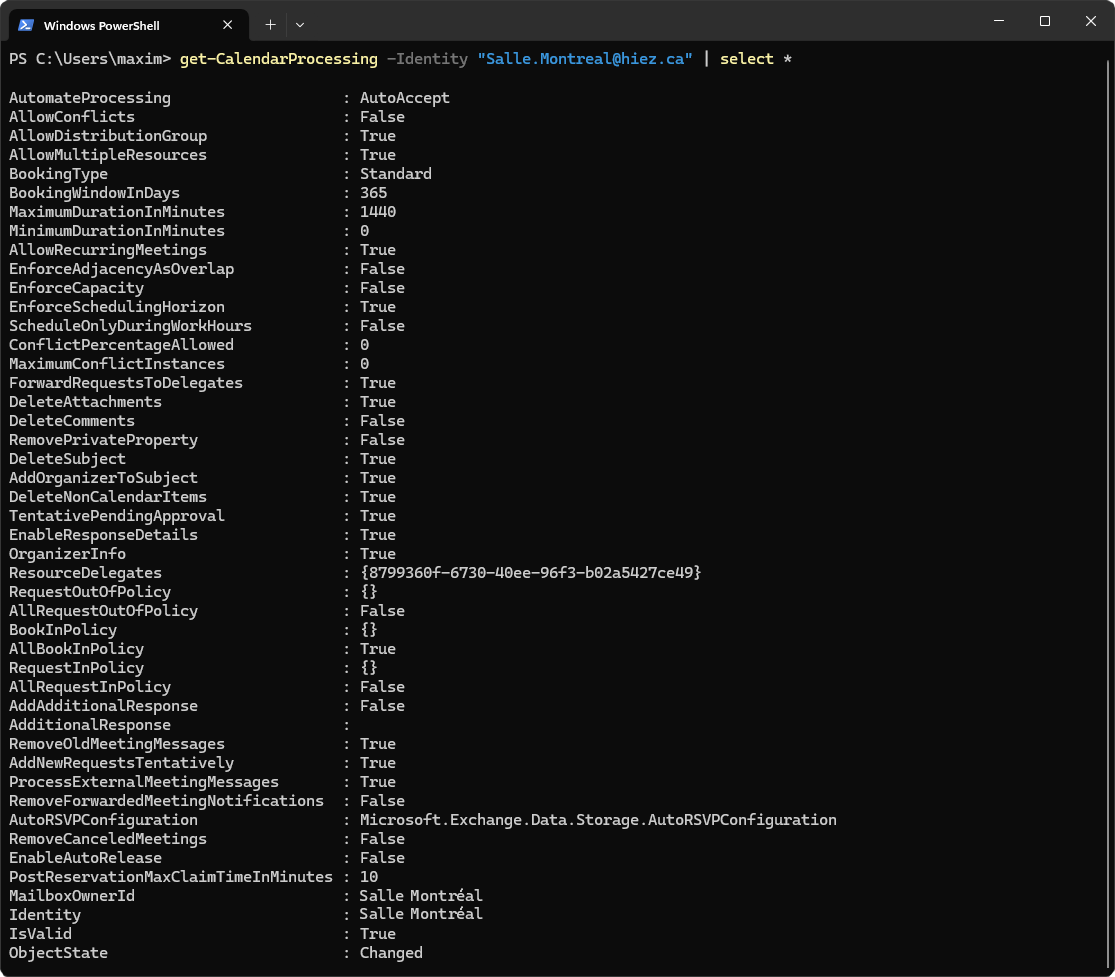
Edit the two Exchange attributes DeleteComments and ProcessExternalMeetingMessages using the following PowerShell command :

Set-CalendarProcessing -Identity "Salle.Montreal@hiez.ca" -DeleteComments $false -ProcessExternalMeetingMessages $true

It may take several minutes for the configuration to take effect. Your account should then look like this :
image


Step 5 : Sign in to the Microsoft Teams Rooms Pro Management portal

Sign in to the Microsoft Teams Rooms Pro Management portal by opening your web browser to https://portal.rooms.microsoft.com.


Step 6 : Enable Zoom and Webex providers

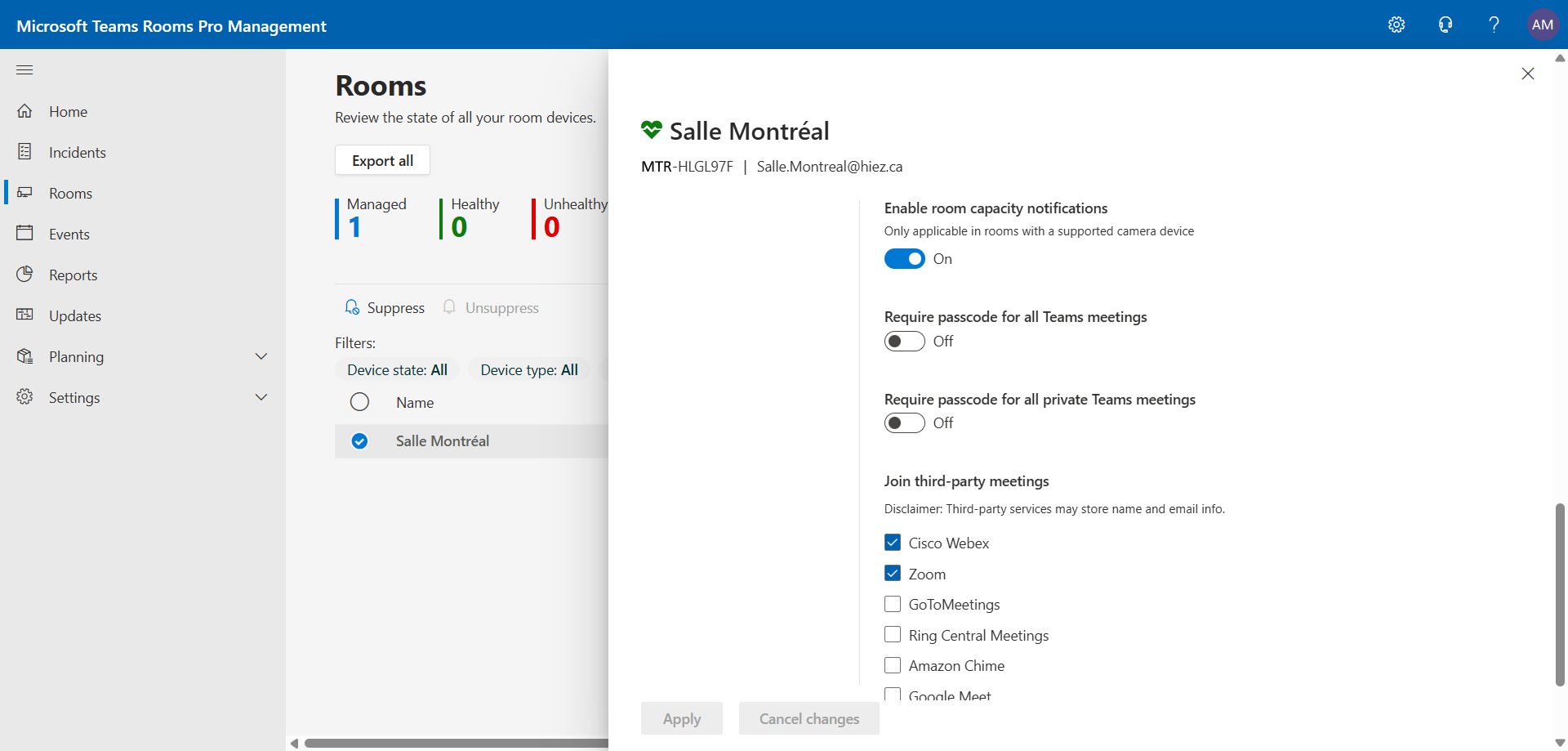
In the left menu, click Rooms, then the room you want to edit.

Click Settings, then Meetings, and enable the Zoom and Webex providers.
image


Result

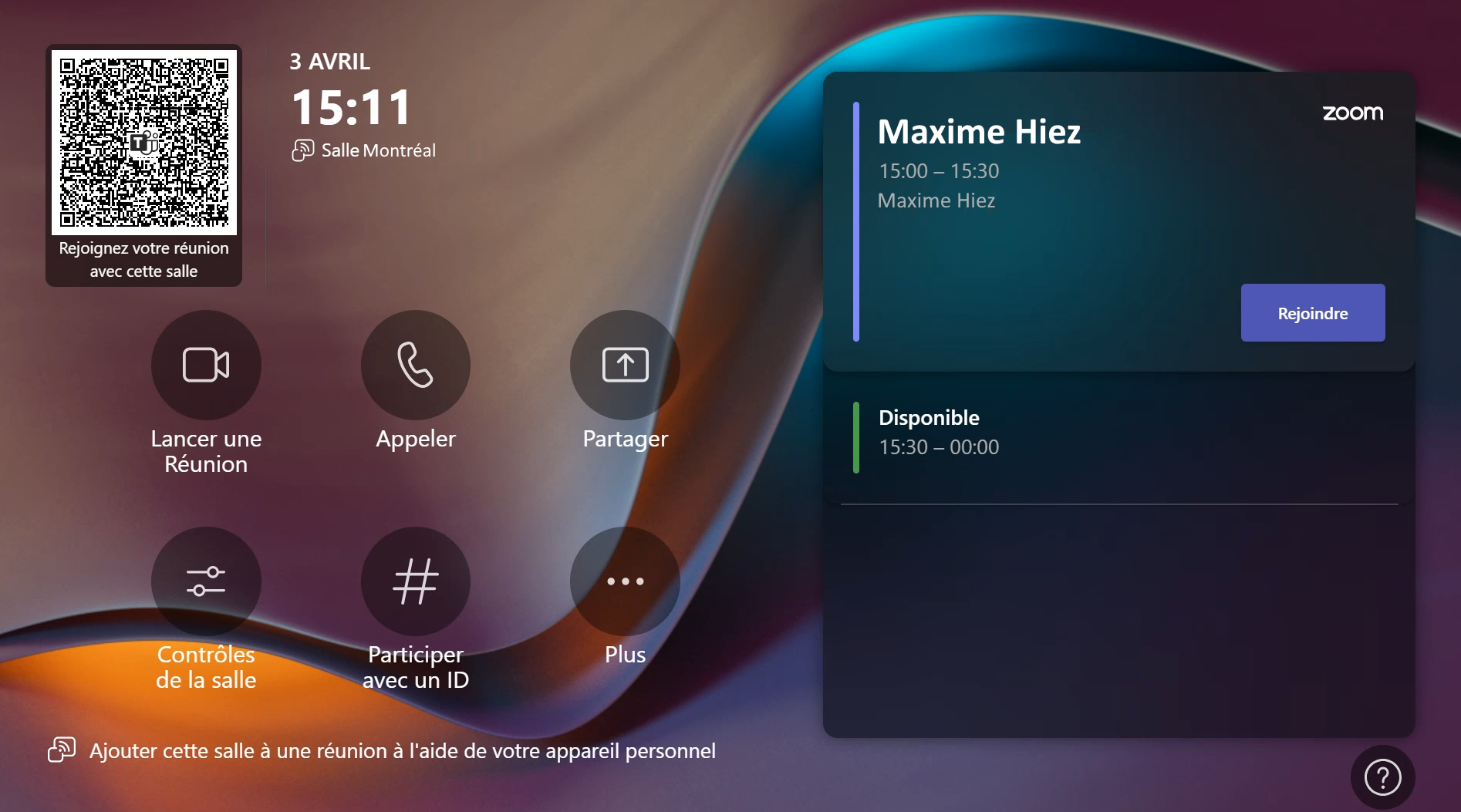
After a few minutes of waiting, the MTR should be able to process the invitation and display a Join button with a Zoom (or Webex) logo on the tablet.
image


What about an Android MTR room ?

You can follow steps 1, 2, 3, and 4, but activating Zoom and Webex is done directly from the tablet.


Conclusion

The Direct Guest Join feature for Microsoft Teams Rooms improves the flexibility and efficiency of collaborative work environments. By allowing users to join Zoom and Webex meetings directly from their MTR devices, this feature simplifies meeting management and strengthens team collaboration.

You now know how to enable Zoom and Webex meetings on MTR.


Sources

Microsoft Learn - Third-party meetings on MTR


Did you enjoy this post ? If you have any questions, comments or suggestions, please feel free to send me a message from the contact form.

Don’t forget to follow us and share this post.
Related Posts

Digital signage with Teams Rooms

Digital signage with Teams Rooms

Introduction Microsoft Teams continues to innovate to offer increasingly effective communication and collaboration solutions. Among the recent features, digital signage in Teams Rooms ext

Read More
How to disable self-service on Copilot licenses

How to disable self-service on Copilot licenses

Introduction Microsoft has activated a setting in the tenants (by default) to allow any user to purchase a Microsoft Copilot license through the *Microsoft 365 Copilot self-service pursha

Read More
Migrating Android Teams devices to AOSP

Migrating Android Teams devices to AOSP

Introduction Microsoft announced a major migration for Android-based Microsoft Teams devices, such as phones, conference rooms, and panels. This migration consists of moving from the *Devic

Read More
How to activate Microsoft 365 Passkey in Entra ID

How to activate Microsoft 365 Passkey in Entra ID

Introduction Microsoft 365 Passkey is an authentication method that replaces passwords with more secure options like facial recognition, fingerprint, or a PIN.Prerequisites **<

Read More
End of support for Teams Rooms on Windows 10

End of support for Teams Rooms on Windows 10

Introduction Microsoft has announced the end of support for the latest version of Windows 10 (22H2 - version 10.0.19045) on Teams Rooms, effective October 14, 2025. This decision marks an i

Read More
How to configure callback in a Teams queue

How to configure callback in a Teams queue

Introduction Callback in Teams allows callers in a queue to be called back after a certain time rather than waiting until an agent becomes available.Prerequisites **Required

Read More
How to add tags to an Azure virtual machine

How to add tags to an Azure virtual machine

Introduction Tags in Azure are customizable labels (in the form of metadata) that you can apply to your resources to organize and manage your cloud environments more efficiently. They play

Read More
How to handle duplicates in Teams directory search

How to handle duplicates in Teams directory search

Introduction Microsoft recently announced a significant optimization for the search by name and extension functionality in its Teams auto attendants. You have probably already had this case

Read More
How to inventory Direct Routing numbers in Teams

How to inventory Direct Routing numbers in Teams

Introduction Microsoft Teams continues to evolve to offer ever more effective communication and collaboration solutions. To make life easier for administrators, Microsoft has announced the

Read More
Multi-camera view in the Teams Rooms on Windows

Multi-camera view in the Teams Rooms on Windows

Introduction Microsoft continues to innovate to improve the user experience in Microsoft Teams Rooms. One of the latest features introduced is the multi-camera view, available on Teams Room

Read More
The end of AzureAD and MSOnline PowerShell modules

The end of AzureAD and MSOnline PowerShell modules

Introduction Microsoft recently announced the General Availability of the Microsoft Entra PowerShell module. This module offers administrators and IT professionals a new way to manage and

Read More
PowerShell Teams module updated to version 6.8.0

PowerShell Teams module updated to version 6.8.0

Introduction Microsoft recently released the new version 6.8.0 of the PowerShell module for Microsoft Teams.Installation You can check the version of the installed module via t

Read More
How to block a specific external user in Teams

How to block a specific external user in Teams

Introduction Microsoft recently introduced a new feature for Teams administrators to block specific external users. This update aims to strengthen security and protect internal members of t

Read More
How to enable remote access to MTR via Teams Rooms Pro

How to enable remote access to MTR via Teams Rooms Pro

Introduction The Microsoft Teams Room Pro Management portal is a powerful solution designed to help administrators effectively monitor and manage meeting rooms equipped with Microsoft Tea

Read More
How to migrate your Android Teams devices to AOSP

How to migrate your Android Teams devices to AOSP

Introduction I told you last November about the approach to migrating to AOSP (Android Open Source Project) for Android-based Microsoft Teams devices, such as phones, conference rooms a

Read More
New Yealink MeetingBoard 65 and 85 for Teams rooms

New Yealink MeetingBoard 65 and 85 for Teams rooms

Introduction The new Yealink MeetingBoard 65 and 85 are an innovative and comprehensive solution designed to transform meeting rooms into intelligent collaboration spaces. These all-in-on

Read More
How to enable LAPS on the MTR Admin account via Intune

How to enable LAPS on the MTR Admin account via Intune

Introduction Microsoft's LAPS (Local Administrator Password Solution) is a free tool designed to improve password security for local administrator accounts on workstations, servers and

Read More
PowerShell Azure module updated to version 13.3.0

PowerShell Azure module updated to version 13.3.0

Introduction Microsoft recently released the new version 13.3.0 of the PowerShell module for Microsoft Azure.Installation You can check the version of the installed module via

Read More
How to update your Android Teams devices to AOSP

How to update your Android Teams devices to AOSP

Introduction I wrote an article last February on how to prepare the migration of your Android-based Microsoft Teams devices to AOSP (Android Open Source Project). The firmware has just

Read More
Facilitator, new AI agent for taking notes in meetings

Facilitator, new AI agent for taking notes in meetings

Introduction Microsoft recently announced a new feature for Teams Rooms: Facilitator ; an AI agent that takes notes during Teams meetings. This feature is currently in pre-public release

Read More
PowerShell Teams module updated to version 6.9.0

PowerShell Teams module updated to version 6.9.0

Introduction Microsoft recently released the new version 6.9.0 of the PowerShell module for Microsoft Teams.Installation You can check the version of the installed module via t

Read More
Enterprise Connect 2025 : Yealink SkySound CM50 Dante kit

Enterprise Connect 2025 : Yealink SkySound CM50 Dante kit

Introduction Enterprise Connect is an annual conference that brings together communications technology professionals, innovators, and others. This event showcases technological advances i

Read More
Enterprise Connect 2025 : New equipment for MTR

Enterprise Connect 2025 : New equipment for MTR

Introduction At the Microsoft Teams Enterprise Connect 2025 event, several new products were announced, offering innovative solutions to improve collaboration and communication in the workp

Read More
PowerShell Teams module updated to version 7.0.0

PowerShell Teams module updated to version 7.0.0

Introduction Microsoft recently released the new version 7.0.0 of the PowerShell module for Microsoft Teams.Installation You can check the version of the installed module via t

Read More
Introducing the Logitech Rally Board 65

Introducing the Logitech Rally Board 65

Introduction The Logitech Rally Board 65 is an all-in-one video conferencing solution designed to simplify meetings and collaboration in business environments. With its 65-inch touchscree

Read More
PowerShell Teams module updated to version 7.1.0

PowerShell Teams module updated to version 7.1.0

Introduction Microsoft recently released the new version 7.1.0 of the PowerShell module for Microsoft Teams.Installation You can check the version of the installed module via t

Read More
PowerShell Azure module updated to version 14.1.0

PowerShell Azure module updated to version 14.1.0

Introduction Microsoft recently released the new version 14.1.0 of the PowerShell module for Microsoft Azure.Installation You can check the version of the installed module via

Read More
How to configure a calling plan spend limit in Teams

How to configure a calling plan spend limit in Teams

Introduction Businesses interested in using Microsoft Teams as their single provider for telephony services, but reluctant due to the high cost of calling plans, can choose a *Pay-As-You-Go

Read More
How to configure and analyze emergency calls in Teams

How to configure and analyze emergency calls in Teams

Introduction Microsoft Teams telephony offers an essential feature for organizations : emergency call management. This feature allows users to make emergency calls while dynamically providi

Read More
PowerShell Teams module updated to version 7.2.0

PowerShell Teams module updated to version 7.2.0

Introduction Microsoft recently released the new version 7.2.0 of the PowerShell module for Microsoft Teams.Installation You can check the version of the installed module via t

Read More
PowerShell Azure module updated to version 14.2.0

PowerShell Azure module updated to version 14.2.0

Introduction Microsoft recently released the new version 14.2.0 of the PowerShell module for Microsoft Azure.Installation You can check the version of the installed module via

Read More
New Yealink MeetingBar A50 for Teams Rooms

New Yealink MeetingBar A50 for Teams Rooms

Introduction In an increasingly hybrid work world, businesses are looking for video conferencing solutions that are powerful, easy to deploy, and seamlessly integrated into their *Microsoft

Read More
PowerShell Teams module updated to version 7.3.0

PowerShell Teams module updated to version 7.3.0

Introduction Microsoft recently released the new version 7.3.0 of the PowerShell module for Microsoft Teams.Installation You can check the version of the installed module via t

Read More
PowerShell Azure module updated to version 14.3.0

PowerShell Azure module updated to version 14.3.0

Introduction Microsoft recently released the new version 14.3.0 of the PowerShell module for Microsoft Azure.Installation You can check the version of the installed module via

Read More
PowerShell Teams module updated to version 7.4.0

PowerShell Teams module updated to version 7.4.0

Introduction Microsoft recently released the new version 7.4.0 of the PowerShell module for Microsoft Teams.Installation You can check the version of the installed module via t

Read More
Malicious URL protection in Teams

Malicious URL protection in Teams

Introduction In a world where phishing attacks and malicious links are constantly on the rise, Microsoft is strengthening Microsoft Teams security with a native malicious URL protection f

Read More
PowerShell Azure module updated to version 14.5.0

PowerShell Azure module updated to version 14.5.0

Introduction Microsoft recently released the new version 14.5.0 of the PowerShell module for Microsoft Azure.Installation You can check the version of the installed module via

Read More
How to activate Defender EDR in "Block Mode"

How to activate Defender EDR in "Block Mode"

Introduction In a context of constantly evolving cyber threats, antivirus solutions are no longer sufficient to effectively protect workstations. Microsoft Defender for Endpoint's *Block
Read More
PowerShell Teams module updated to version 7.5.0

PowerShell Teams module updated to version 7.5.0

Introduction Microsoft recently released the new version 7.5.0 of the PowerShell module for Microsoft Teams.Installation You can check the version of the installed module via t

Read More
How to configure calendar sharing in Exchange

How to configure calendar sharing in Exchange

Introduction In a context where organizations are collaborating more closely, it's not uncommon for users within one organization to need to efficiently schedule meetings by accessing the c

Read More
PowerShell Azure module updated to version 15.2.0

PowerShell Azure module updated to version 15.2.0

Introduction Microsoft recently released the new version 15.2.0 of the PowerShell module for Microsoft Azure.Installation You can check the version of the installed module via

Read More
PowerShell Teams module updated to version 7.6.0

PowerShell Teams module updated to version 7.6.0

Introduction Microsoft recently released the new version 7.6.0 of the PowerShell module for Microsoft Teams.Installation You can check the version of the installed module via t

Read More
PowerShell Azure module updated to version 15.3.0

PowerShell Azure module updated to version 15.3.0

Introduction Microsoft recently released the new version 15.3.0 of the PowerShell module for Microsoft Azure.Installation You can check the version of the installed module via

Read More
How to migrate a Surface Hub 2S to a Windows MTR

How to migrate a Surface Hub 2S to a Windows MTR

Introduction With the end of support for Windows 10, businesses can migrate their Surface Hub 2S to Microsoft Teams Rooms on Windows (MTRoW). USB migration is the method that allows

Read More
Purview Sensitivity Labels are coming to OneNote

Purview Sensitivity Labels are coming to OneNote

Introduction Good news for security and compliance teams, Sensitivity Labels are now General Availability in OneNote. This update finally allows you to apply the same classification a

Read More
How to download Cisco Webex recorded calls via API

How to download Cisco Webex recorded calls via API

Introduction Cisco Webex Contact Center offers advanced call recording capabilities, essential for quality, compliance, and continuous service improvement. Supervisors can easily listen t

Read More
PowerShell Azure module updated to version 15.4.0

PowerShell Azure module updated to version 15.4.0

Introduction Microsoft recently released the new version 15.4.0 of the PowerShell module for Microsoft Azure.Installation You can check the version of the installed module via

Read More
PowerShell Teams module updated to version 7.7.0

PowerShell Teams module updated to version 7.7.0

Introduction Microsoft recently released the new version 7.7.0 of the PowerShell module for Microsoft Teams.Installation You can check the version of the installed module via t

Read More
How to enable multi-lines for Teams telephony

How to enable multi-lines for Teams telephony

Introduction Microsoft has just introduced a feature that allows a user to have up to 11 numbers (including their primary and private lines) in their Microsoft Teams phone system. Users c

Read More
Microsoft raises the conditional access policy limit

Microsoft raises the conditional access policy limit

Introduction Microsoft quietly raises the limit of conditional access policies per tenant, from 195 to 244. This limit applies to all policies, whether active, disabled, or in *report-onl

Read More
Consecutive bilingual interpretation in Teams

Consecutive bilingual interpretation in Teams

Introduction The Interpreter agent in Microsoft Teams previously offered only a simultaneous translation mode, where the synthesized voice overlapped with the speaker's voice in real ti

Read More
PowerShell Teams module updated to version 7.8.0

PowerShell Teams module updated to version 7.8.0

Introduction Microsoft recently released the new version 7.8.0 of the PowerShell module for Microsoft Teams.Installation You can check the version of the installed module via t

Read More
PowerShell Azure module updated to version 16.0.0

PowerShell Azure module updated to version 16.0.0

Introduction Microsoft recently released the new version 16.0.0 of the PowerShell module for Microsoft Azure.Installation You can check the version of the installed module via

Read More
How to remove "Unlock Teams Premium" in Teams

How to remove "Unlock Teams Premium" in Teams

Introduction By default, users can obtain a Microsoft Teams Premium trial license by requesting one directly from their Teams client. This can lead to subsequent billing issues, so it is

Read More
PowerShell Azure module updated to version 16.0.0

PowerShell Azure module updated to version 16.0.0

Introduction Microsoft recently published the new version 16.1.0 of the PowerShell module for Microsoft Azure.Installation You can check the installed module version via the fo

Read More