Microsoft Entra Backup and Recovery finally available
- Maxime Hiez
- Entra ID
- 23 Jul, 2026
Introduction
Accidentally deleting a user account, a conditional access policy, or a service principal assignment can quickly paralyze a Microsoft Entra ID tenant. Until now, no native mechanism allowed restoring these objects to a prior state without resorting to third-party tools or manual procedures. Microsoft Entra Backup and Recovery is now in General Availability and fills this gap directly from the Entra portal.
What is Microsoft Entra Backup and Recovery ?
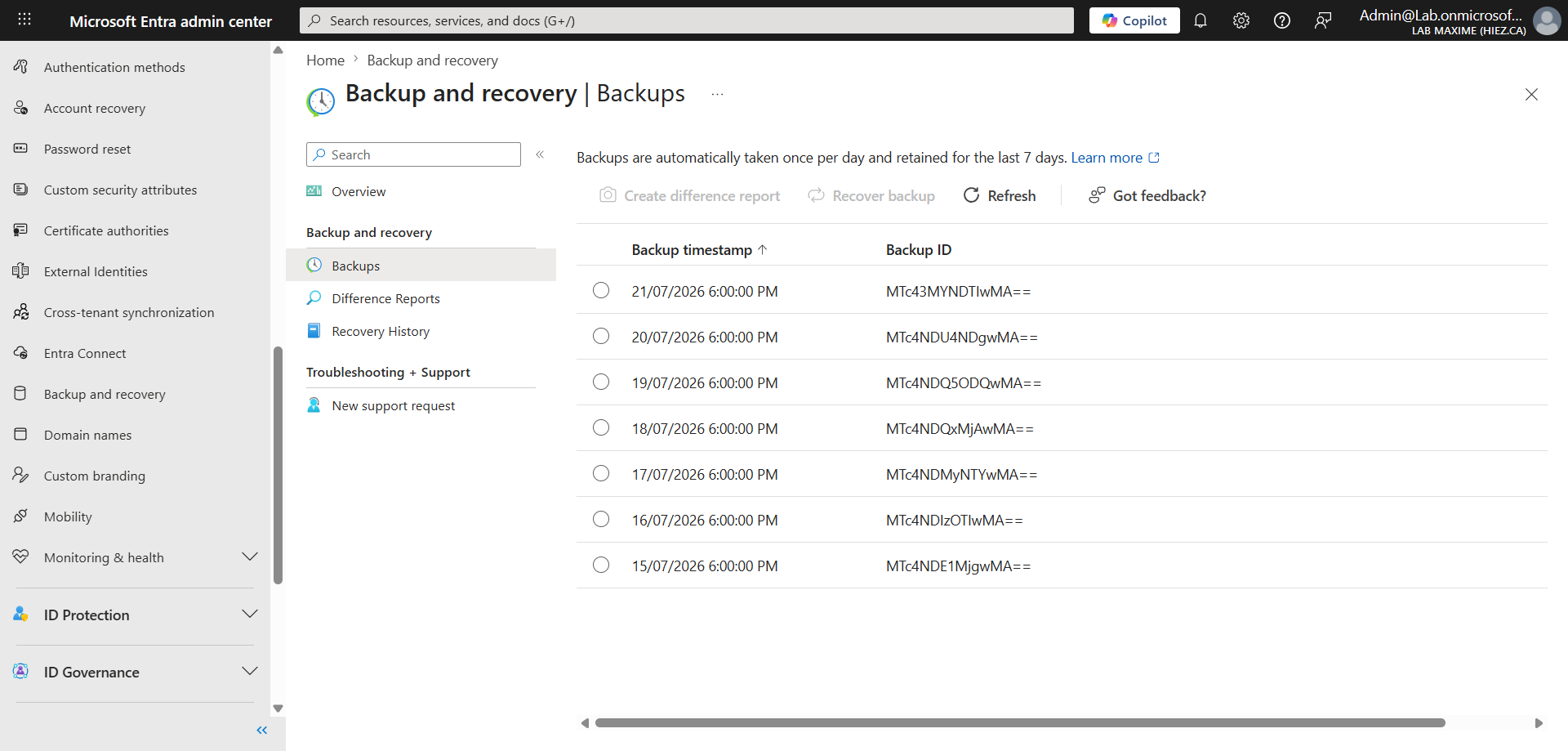
Microsoft Entra Backup and Recovery is an integrated, always-on backup solution. It automatically takes a daily snapshot of critical directory objects and retains a seven-day history. No configuration is required to get started, and no one can disable, modify, or delete the backups, even a Global Administrator.
The solution is accessible from the Microsoft Entra portal via the Backup and recovery section, which contains four sub-pages : Overview, Backups, Difference reports, and Recovery history.
What is covered
The solution covers the main directory objects, with full or partial coverage depending on the type :
- Conditional access policies : Full coverage of all properties.
- Named locations : Full coverage of all properties.
- Users : Partial coverage (33 properties ; manager and sponsor links are excluded).
- Microsoft 365 and security groups : Partial coverage (12 properties ; static members included, dynamic group rules and owner links excluded).
- Applications : Partial coverage (selected configuration properties ; secrets, certificates, and application proxy configuration excluded).
- Service principals : Partial coverage (app role assignments recovered as anchors).
- Authentication methods policies : Selected methods (FIDO2, Authenticator, SMS, Voice, Email OTP, OATH, TAP, CBA).
Several items are explicitly excluded :
- Microsoft 365 resources : Mailboxes, OneDrive, and SharePoint fall under Microsoft 365 Backup Storage, a separate product.
- Permanently deleted objects : Cannot be recovered or recreated. Using protected actions in Entra is recommended to limit this risk.
- Objects synchronized from on-premises AD : Visible in difference reports, but excluded from recovery. Restoration must be performed in the local Active Directory.
- User OAuth2 consents : Only admin consents of type AllPrincipals are included.
How to access it ?
Access to the feature requires one of the following roles :
- Microsoft Entra Backup Reader : View backups, difference reports, and recovery history.
- Microsoft Entra Backup Administrator : All Reader permissions, plus the ability to launch difference reports and recovery tasks.
The recommended workflow is to launch a difference report before any recovery, to review exactly what has changed. This step also pre-loads the backup data and speeds up the subsequent recovery task.
During a recovery, three scope levels are available :
- Recover all objects to a prior state.
- Recover only certain object types (for example, only conditional access policies).
- Recover up to 100 specific objects identified by their Object ID.
Availability and prerequisites
Microsoft Entra Backup and Recovery is included at no additional cost with Microsoft Entra ID P1 and P2 licenses. The feature is available for Workforce tenants only. Entra External ID and Azure AD B2C tenants are not supported.
Programmatic access via Microsoft Graph is available, but only under the /beta endpoint (microsoft.graph.entraRecoveryServices namespace). The use of beta APIs in production is not officially supported by Microsoft.
Conclusion
Microsoft Entra Backup and Recovery finally provides a native safety net for Entra ID directory objects. For a complete resilience strategy, it is recommended to complement it with soft-deletion monitoring, protected actions for critical objects, an infrastructure-as-code approach for conditional access policies, and Microsoft 365 Backup Storage for Exchange, OneDrive, and SharePoint data.
Sources
Microsoft Learn - Entra backup and recovery overview
Microsoft Learn - Supported objects and properties
Microsoft Learn - Backup model, difference report, and recovery
Microsoft Learn - Recover objects
Did you enjoy this post ? If you have any questions, comments or suggestions, please feel free to send me a message from the contact form.
Don’t forget to follow us and share this post.