Managing Windows Server Insider with Intune in preview
- Maxime Hiez
- Intune
- 20 Nov, 2026
Introduction
Managing servers from the same console as workstations is now something Microsoft Intune offers, but only in preview : Windows Server Insider builds only, for non-production testing, with no Microsoft support in production and no enrollment into a production Intune environment. The preview has been available since the week of November 16, 2026, with service release 2611, and comes with no general availability date and no Message Center or roadmap ID. Here are the eligible servers, enrollment, what works, what is excluded and the assignment risks.
Which servers are eligible ?
Only one version is eligible : Windows Server vNext Insider Preview, build 29621.1000 or later. No released Windows Server is listed as supported. The Windows Server documentation calls it Windows Server 2028 Preview (build 29706, November 17, 2026).
The scope is narrow : physical servers and persistent virtual machines with Desktop Experience. Server Core and multi-session, ephemeral or non-persistent hosts are excluded.
How do you enroll a server ?
Enrollment is off by default : servers are blocked in the enrollment restrictions. For enrollment through Add work or school account, both Server devices and Personally owned devices must be allowed. The MDM user scope must also cover the accounts involved (Some for a pilot).
There are two paths :
- Microsoft Entra join : For a new installation, from Settings > Accounts > Access work or school
- Hybrid join : With automatic enrollment through group policy, for a pilot server that depends on the domain
Hybrid join requires a synced domain user with a valid Intune license, and Microsoft Entra ID P1 or P2 for automatic enrollment. Userless enrollment is not supported.
No additional Windows Server subscription is required for the preview, but that does not hold for future terms.
What works
- Policies : Settings catalog (about fifty CSP groups, including Kerberos and SecureBoot), custom profiles, ADMX templates (Edge, Microsoft 365 Apps, OneDrive, Chrome), endpoint security templates (antivirus, disk encryption, firewall, LAPS, attack surface reduction)
- Compliance : Supported, and usable as a Conditional Access signal
- Apps : Win32 app deployment and monitoring
- Updates : Update ring settings (Windows Update for Business)
- Remote actions : Sync, Restart, BitLocker key and local administrator password rotation, Retire, Delete and Wipe
No new RBAC role is added.
What is excluded
The limits to know about for a pilot :
- Separate quality update, feature update and driver policies are excluded, while the quality update deferral settings in rings remain valid
- In compliance, the Configuration Manager, firewall, antivirus and antispyware checks are excluded and report Error or Not applicable
- Co-management with Configuration Manager, MMPC features (Endpoint Privilege Management, Resource Explorer), moving Defender security settings management to MDM and disconnected servers are not part of the preview
- A Conditional Access policy that requires MFA can interrupt sync without prompting for sign-in : the user has to run Sync and authenticate
The role of Windows Autopatch in server update management is still unclear : only update rings, maintenance windows included, are documented for the preview. It is best not to count on Autopatch policies for servers. In addition, Windows Autopilot does not apply to servers, and MDM-only enrollment, bulk enrollment and automatic enrollment of co-managed devices are not yet available.
Before you turn it on
The first risk is assignment. Existing Windows assignments, All devices, users and dynamic groups, can reach servers : creating a pilot server group does not exclude them from policies already in place. Policy sets and PowerShell scripts do not support assignment filters.
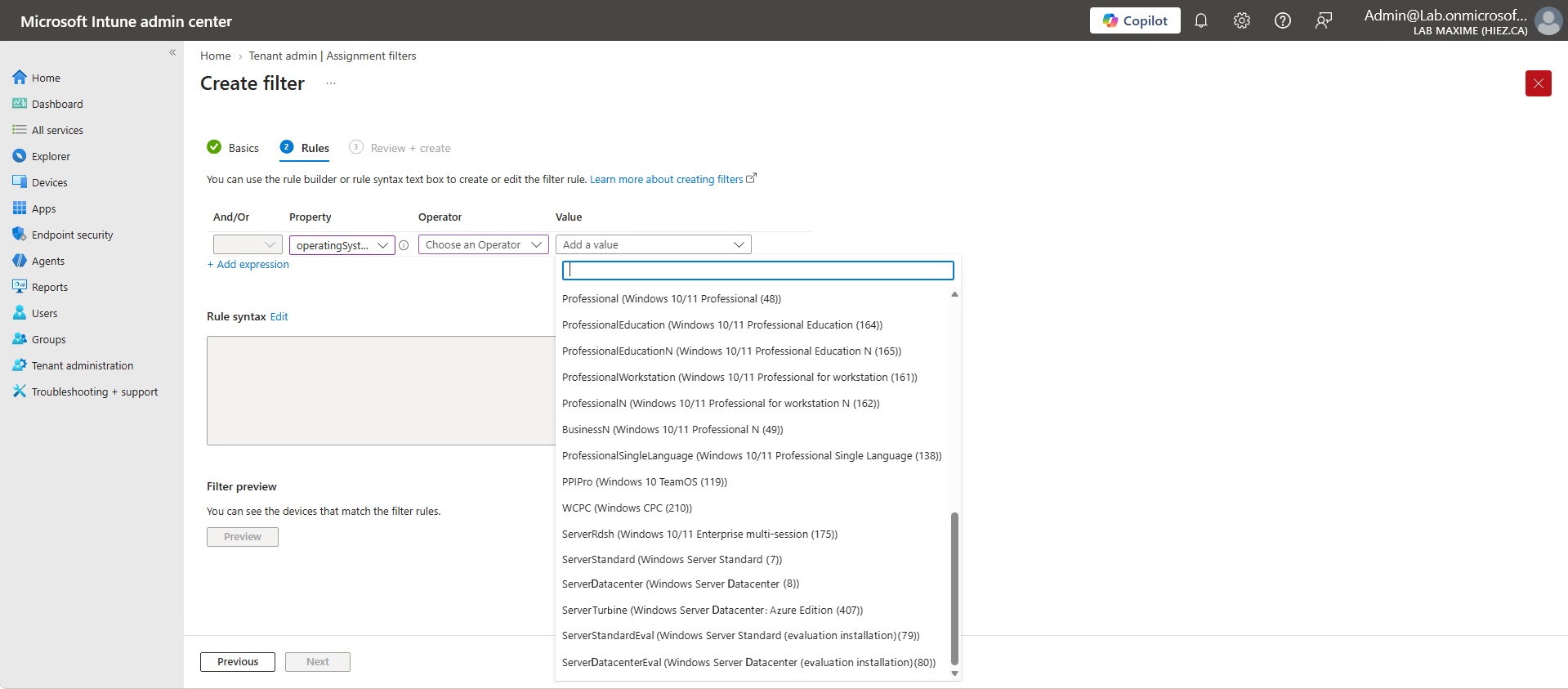
To separate servers, assignment filters have new operatingSystemSKU values : Datacenter (8), Datacenter evaluation (80), Standard (7), Standard evaluation (79) and Datacenter: Azure Edition (407). The Windows Server value added to the edition filter in the settings picker is for display only : it reserves no settings for servers and does not control who receives the policy.
On an Azure virtual machine, enrollment gives control to the applicable Intune roles, bypassing Azure RBAC and JIT. Finally, Azure Arc is not required, but it is still recommended for production and for cloud or on-premises server infrastructure. Intune targets servers tied to a user identity, so avoid conflicting policies between the two.
warning
Conclusion
For now, this is a testing ground : an Insider build, non-critical servers and no production support. It is mainly of interest for servers that behave like workstations. Try it in a test tenant, not in production : check existing assignments first, then enroll only a pilot server with the narrowest MDM scope. The rest waits for general availability, a clarified Autopatch and known licensing terms.
Sources
Microsoft Learn - Get started with Windows Server management (Insider preview)
Microsoft Learn - What’s new in Microsoft Intune
Microsoft Learn - Supported operating systems and browsers in Intune
Microsoft Learn - What’s new in Windows Server 2028 Preview
Did you enjoy this post ? If you have any questions, comments or suggestions, please feel free to send me a message from the contact form.
Don’t forget to follow us and share this post.