Choosing a telephony provider for MFA in Entra
- Maxime Hiez
- Entra ID
- 08 Nov, 2026
Introduction
From February 1, 2027 (July 1, 2027 for Global Administrators and external users), Microsoft will no longer deliver authentication SMS messages and voice calls itself in Microsoft Entra. Organizations that need to keep these methods can hand delivery over to their own provider with Choose Your Own Telephony (CYOT), generally available since October 30, 2026 for workforce Microsoft Entra ID tenants in global Azure. The announcement came through MC1519855, which doesn’t cite a roadmap ID, and then in the Entra roundup of November 6, 2026. Three providers are available : Soprano, Telesign and Infobip.
Check the article on migrating SMS and voice users to Passkey HERE.
What CYOT does
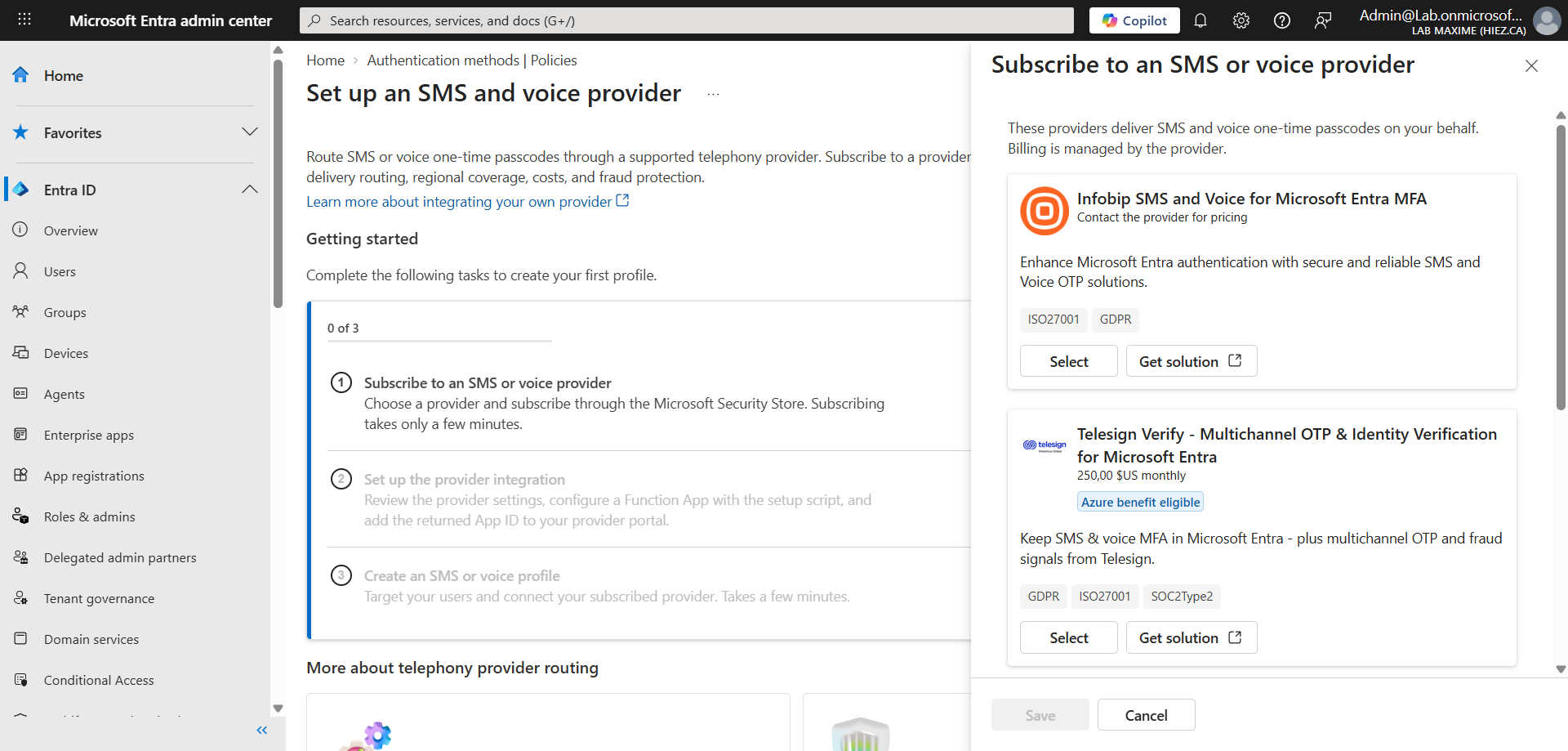
Entra still manages the authentication experience, including generating and validating the one-time code. Only the delivery of the SMS or the call goes through the chosen provider. An Azure Function, deployed in the customer’s Azure subscription, connects Entra to the provider. Each offer is listed in the Microsoft Security Store :
- Soprano
- Telesign
- Infobip
One provider can deliver SMS and another voice. Passkeys remain Microsoft’s recommendation, with telephony reserved for business, regulatory or technical requirements.
What happens on February 1, 2027 without a provider ?
Without a configured provider, affected users can no longer use SMS or voice for MFA. Those for whom it’s the only method get a blocking prompt to register a passkey, with no opt-out. This isn’t an account lockout : the user carries on signing in once the passkey is registered. Users who have registered TOTP don’t get the prompt.
With a provider configured and users migrated before the date, the prompt doesn’t appear ; users who remain on Microsoft’s delivery are subject to it. Self-service password reset (SSPR) is affected too. The temporary opt-out only covers the automatic enablement of passkeys and the registration campaign, never the enforcement of the retirement.
note
How do you set up CYOT ?
The entry point is the Microsoft Entra admin center, under Entra ID > Authentication methods > Policies > Add telecom profile. It requires an Azure subscription with a valid payment method, Azure Cloud Shell in PowerShell mode (recommended) or PowerShell 7.0 or later with Azure CLI 2.61 or later, and a test user with a phone number.
The required roles :
- Subscription Owner : On the subscription, or Contributor with Role Based Access Control Administrator
- Privileged Role Administrator : Directory access during deployment
- Authentication Policy Administrator : Profile creation
Setup takes five steps :
- Buy the provider’s offer in the Microsoft Security Store
- Run the Setup-Epp.ps1 script from Cloud Shell, which creates the Entra application and deploys the Azure resources
- Complete the registration with the provider using the Application (client) ID
- Create one profile per channel, SMS or voice
- Test
Deployment is gradual. In Evaluation mode, a share of requests (Evaluation sampling percentage) goes to the integration while Microsoft keeps delivering the codes. In Production mode, the percentage of traffic routed through the provider (Traffic routed through provider percentage) goes up to 100. A policy change takes up to about an hour.
note
Costs, limits and responsibilities
The cost splits in two : the provider sets the price of SMS and voice, and Azure hosting is billed to the customer’s subscription. No price is published in the documentation : it’s in each provider’s offer in the Security Store. Migrating to a passkey costs nothing extra.
The customer deploys and operates the integration, manages the account with the provider, renews credentials and certificates, and sets the fraud controls (destinations, channels, spending caps, notifications) before going to production. Multi-region deployment and a secondary provider are sample-only guidance, to be tested before relying on them. Microsoft supports authentication, the customer’s Azure team supports the Function, and the provider supports delivery.
The limits :
- Tenants : Workforce only, neither Microsoft Entra External ID nor Azure AD B2C
- Cloud : Global Azure ; the retirement timeline also covers GCC, but CYOT availability there isn’t documented
- Sign-in : SMS and voice as verification only, not as primary sign-in
Conclusion
CYOT is the right answer for the populations that genuinely need SMS or voice, but it shifts the cost, the operation of the Function, the certificates and fraud prevention to the customer. For everyone else, passkeys remain the recommended path, with no extra migration cost. Before February 1, 2027, admins should count the accounts for which SMS or voice is the only MFA method, check the prices in the Security Store offers and start the evaluation on a pilot group.
Sources
Microsoft Learn - Choose your own telephony provider for SMS and voice
Microsoft Learn - Telephony providers FAQ
Microsoft Learn - Set up SMS and voice with your own provider
Microsoft Learn - Passkeys by default and retirement of SMS and voice
Microsoft Learn - SMS and voice retirement FAQ
Microsoft Learn - Protect against telephony fraud
Did you enjoy this post ? If you have any questions, comments or suggestions, please feel free to send me a message from the contact form.
Don’t forget to follow us and share this post.