How to block the creation of AI agent identities in Entra ID
- Maxime Hiez
- Entra ID , Tutorial
- 15 Oct, 2026
Introduction
Starting November 4, 2026, any default user (without a built-in or custom role in Entra ID) will be able to create agent blueprints, unless an administrator has explicitly turned off the “Users can register agent identity blueprints” setting. This behavior applies to every Entra ID tenant and rolls out worldwide between early and late November 2026.
A setting changed before the rollout actually reaches a tenant has no immediate effect : the default behavior only changes once the rollout reaches the tenant in question.
Why this matters
Check the article on Conditional Access for agent identities HERE, which introduced the agent blueprint as the template used to create AI agent identities. Until now, creating a blueprint required the Agent ID Developer or Agent ID Administrator role. The new default setting extends this capability to any standard user, exactly as Entra ID already does for application registration through the “Users can register applications” setting.
In an organization that doesn’t adjust this setting, any user without an administrative role will therefore be able to create an agent blueprint, become its owner, and then create agent identities from that blueprint without any additional Entra ID role required for this last step.
What isn’t affected by this change
- Existing blueprints : No blueprint already created is affected
- Creating identities from an existing blueprint : Still governed by current permissions (blueprint owner, or the Agent ID Developer / Agent ID Administrator / AI Administrator role)
- Applications that create identities : Programmatic flows through Microsoft Graph don’t change
- Microsoft Foundry and Security Copilot : The licensing and Azure subscription prerequisites of these platforms remain unchanged
note
Step 1 : Sign in to the Microsoft Entra Admin Center
Sign in to the Microsoft Entra Admin Center by opening your web browser to https://entra.microsoft.com.
Step 2 : Restrict the creation of AI agent identities
In the left-hand menu, click Users, then User settings, and turn off the Users can register agent identity blueprints option.
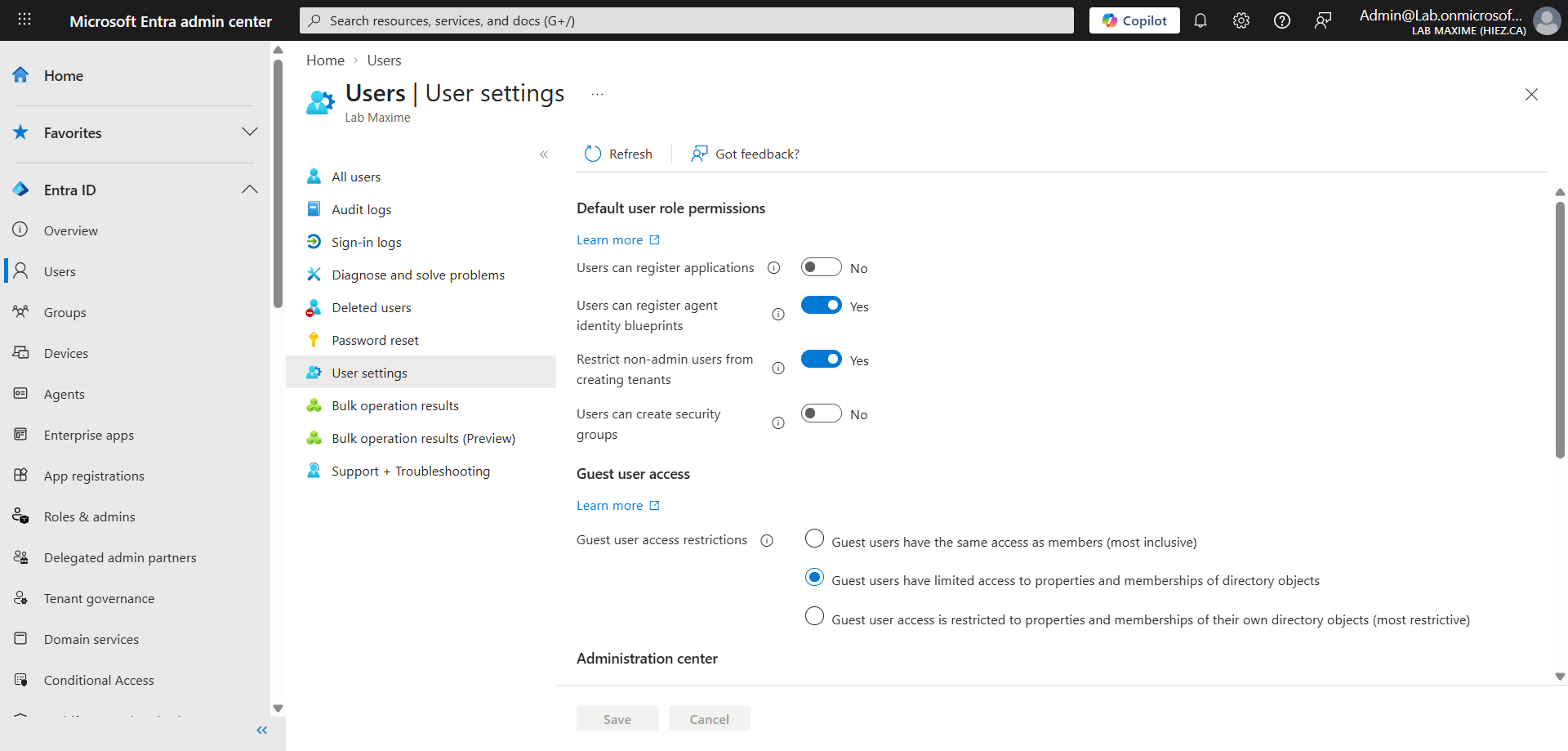
Users assigned the Agent ID Developer or Agent ID Administrator role retain the ability to create blueprints, regardless of this setting.
warning
Conclusion
This change in default behavior deserves the same scrutiny as application registration : an organization that doesn’t want any user to be able to create identities for AI agents must review this setting before the full rollout, expected by the end of November 2026.
Sources
Microsoft Learn - What are the default user permissions in Microsoft Entra ID ?
Microsoft Learn - Create an agent identity blueprint
Microsoft Learn - Microsoft Entra built-in roles
Did you enjoy this post ? If you have any questions, comments or suggestions, please feel free to send me a message from the contact form.
Don’t forget to follow us and share this post.