Type something to search...
How to replace reactions in Teams meetings

How to replace reactions in Teams meetings


Introduction

Teams Premium lets organizations replace the standard meeting reactions with custom visuals in their brand colors. Administrators upload the visual assets and define themes, while users can select those themes when scheduling their meetings.


Prerequisites

Required licenses

  • Microsoft Teams Premium.

Administrator role

  • An account with the Global Administrator or Teams Administrator role to access the Microsoft Teams Admin Center.

Step 1 : Sign in to the Microsoft Teams Admin Center

Sign in to the Microsoft Teams Admin Center by opening your web browser to https://admin.teams.microsoft.com.


Step 2 : Create a new theme

In the left menu, click Meetings, then Customization policies, and edit the Global (Org-wide default) policy or create a new one.

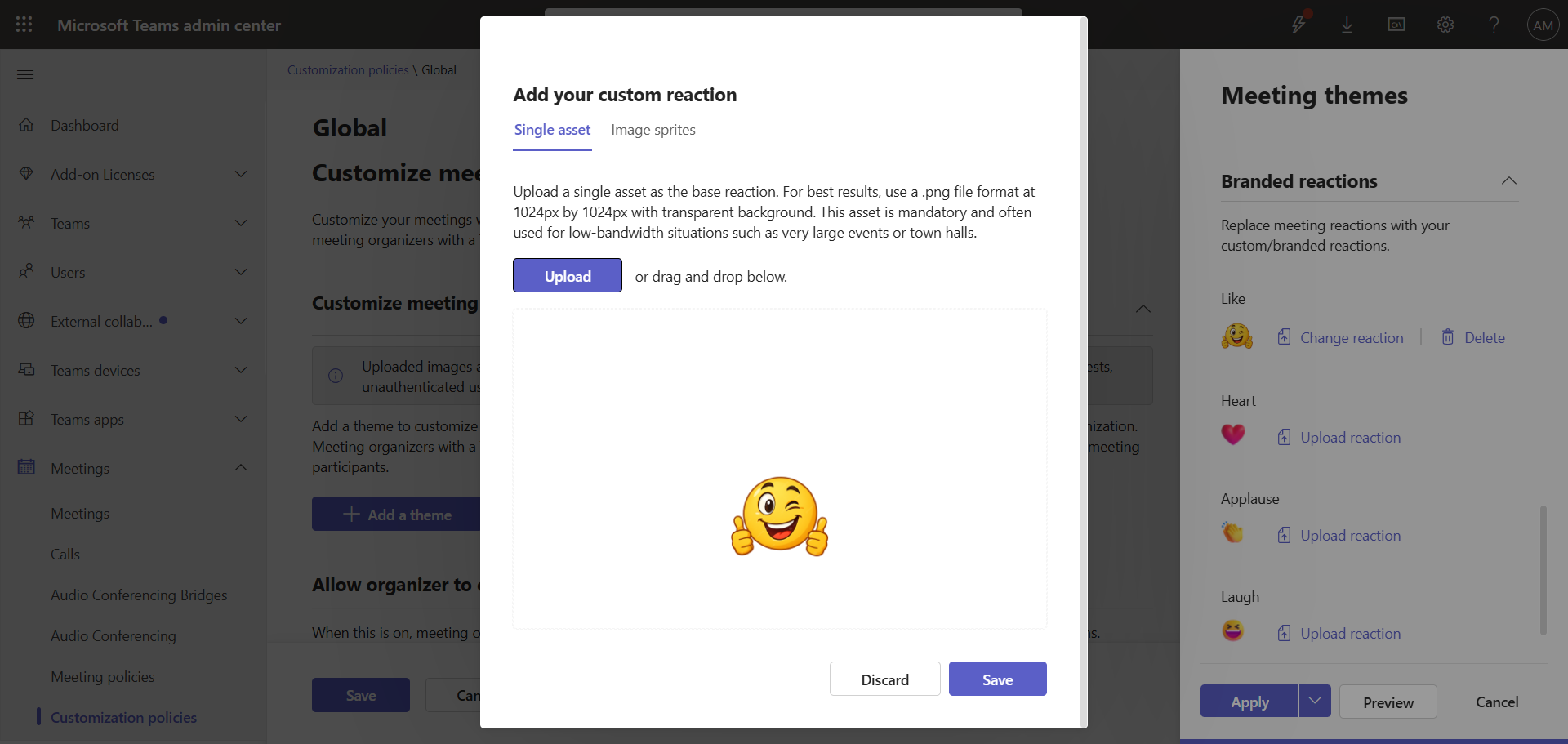
Replace one or more reactions with your new images.
image

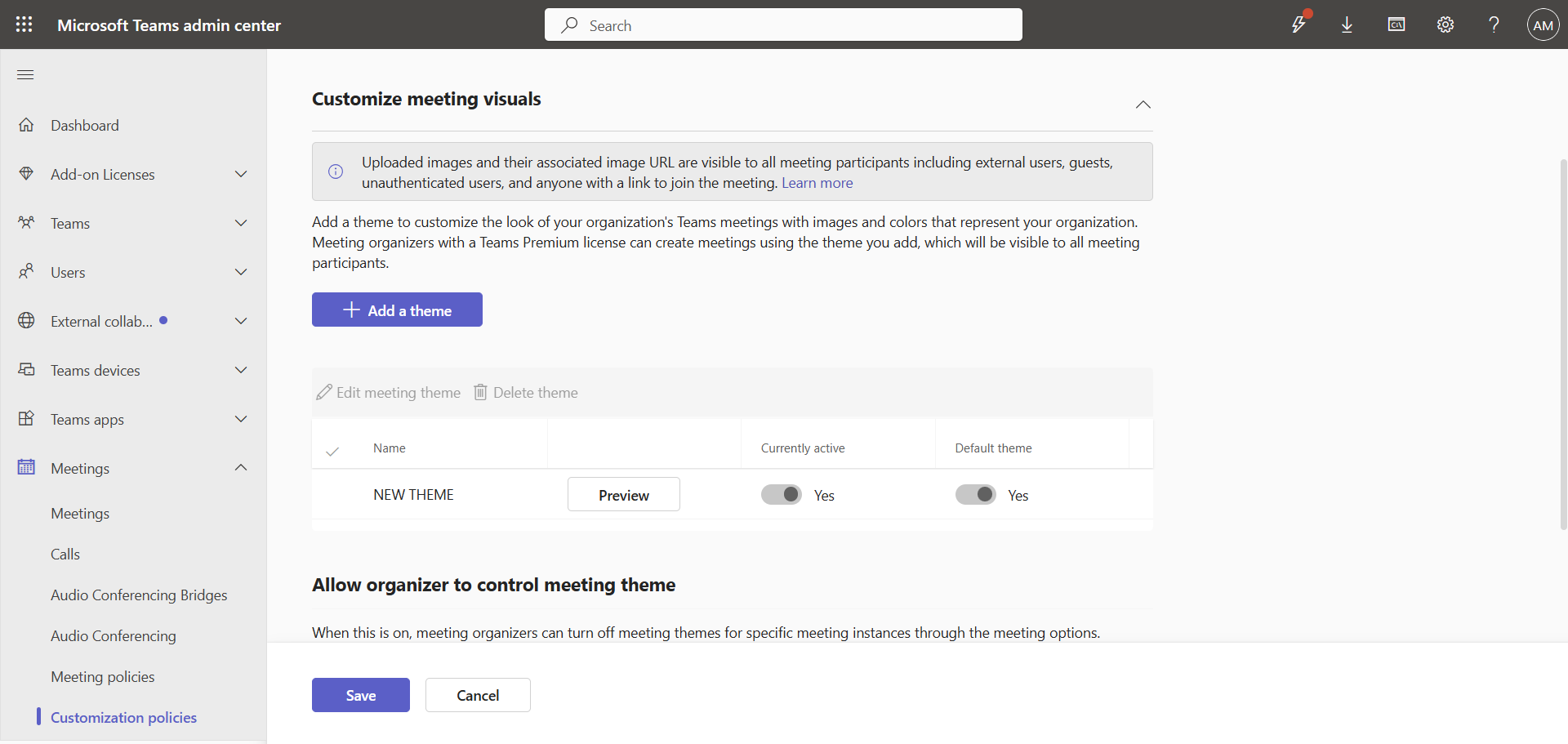
The new theme appears in your meeting visuals and is applied automatically.
image

note

The image must be a PNG with a transparent background, 1024px by 1024px.

Validate the result

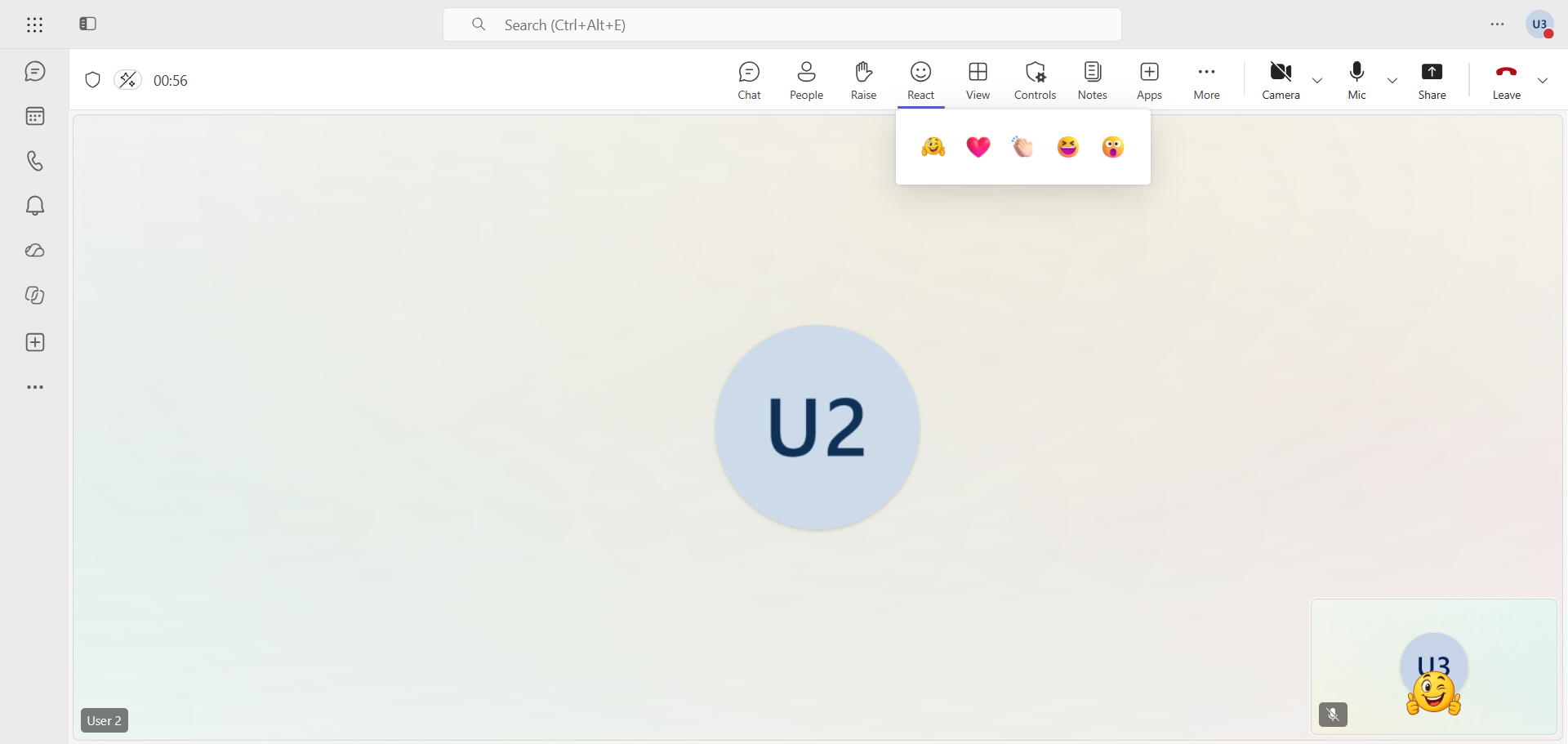
The new theme is applied within a few minutes. Here, the single replaced reaction appears in the banner.
image

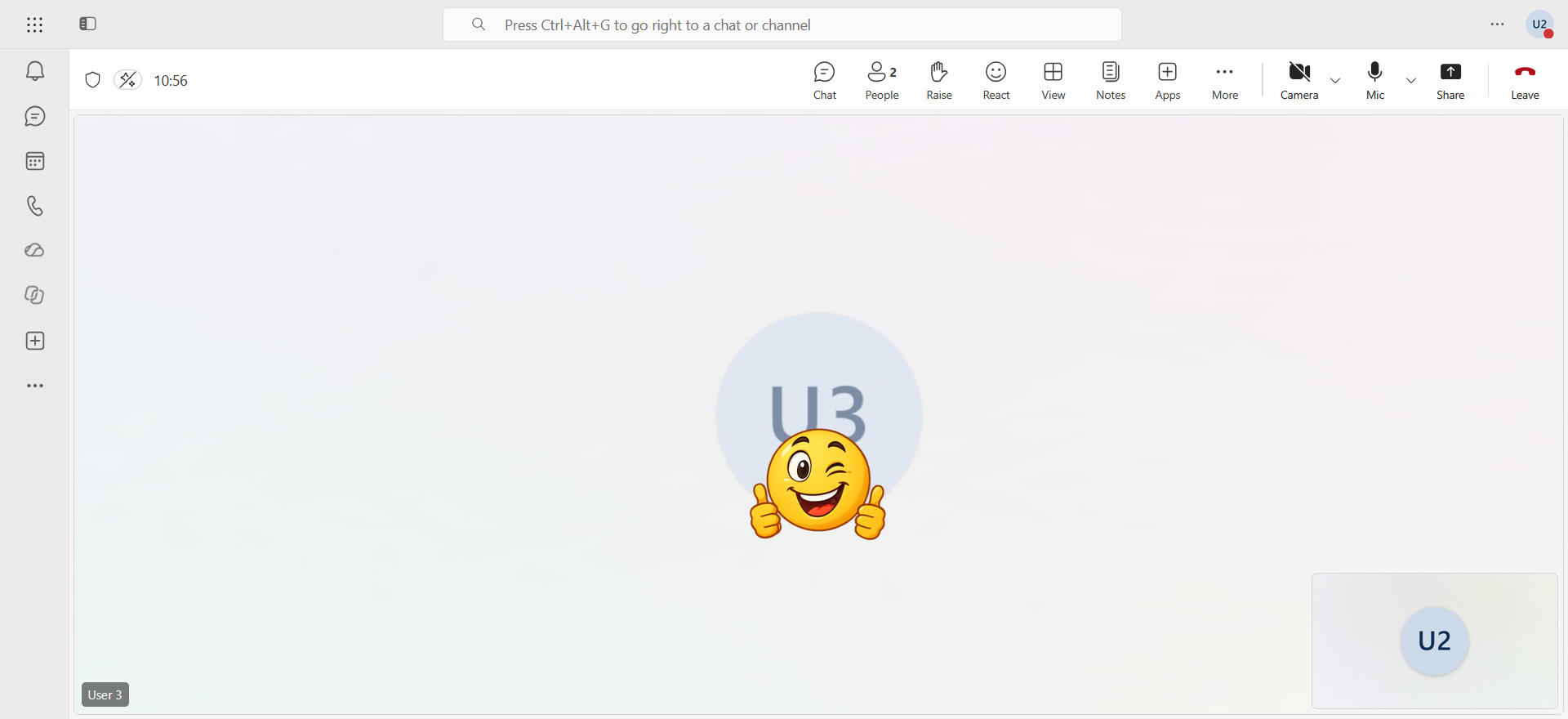
Remote participants receive it as well.
image


Conclusion

You now know how to upload custom reactions in Teams.


Sources

Microsoft Learn - Create and manage meeting themes for Teams meetings


Did you enjoy this post ? If you have any questions, comments or suggestions, please feel free to send me a message from the contact form.

Don’t forget to follow us and share this post.
Related Posts

Email verification of external Teams participants

Email verification of external Teams participants

Introduction Microsoft Teams Premium introduces a new feature to enhance the security and reliability of your meetings : email verification for external participants. This feature allows

Read More
New skin tones for emojis in Teams

New skin tones for emojis in Teams

Introduction Microsoft recently announced the General Availability of a new feature in Microsoft Teams : skin tone settings for emojis and reactions. This update allows users to personali

Read More
Blocking screenshots during Teams meetings

Blocking screenshots during Teams meetings

Introduction Microsoft Teams continues to strengthen the privacy and security of online meetings. Starting in July 2025, a new feature will be rolled out to prevent screenshots during meeti

Read More
Displaying a countdown timer during Teams meetings

Displaying a countdown timer during Teams meetings

Introduction Microsoft Teams continues to evolve to offer ever-more advanced communication and collaboration solutions. Among the new features coming soon is the integration of a countdown

Read More

Mercedes-Benz, your car becomes a rolling office

Introduction In an automotive market increasingly focused on smart and connected mobility, Mercedes-Benz is taking a giant leap forward. With the new generation of the CLA model, the Ge

Read More
Enabling sign language in Teams meetings

Enabling sign language in Teams meetings

Introduction In its effort to make collaboration tools more accessible to everyone, Microsoft has announced the arrival of Sign Language mode in Microsoft Teams. This new feature aims to

Read More
Sensitive content detection in Teams meetings

Sensitive content detection in Teams meetings

Introduction In a world where business interactions increasingly take place via video conferencing, the security of information shared in meetings is becoming a major issue. Microsoft is ad

Read More
Record only audio in Teams meetings

Record only audio in Teams meetings

Introduction Microsoft is expanding its offering with a long-awaited option : audio-only recording for meetings and calls. This new feature allows users to capture the audio of a meeting wh

Read More
Blocking screen captures in Teams meetings

Blocking screen captures in Teams meetings

Introduction In a world where business interactions increasingly take place via video conferencing, the security of information shared in meetings is becoming a major issue. A simple screen

Read More
Consecutive bilingual interpretation in Teams

Consecutive bilingual interpretation in Teams

Introduction The Interpreter agent in Microsoft Teams previously offered only a simultaneous translation mode, where the synthesized voice overlapped with the speaker's voice in real ti

Read More
How to remove "Unlock Teams Premium" in Teams

How to remove "Unlock Teams Premium" in Teams

Introduction By default, users can obtain a Microsoft Teams Premium trial license by requesting one directly from their Teams client. This can lead to subsequent billing issues, so it is

Read More
Bot protection in Microsoft Teams meetings

Bot protection in Microsoft Teams meetings

Introduction AI note-taking tools like Read.ai, Fireflies.ai or Otter.ai join meetings as external participants. For organizers, this raises a real control challenge : when the lobby

Read More
Reporting security concerns in Teams meetings

Reporting security concerns in Teams meetings

Introduction Microsoft Teams already allows a suspicious message or call to be reported. Reporting now extends to meetings and group calls, with the MC1446794 announcement. The rollout

Read More
Mandatory consent before joining a Teams meeting

Mandatory consent before joining a Teams meeting

Introduction Microsoft Teams is introducing mandatory consent before entering a meeting, with the announcement MC1454114. Administrators can now require every participant to accept cust

Read More
Simultaneous dual-presenter screen sharing in Teams

Simultaneous dual-presenter screen sharing in Teams

Introduction Microsoft is developing a feature that lets two presenters share their screen or a window at the same time in a Teams meeting, referenced under roadmap item 80239. Genera

Read More
Teams adds message reminders

Teams adds message reminders

Introduction Microsoft Teams is introducing Remind Me, a reminder option for chat and channel messages, with the announcement MC1470887 (roadmap item 565869). The Targeted Release

Read More
Granular Conditional Access for Teams meetings

Granular Conditional Access for Teams meetings

Introduction Today, Microsoft Teams is a single cloud app in Microsoft Entra Conditional Access : a policy that requires multifactor authentication or a compliant device applies to th

Read More
Teams adds two protections for meetings and guests

Teams adds two protections for meetings and guests

Introduction In Microsoft Teams, a meeting or a guest invitation comes down to a simple question that users have to answer on their own : is this person really who they claim to be ? Two

Read More
Advanced hunting for Teams calls and meetings in Defender

Advanced hunting for Teams calls and meetings in Defender

Introduction A user report says a Microsoft Teams call or meeting was suspicious, but it doesn't say what actually happened. To investigate, the security team needs the events themselves.

Read More
How to transfer meeting ownership in Exchange

How to transfer meeting ownership in Exchange

Introduction When users leave the company (or change roles), they often leave behind a calendar full of meetings they are still the "organizers" of. Whoever took over their role had to re

Read More
Anthropic unveils Claude Meetings in beta

Anthropic unveils Claude Meetings in beta

Introduction Anthropic launched Claude Meetings in beta on November 12, 2026 : Claude joins a video call as a visible participant, follows the conversation, answers questions and star

Read More