Purview removes Copilot from Teams retention policies
- Maxime Hiez
- Purview
- 29 Oct, 2026
Introduction
Since September 2025, Microsoft Purview has handled retention for Microsoft 365 Copilot interactions in a location separate from Teams chats. Yet some legacy Teams retention policies still apply to Copilot interactions today. The MC1481313 announcement (roadmap item 571306), flagged as a Major change, puts an end to that : these policies will become Teams-only policies, with a worldwide rollout from mid-January to the end of January 2027. Action is required for organizations that rely on them to retain or delete Copilot interactions.
What changes for Copilot interactions
Once the change rolls out, existing Teams retention policies that cover Copilot today will no longer apply to that workload. These legacy policies will no longer retain or delete Copilot interactions : those interactions will only fall under policies explicitly configured for Copilot. On the Teams side, retention behavior stays the same.
These legacy policies are a leftover from the old model. Copilot messages automatically landed in the Teams chats and Copilot interactions location because they were retained and deleted by the same mechanisms as Teams chats, even for users who didn’t use Teams. The MC926899 announcement split these locations, with general availability rolling out from mid-September 2025 ; new policies have relied on the Microsoft Copilot experiences location ever since.
The schedule has already moved once : the first version of MC1481313, published on September 28, 2026, announced a rollout from late October to mid-November 2026. Microsoft sets no action deadline outside this window, and the two reference Microsoft Learn pages on Copilot retention, last updated on June 25, 2026, don’t mention the change yet.
warning
Finding the affected retention policies
The announcement provides neither a cmdlet nor a method to identify the affected policies : it only asks for a review of existing Purview retention policies. The simplest route is the portal. In Data Lifecycle Management, open each retention policy that targets Teams chats and check whether its location is named Teams chats and Copilot interactions : that legacy location is the one still covering Copilot.
A combined policy can no longer be edited once the separate locations are available, but it can still be narrowed down to Teams chats only, for those who’d rather do it before the deadline, via the following command, to run in Security & Compliance PowerShell :
Set-RetentionCompliancePolicy -Identity "<policy name>" -Applications "User:TeamsChatUserInteractions"It’s best to create the Copilot policy first and wait for it to apply, which can take up to seven days, before narrowing down the legacy policy, so there’s no period without coverage.
Creating the policy for Microsoft Copilot experiences
The policy is created in the Microsoft Purview portal, under Solutions > Data Lifecycle Management > Policies > Retention policies > New retention policy.
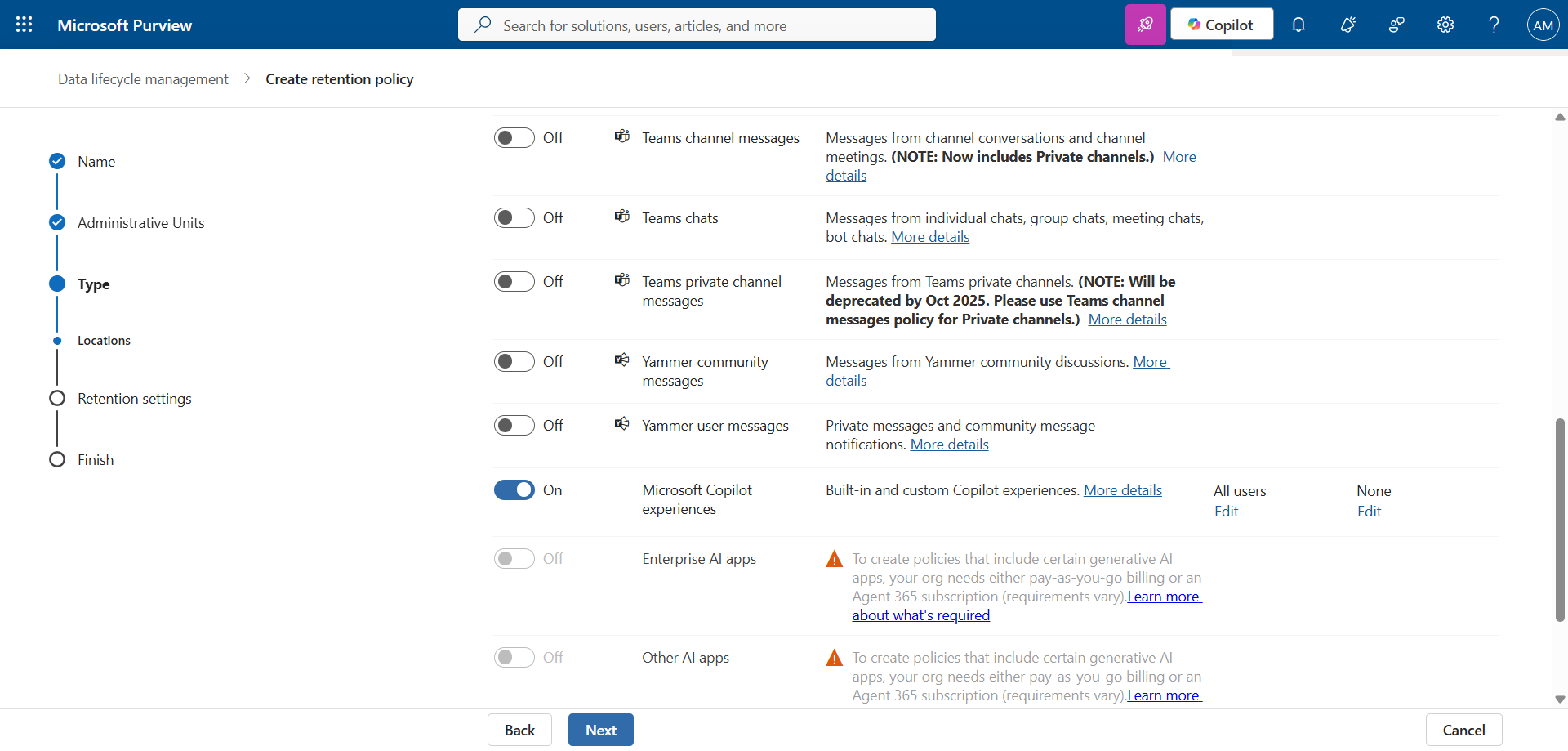
The policy covers user prompts and Copilot responses (text, links and references, as well as threaded summaries for Copilot in Teams) ; “in progress” messages aren’t captured. For Microsoft 365 Copilot and Copilot Studio, no collection policy is needed, unlike other AI apps.
Plan for the delays : a new policy can take up to seven days to apply, and Exchange retention processing usually takes 1 to 7 days. A deletion after 1 day can therefore take up to 16 days before the message disappears from eDiscovery searches. Users aren’t notified when a policy deletes their Copilot messages.
Required licenses
Every combination Microsoft lists includes Microsoft 365 Copilot :
- Copilot retention policy : Microsoft 365 E3 or E5, or Microsoft 365 E3 with Microsoft Purview Suite or E5 Information Protection and Governance, each with Microsoft 365 Copilot
- With an adaptive scope : Microsoft 365 E5, or Microsoft 365 E3 with Microsoft Purview Suite or E5 Information Protection and Governance, each with Microsoft 365 Copilot
Conclusion
The change doesn’t affect Teams, but it strips Copilot interactions of coverage that some tenants still rely on without realizing it. The postponement to January 2027 leaves time to take inventory in the portal and create the policy on Microsoft Copilot experiences, as long as nobody waits for Learn to be updated or for a second postponement. Microsoft also recommends updating compliance documentation and informing records management owners, so the new policy is known beyond the Purview team.
Sources
Microsoft 365 Roadmap - 571306
Microsoft Learn - Retention for Copilot and AI apps
Microsoft Learn - Create and configure retention policies
Microsoft Learn - PowerShell cmdlets for retention
Microsoft Learn - Microsoft Purview service description
Did you enjoy this post ? If you have any questions, comments or suggestions, please feel free to send me a message from the contact form.
Don’t forget to follow us and share this post.