Type something to search...
How to create SBC monitoring alerts in Teams

How to create SBC monitoring alerts in Teams


Introduction

The Microsoft Teams admin center now features a new alert rule dedicated to Direct Routing, enabling proactive monitoring of Session Border Controller (SBC) state changes. This rule addresses a significant need for organizations using a Direct Routing as a Service model, where the SBC is not directly managed by the company’s IT department.


Prerequisites

Microsoft Teams telephony enabled

  • Direct Routing configuration with an SBC.
  • A configured Teams team.

Administrator role

  • An account with the Global Administrator or Teams Administrator role to access the Microsoft Teams Admin Center.

Step 1 : Sign in to the Microsoft Teams Admin Center

Sign in to the Microsoft Teams Admin Center by opening your web browser to https://admin.teams.microsoft.com.


Step 2 : Enable the rule

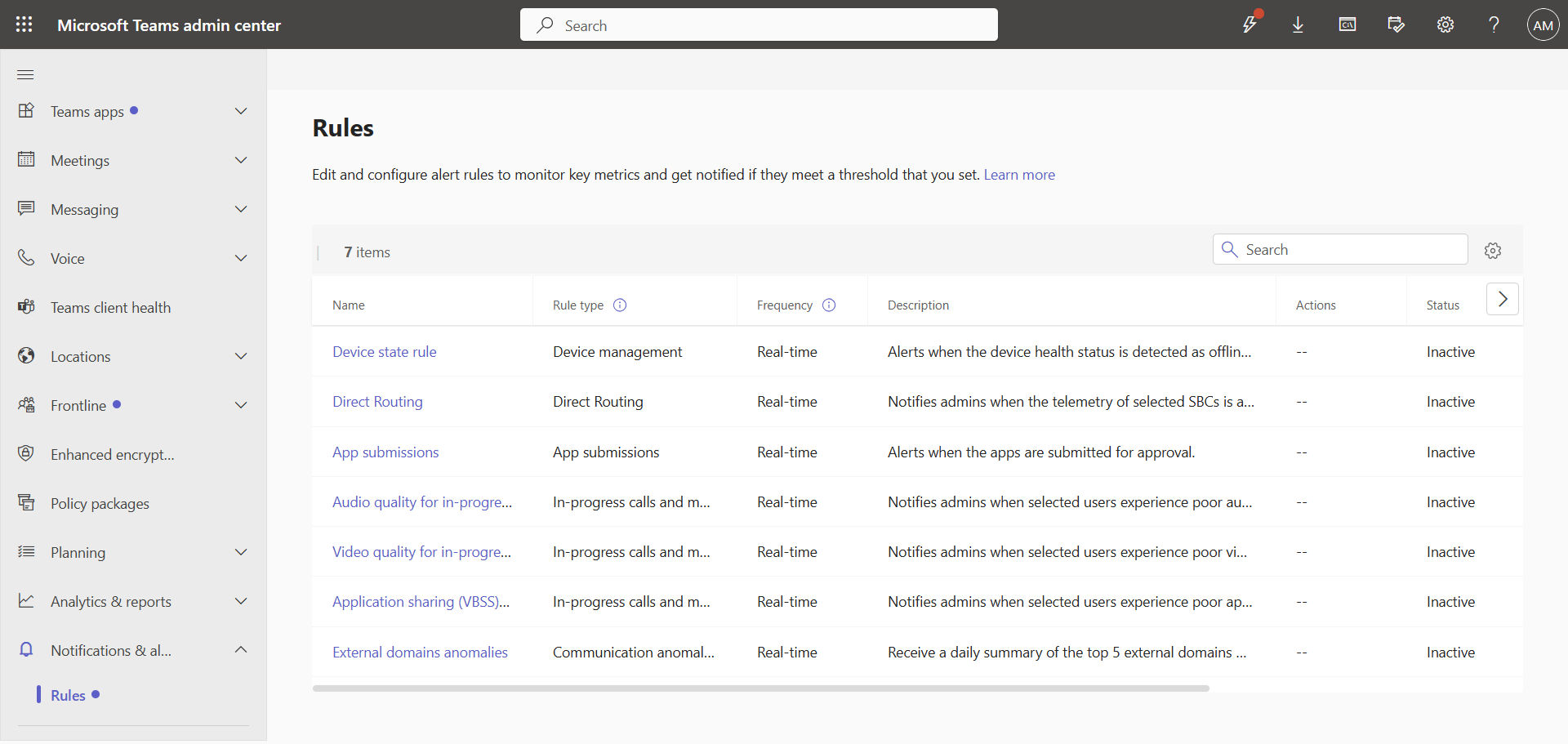
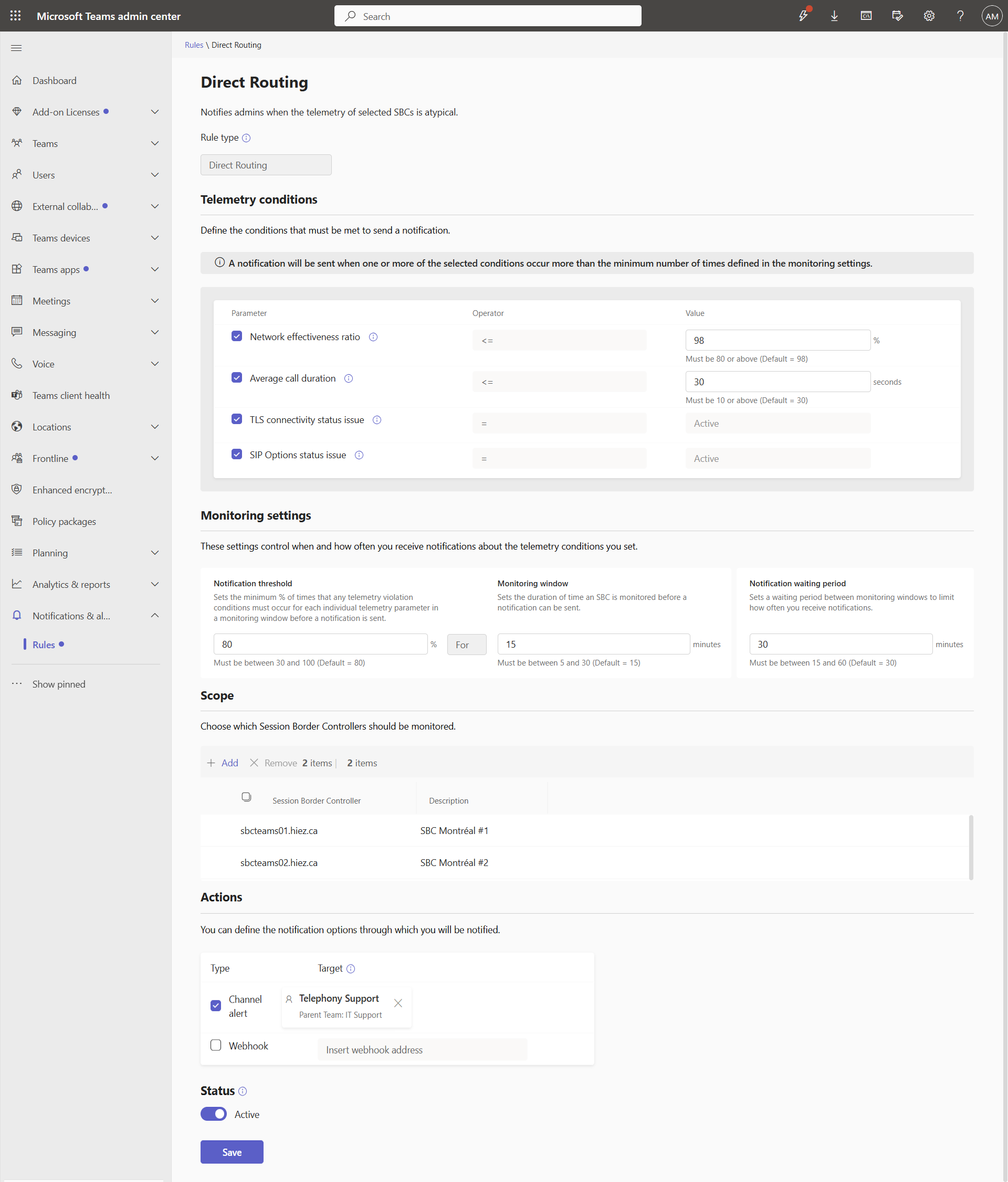
In the left menu, click Notifications & alerts, then Rules, and then Direct Routing.
image

The settings are already pre-filled, but you can adjust the values ​​to suit your needs. All you need to do is assign the SBCs to monitor and the Teams channel to notify.
image


Step 3 : Validate the result

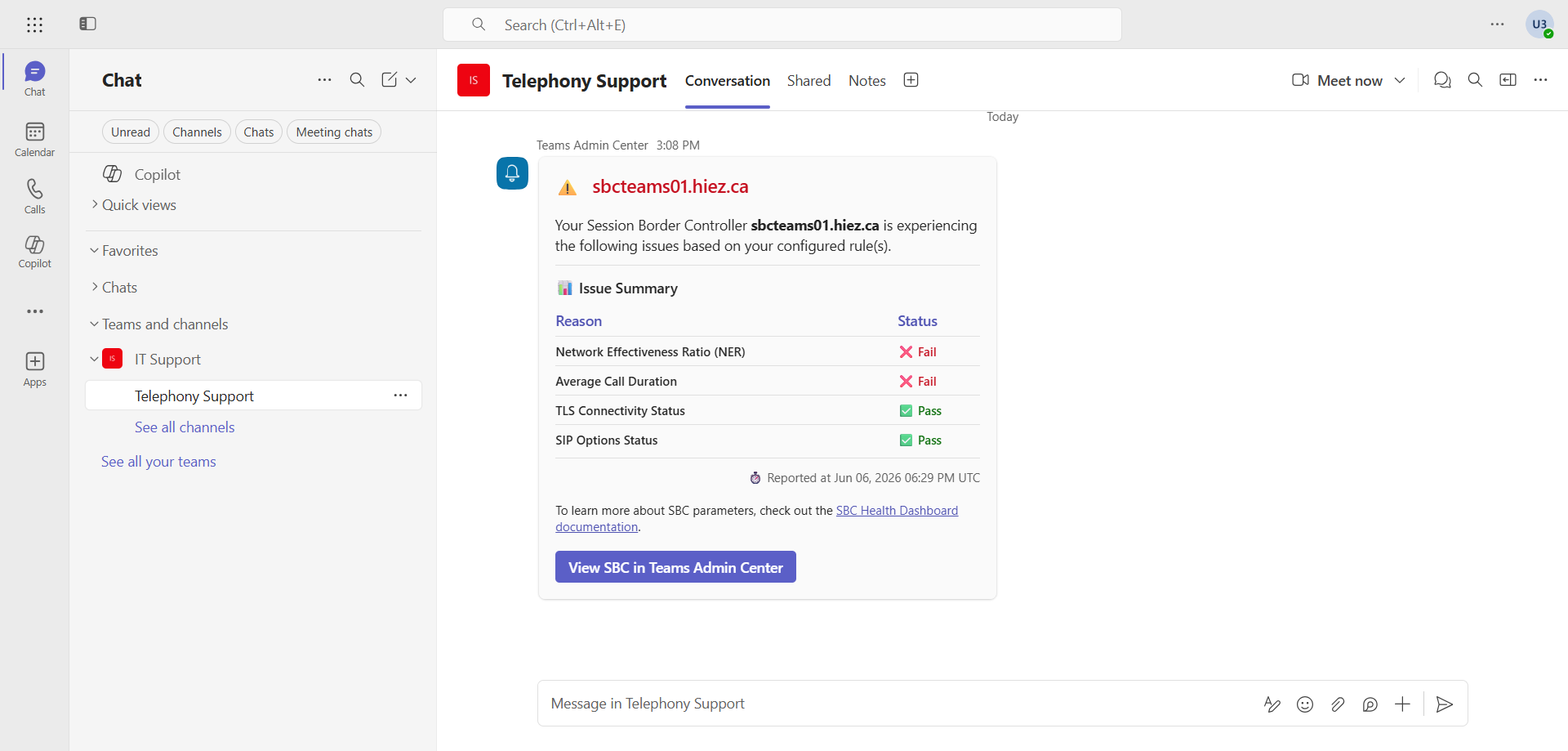
After a few minutes, the Teams channel should start receiving alerts.
image


Monitored metrics

Alerts are based on telemetry already collected by the Direct Routing health dashboard. The main metrics monitored are :

  • Network efficiency : Ratio measuring the network’s ability to route calls to the recipient.
  • Simultaneous call capacity : Triggers an alert when the threshold configured via -MaxConcurrentSessions reaches 90%.
  • TLS connectivity : Status of the TLS connection between the SBC and the Direct Routing interface, including certificate expiration detection.
  • SIP options : Receipt or absence of SIP option messages sent by the SBC every minute.

Conclusion

This native alerting rule simplifies the monitoring of Direct Routing infrastructures by enabling proactive incident response, without leaving the Microsoft ecosystem. It is particularly useful in scenarios where the SBC is operated by a third-party service provider.

You now know how to create alerts for your Teams SBCs.


Sources

Microsoft Learn - Microsoft Teams monitoring and alerting

Microsoft Learn - Health dashboard for Direct Routing


Did you enjoy this post ? If you have any questions, comments or suggestions, please feel free to send me a message from the contact form.

Don’t forget to follow us and share this post.

Related Posts

How I resolved dropped Teams calls

How I resolved dropped Teams calls

Introduction A customer contacted me to tell me that he was having an issue with his Microsoft Teams telephony. Outgoing calls are being cut off even before the audio connection is establ

Read More
Import the DigiCert Root G2 certificate into a Ribbon SBC

Import the DigiCert Root G2 certificate into a Ribbon SBC

Introduction Since the arrival of Teams Direct Routing telephony, TLS certificates used by Microsoft servers are linked to the following root certification authority :Common Certificate

Read More
Import the DigiCert Root G2 certificate into an Audiocodes SBC

Import the DigiCert Root G2 certificate into an Audiocodes SBC

Introduction Since the arrival of Teams Direct Routing telephony, TLS certificates used by Microsoft servers are linked to the following root certification authority :Common Certificate

Read More
How to configure callback in a Teams queue

How to configure callback in a Teams queue

Introduction Callback in Teams allows callers in a queue to be called back after a certain time rather than waiting until an agent becomes available.Prerequisites **Required

Read More
How to handle duplicates in Teams directory search

How to handle duplicates in Teams directory search

Introduction Microsoft recently announced a significant optimization for the search by name and extension functionality in its Teams auto attendants. You have probably already had this case

Read More
How to inventory Direct Routing numbers in Teams

How to inventory Direct Routing numbers in Teams

Introduction Microsoft Teams continues to evolve to offer ever more effective communication and collaboration solutions. To make life easier for administrators, Microsoft has announced the

Read More
Debugging Teams calls via the SIP ladder

Debugging Teams calls via the SIP ladder

Introduction Microsoft Teams continues to evolve to offer ever more advanced communication and collaboration solutions. Among the features arriving very soon, we find the possibility of obt

Read More
How to analyze Direct Routing calls via the SIP ladder

How to analyze Direct Routing calls via the SIP ladder

Introduction I wrote an article last February to announce the upcoming release of the SIP ladder to analyze Teams Direct Routing calls from the Microsoft Teams Admin Center. The feature is

Read More
How to analyze incoming calls in Teams with CQD

How to analyze incoming calls in Teams with CQD

Introduction Microsoft's Teams Call Quality Dashboard (CQD) is a powerful tool designed to help administrators monitor and improve the quality of phone calls within their organization.

Read More
How to enable LDAP routing in an Audiocodes SBC

How to enable LDAP routing in an Audiocodes SBC

Introduction LDAP (Lightweight Directory Access Protocol) routing over an SBC (Session Border Controller) allows calls to be managed using information stored in an Active Directory.

Read More
Managing call priorities in Teams call queues

Managing call priorities in Teams call queues

Introduction With the evolving use of Microsoft Teams as a business telephony solution, Microsoft is introducing a highly anticipated feature : call priority management in queues. This new

Read More
How to configure and analyze emergency calls in Teams

How to configure and analyze emergency calls in Teams

Introduction Microsoft Teams telephony offers an essential feature for organizations : emergency call management. This feature allows users to make emergency calls while dynamically providi

Read More
How to use shifts in a Teams queue

How to use shifts in a Teams queue

Introduction The Shifts app in Microsoft Teams is a work schedule management tool designed primarily for frontline teams. It allows managers and employees to plan, view, share, and manage

Read More
How to reroute a 404 call with an Audiocodes SBC

How to reroute a 404 call with an Audiocodes SBC

Introduction When a call is sent to an unknown number or extension in a business telephony solution, the call fails and returns an error. Sometimes, this extension is known in another syste

Read More
New root certificates required for Teams telephony

New root certificates required for Teams telephony

Introduction If you have set up Teams telephony via Direct Routing in your Microsoft 365 environment, you depend on TLS/mTLS connectivity between Microsoft SIP proxies and your *Sessi

Read More
How to validate the new Teams Direct Routing certificates

How to validate the new Teams Direct Routing certificates

Introduction In December 2025, Microsoft published a message MC1213773 in the Message Center of the Microsoft 365 Admin Center, explaining that new certificates were required to maint

Read More
How to enable call history in Teams queues

How to enable call history in Teams queues

Introduction Microsoft has just introduced a feature that allows call history to be shared within the Microsoft Teams Queues app. This feature provides queue members with a unified view o

Read More
New LTS version 7.40.600 for SBC Audiocodes

New LTS version 7.40.600 for SBC Audiocodes

Introduction Audiocodes has officially announced a significant change in its support strategy : version 7.40A.600 is now the Long-Term Support (LTS) branch for its SBCs and *Media

Read More
How to enable multi-lines for Teams telephony

How to enable multi-lines for Teams telephony

Introduction Microsoft has just introduced a feature that allows a user to have up to 11 numbers (including their primary and private lines) in their Microsoft Teams phone system. Users c

Read More